FOX3 T 201 Transmitter • Configuration Software 31
Software Menu
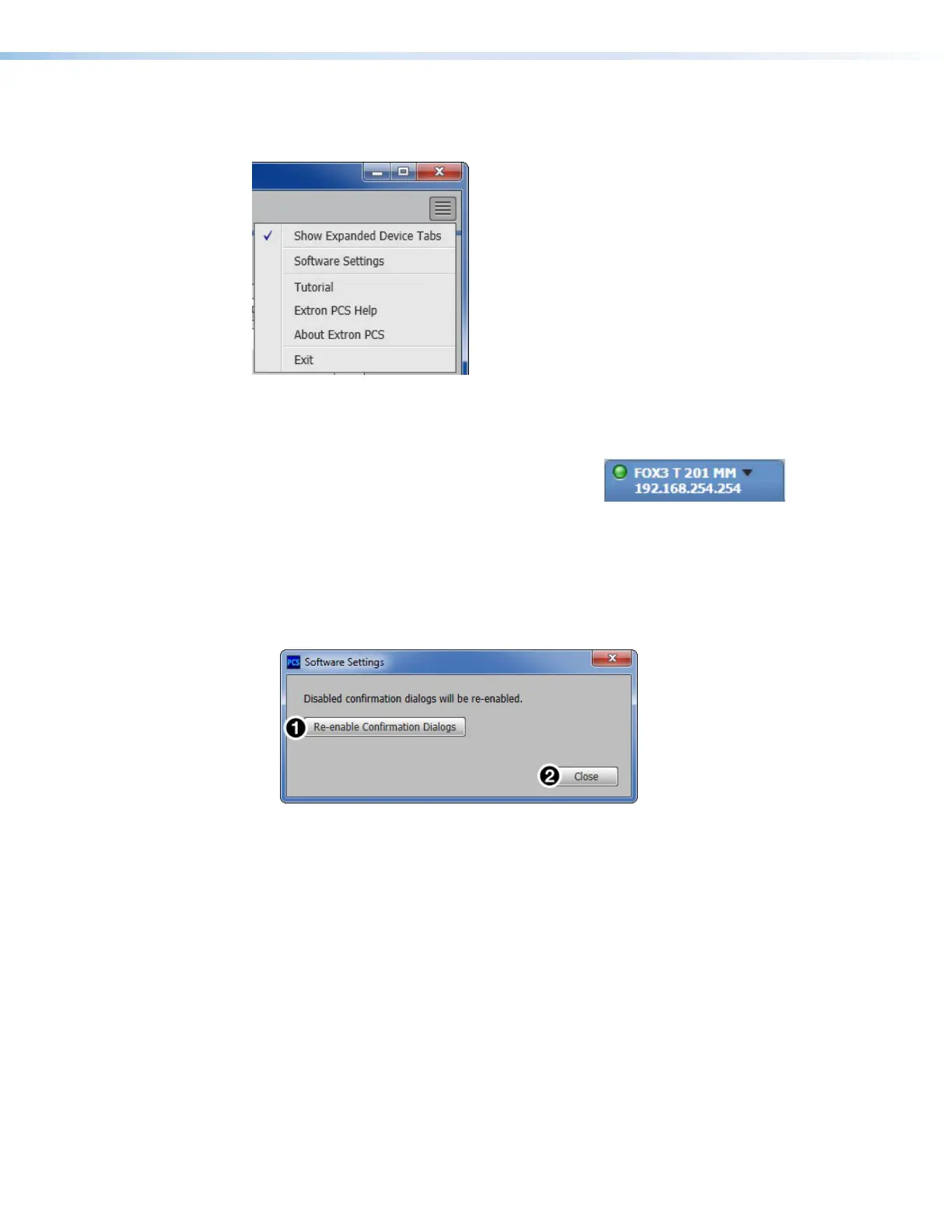
The Software menu (see figure22) contains options pertaining to PCS settings.
Figure 22. PCS Software Menu
Show Expanded Device Tabs
Selecting Show Expanded Device Tabs from the
Software menu displays the device IP address
or connection method in the Device tab.
Figure 23. Expanded Device Tab
Software Settings
This option resets all disabled confirmation dialogs to the default settings.
1. From the Software menu, select Software Settings. The Software Settings
dialog box opens.
Figure 24. Software Settings Dialog Box
2. Click the Re-enable Confirmation Dialogs button (see figure24,
1
). The dialog
box closes and the reset is complete.
Alternatively, click the Close button (
2
) to close the dialog box without re-enabling the
confirmation dialogs.
Tutorial
Display a general overview of where to find features in the PCS framework.
1. From the Software menu, select Tutorial. The Tutorial dialog box opens.
2. Click the I Get It! button to close the dialog box.
Extron PCS Help
Open the PCS help file for general PCS operations.
From the Software menu, select Extron PCS Help.
22
23
24



 To Next Page