User’s Manual
18
NOTE: The recording quality and recording speed of each camera channel will be set as shown below according
to the Record Method and Record Video Quality you set.
HVQPP* SRP* LRTPP*
Motion Event Record Very High / 30 ips High / 5 ips Standard / 2.5 ips
Continuous &
Motion Event Record
Very High / 30 ips (Time)
Very High / 30 ips (Event)
High / 5 ips (Time)
Very High / 30 ips (Event)
Standard / 2.5 ips (Time)
High / 5 ips (Event)
Continuous Record Very High / 30 ips High / 5 ips Standard / 2.5 ips
* Record Video Quality: HVQPP (High Video Quality Priority Profile), SRP (High Video Quality Priority Profile), LRTPP (Longer Recording
Time Priority Profile)
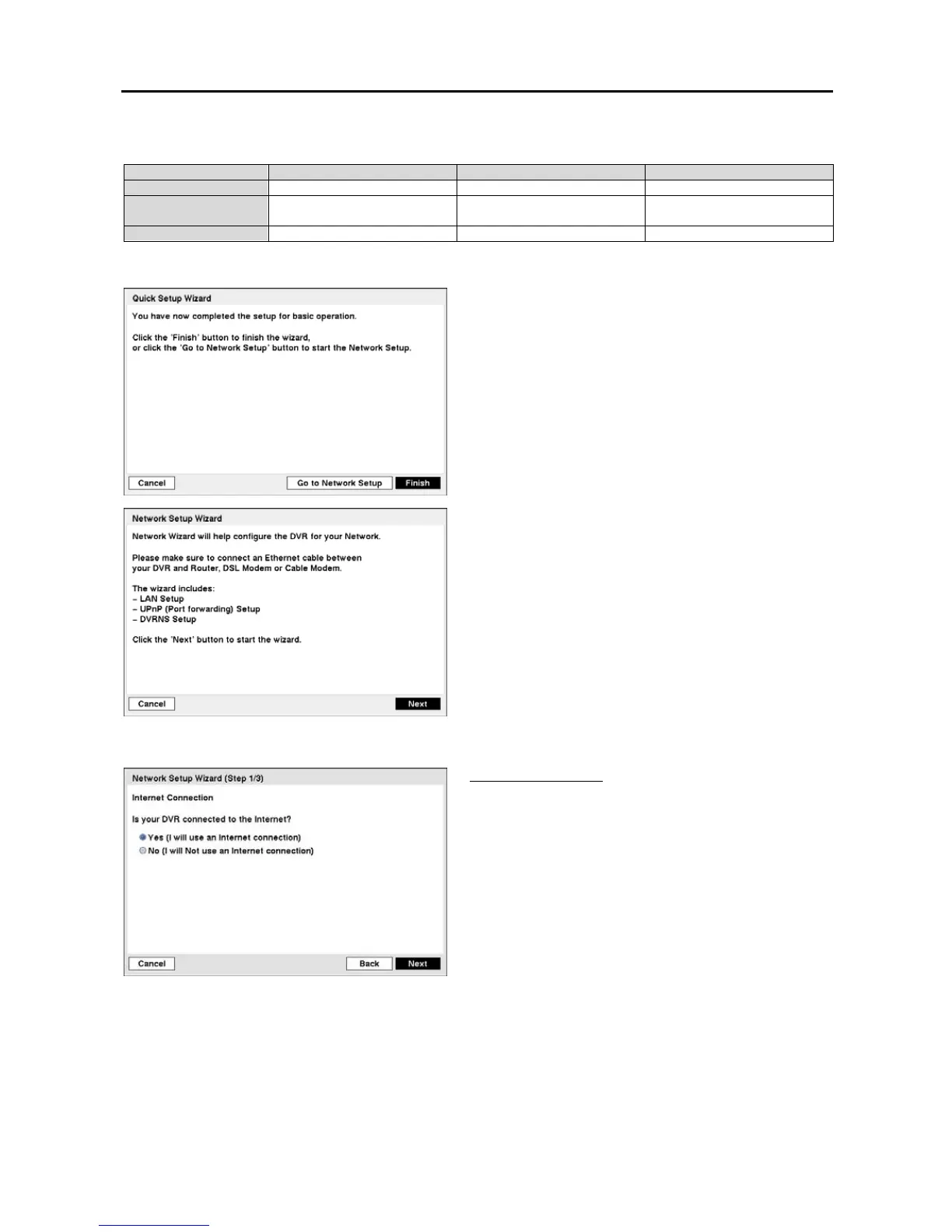
Select the Finish button to finish the Quick Setup Wizard and
select the Go to Network Setup button to start the Network
Setup Wizard.
Figure 18 ─ Network Setup Wizard screen.
If you selected the Go to Network Setup, select the Next
button to start the Network Setup Wizard.
Internet Connection
Select whether or not your DVR is connected to the Internet.


 To Next Page