4-Channel Digital Video Recorder
27
Alarm-Out
Highlight Alarm-Out in the Devices menu and press the
button. The Alarm-Out screen allows you to change the
settings and establish a schedule for each alarm output from the DVR.
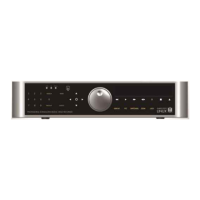
Highlight the Schedule tab, and the Alarm-Out Schedule setup screen displays.
The Mode box allows you to set how the alarm reacts during the scheduled time. When set to On, the Alarm-Out is
active during the scheduled time. When set to Event, the Alarm-Out is only active when there is an Event during the
scheduled time.
The Alarm-Out box allows you to select between Alarm Output and Beep (DVR’s internal buzzer).
The box allows you to delete an alarm output schedule. You will be asked to confirm whether or not you really wish
to delete the schedule.
Display
Highlight Display in the Devices menu and press the
button. The Display screen allows you to select what
information will be displayed on the monitor.
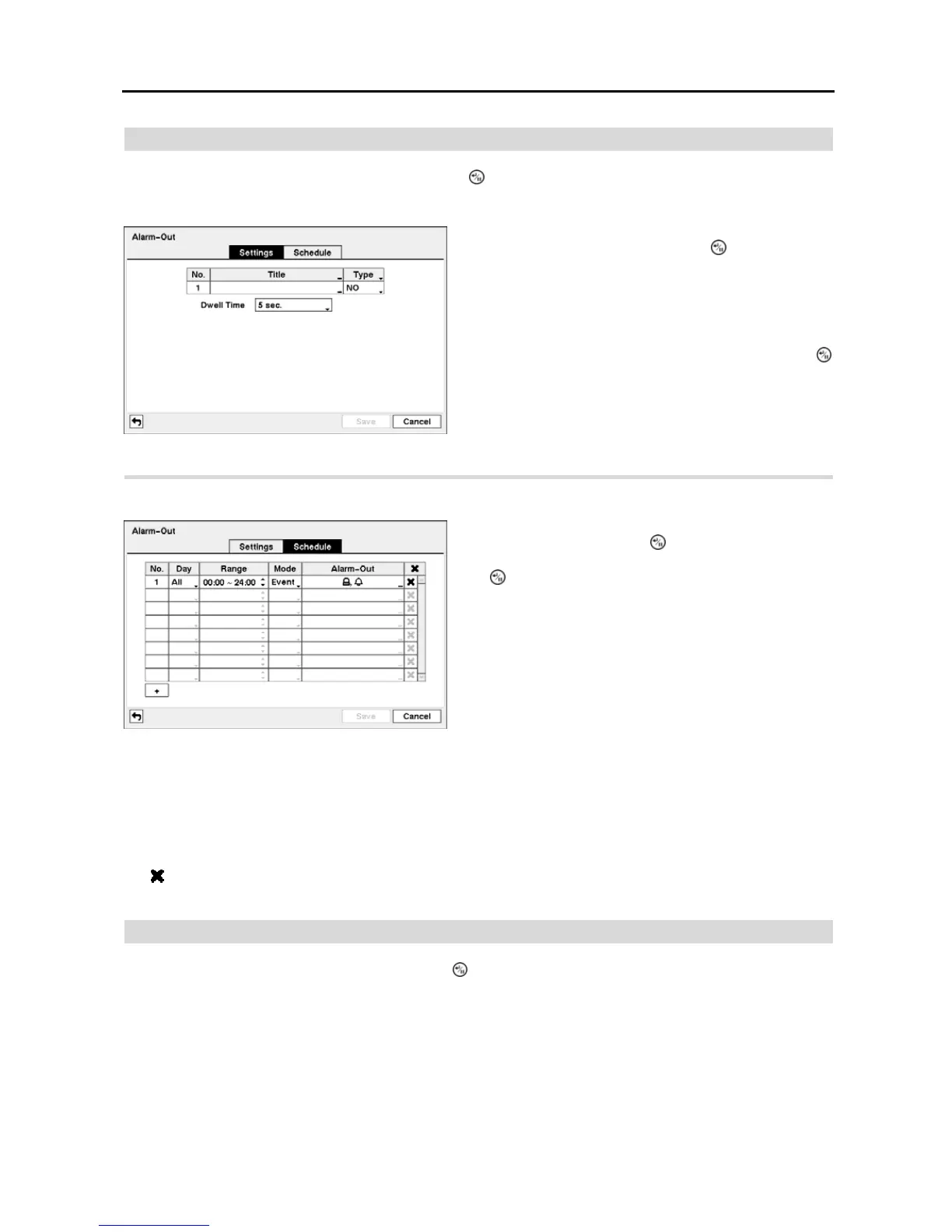
Figure 32 ─ Alarm-Out Settings setup screen.
The alarm output can be given its title by highlighting the box
under the Title heading and pressing the
button. A virtual
keyboard appears allowing you to enter the title.
Highlighting the box under the Type heading allows to set
the alarm output for NO or NC (normally open or normally
closed).
Highlighting the box beside Dwell Time and pressing the
button allows you to set the dwell time of the alarm output.
Dwell times range from 5 seconds to 15 minutes.
Figure 33 ─ Alarm-Out Schedule setup screen.
You can add and edit alarm output schedules on this screen.
Highlight the + and press the
button to add a schedule.
Highlighting the boxes under the Column heading and pressing
the button allows you to edit the information in those boxes.
The Day box allows you to select the days that the alarm
schedule will be active. The choices are: Sun, Mon, Tue, Wed,
Thu, Fri, Sat, M~F, Hol and All.
The Range box allows you to set the time that the alarm
schedule will be active in 15-minute increments from 00:00
to 24:00.


 To Next Page