4-Channel Digital Video Recorder
23
Highlight the Check box and press the
button to check whether or not the name you entered can be used.
NOTE: The DVR name you entered should be checked by selecting Check, otherwise the DVRNS changes will
not be saved.
NOTE: When entering no name or a name already registered on the DVRNS server, an error message displays.
Highlighting Save and pressing the button registers the DVR on the DVRNS server. Proper DVRNS settings will
display the help desk information of the DVRNS server in the box beside Help Desk.
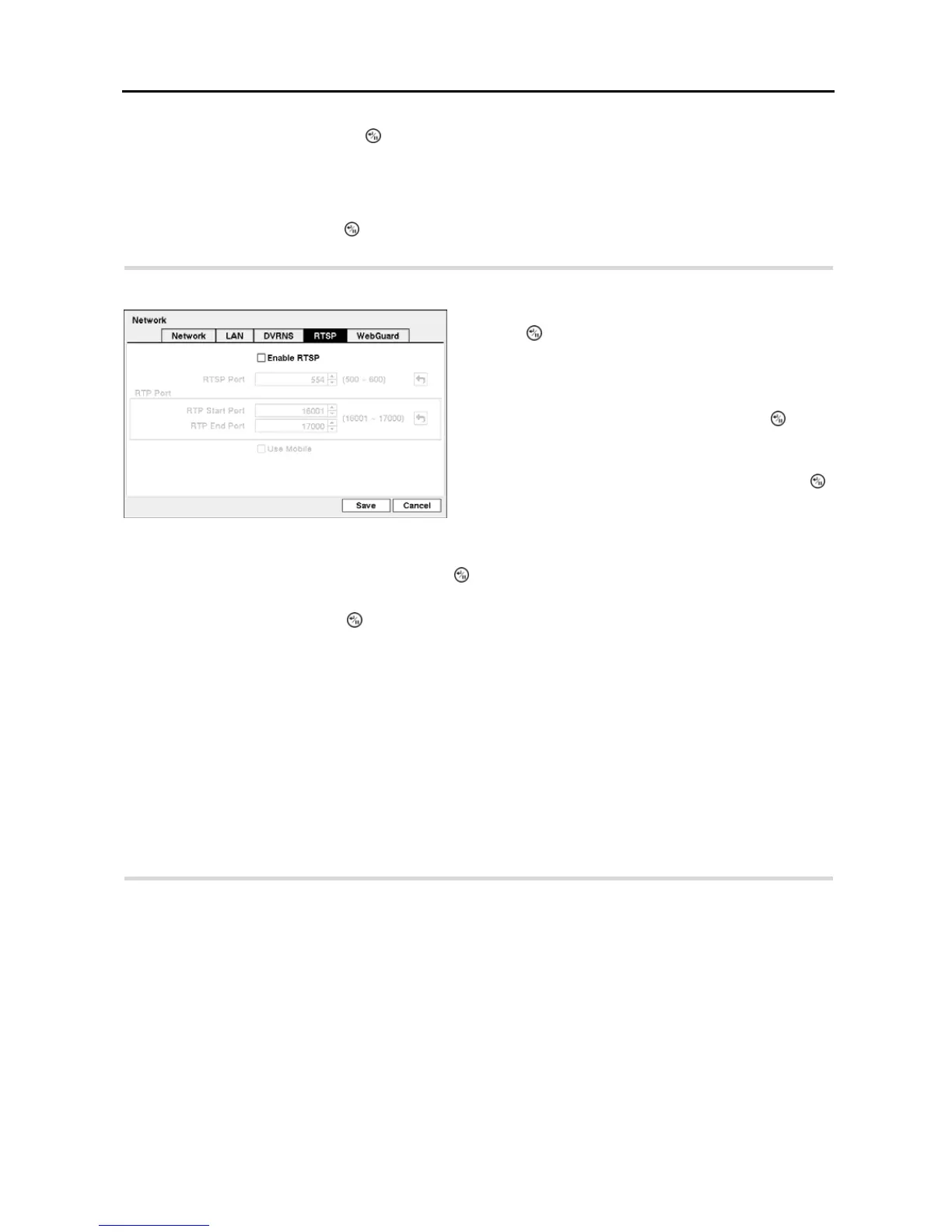
Highlight the RTSP tab, and the RTSP setup screen displays.
Figure 24 ─ RTSP setup screen.
Highlight Enable RTSP (Real-Time Streaming Protocol) and
press the
button to toggle between On and Off. You will
be able to change the settings if Enable RTSP is enabled.
NOTE: When selecting Enable RTSP, the recorded image
resolution cannot be set to Very High during Record setup.
Highlight the box beside RTSP Port and press the button.
Set the port number of the RTSP server obtained from your
system administrator.
Highlight the box beside RTP Start Port and press the
button. Set the start port number of the RTP server obtained
from your system administrator.
Highlight the box beside RTP End Port and press the
button. Set the end port number of the RTP server obtained
from your system administrator.
Highlight Use Mobile and press the button to toggle between On and Off. When set to on, you can access a remote
DVR using a Blackberry or other mobile devices.
NOTE: Selecting Use Mobile sets the recorded image resolution to Standard automatically regardless of your
Record settings.
NOTE: Selecting Use Mobile sets the remote watch quality to Basic automatically regardless of your Network –
Remote Watch settings.
NOTE: Selecting Use Mobile sets the WebGuard service to be enabled automatically regardless of your WebGuard
settings.
NOTE: You can access a remote DVR and monitor live video images using media players, such as VLC Player,
supporting RTSP service. Start the media player on your local PC and enter “rtsp://ID:Password@IP address:
RTSP port number/‘channel number’”, or start Internet Explorer on your Blackberry or other mobile devices and
enter “http://IP address:Webguard port number/”.
NOTE: RTSP service might not be supported, depending on the type of media player.
Highlight the WebGuard tab, and the WebGuard setup screen displays.


 To Next Page