10
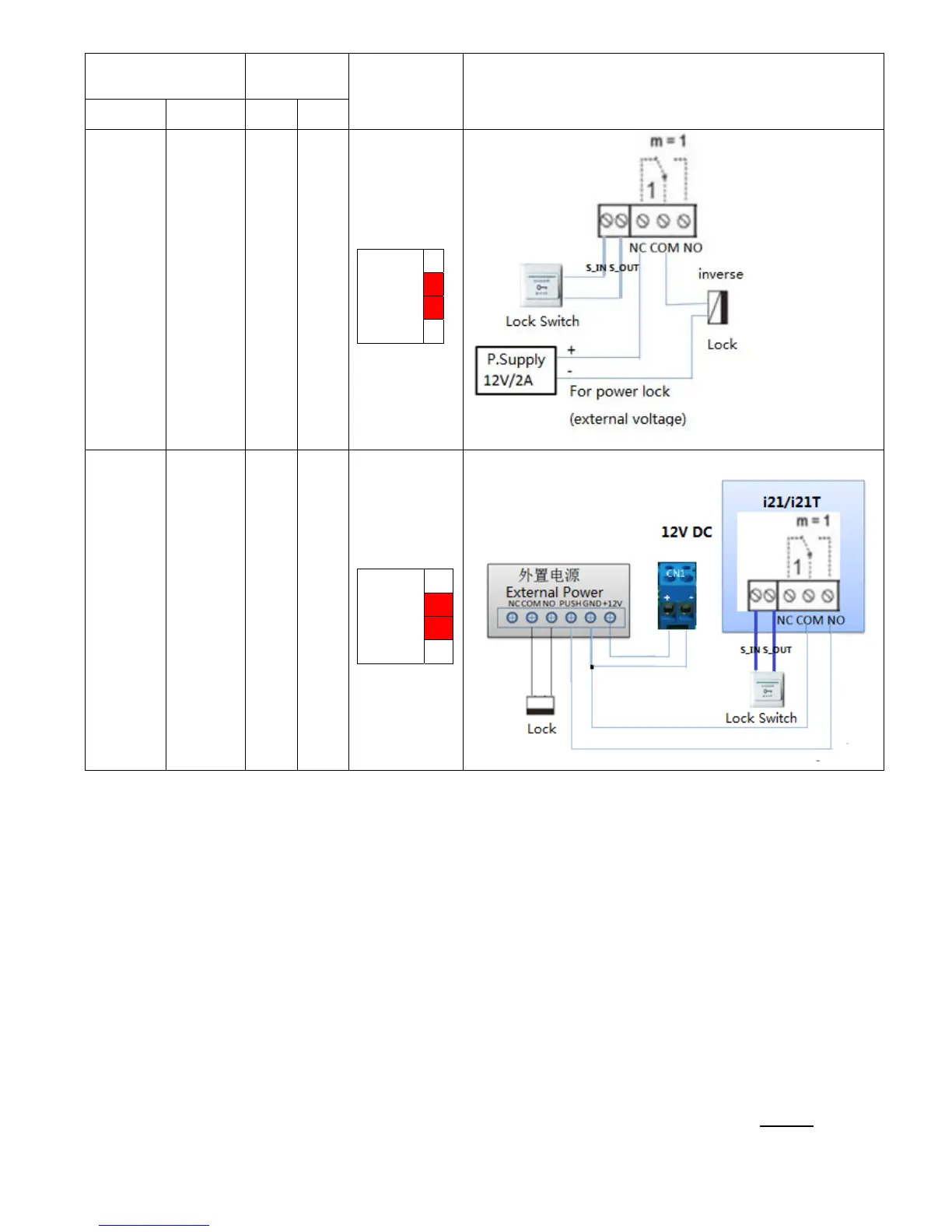
Electric lock power
supply mode
Electric
lock
Jumper
JP39
mode of connection
Internal External NO NC
√
√
Outside
Driver
1
2
3
4
√
√
Outside
Driver
1
2
3
4
2.2. Quick Setting
I21/I21T Provide a complete function and parameter setting,users may need to have the network
and SIP protocol knowledge for understanding the meaning represented by all parameters.In order
to let I21/I21T users can quickly enjoy the high quality speech brought by the IP Phone services
and low cost advantage, we especially lists the basic and must set options in this section,which let
users can real-time started without understanding complex SIP protocols.
In prior to this step,please make sure your broadband Internet online can be normal operation,and complete the
connection of the network hardware. I21/I21T factory default network mode is DHCP. Thus,only
connect I21/I21T with DHCP network environment then network can be automatically connected.
1. Long press # keypad 5 Sec,then waiting for the phone play the IP address;or use



 To Next Page