22
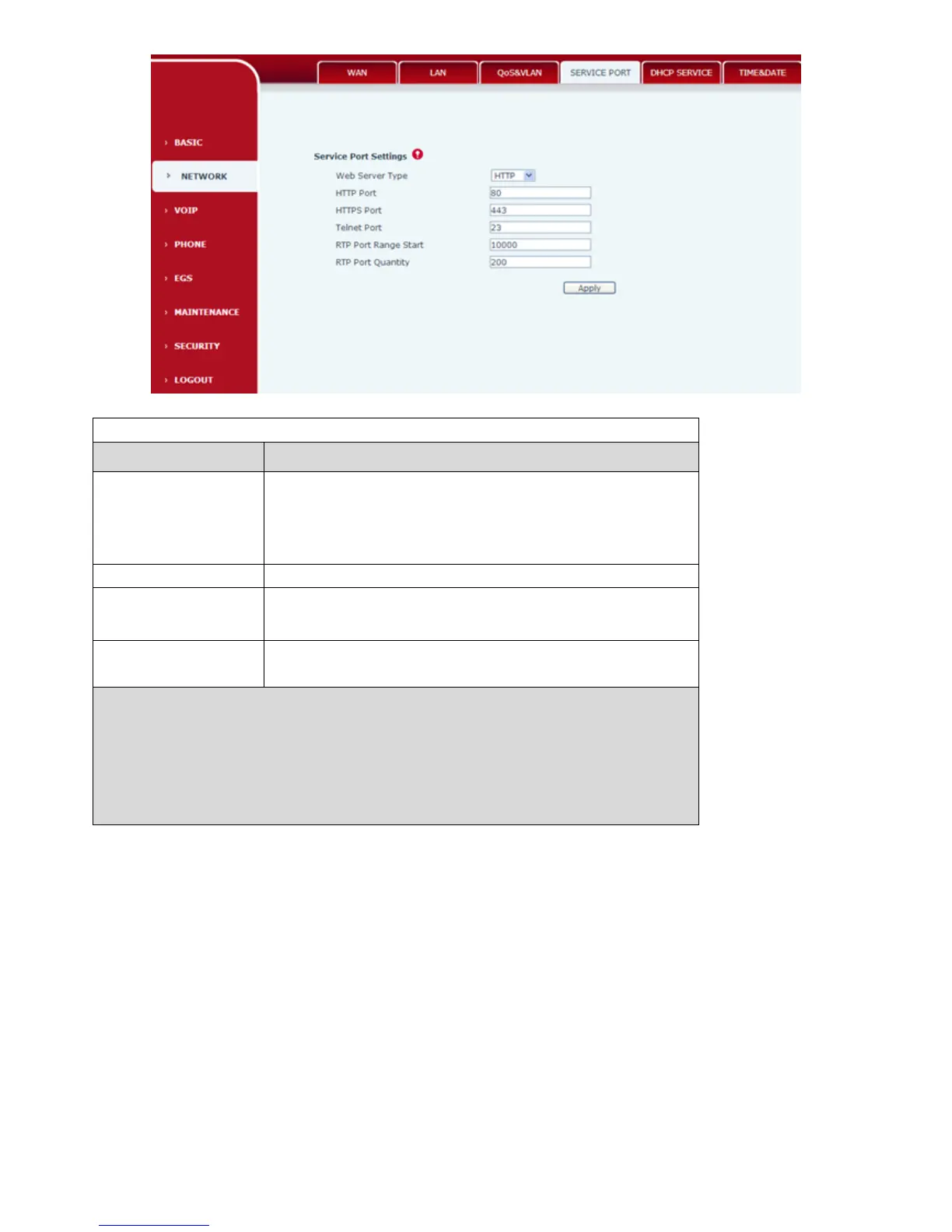
SERVICE PORT
Field Name
Description
HTTP Port
Configurate web browser port,default 80 port, if want
to enhance system security,can modify it to non-80
standard port,save the data after modification,when lo in
again please use this way: http://xxx.xxx.xxx.xxx:xxxx.
Telnet Port
Configurate telnet port,default 23port;
RTP Port Range Port
Configurate phone RTP and open the starting
port.Allocate this port as dynamic allocation;
RTP Port Quantity
Configure the phone allocation RTP port Max
quantity . Default 210 pieces;
Notice:
1)After modifying this page need to save and reboot the phone which can make it come
into force.
2)If change Telnet ,HTTP port number ,it’s better set bigger port number than 1024,
because 1024 port is system reserved port.
3)HTTP port number is set as 0, then forbid the HTTP service.
4.3.2.4. TIME&DATE
According to their own position、configuration time zone and SNTP Server to automatically obtain
time and daylight saving time function,can also according to their need to manually adjust the time.



 To Next Page