18
Active IP Address
The phone current IP;
Current Subnet Mask
Subnet Mask;
Current IP Gateway
The current default gateway IP;
MAC Address
MAC address;
MAC Timestamp
Show the time of getting MAC address
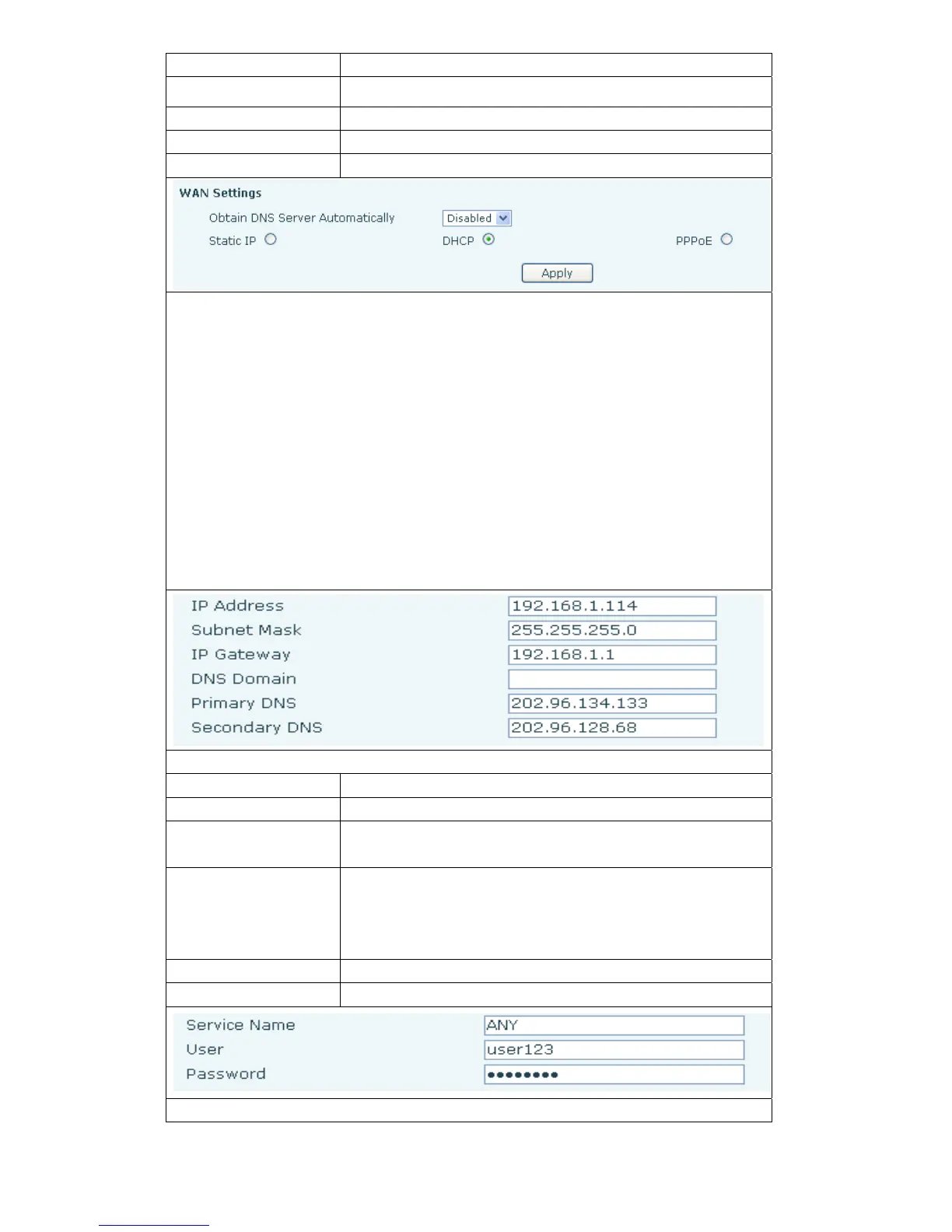
Telephone network on-line mode. Please according to the actual network
environment,choose a suitable network mode. This phone provides three ways
for network online:
static :If your ISP services provide you with fixed IP address,then you
can choose this item. After choosing, you must fill it into Static table:IP
Address / Netmask /Gateway / Primary DNS and other related
information.If you don’t know these information,can ask assistance from
your ISP provider or network management personnel.
DHCP :
in this mode,network information will automatically obtain from
DHCP server,you need not to manually enter these fields.
PPPoE:
when select this mode,you must enter the ADSL online account
and password.
You can reference 3.2.1 Network Settings,set your network quickly.
Only the phone used in Static mode which need set.
IP Address
Please enter your assigned IP addresses.
Subnet Mask
Please enter your assigned subnet mask。
IP Gateway
Please enter your assigned a default gateway
address.
DNS Domain
Set the DNS domain suffix. When the user input in the
DNS domain name address and could not resolute,
after put this domain behind the domain name address then
the phone will go to resolve.
Primary DNS Please enter your DNS service address.
Secondary DNS Please enter your spare DNS service address.
Only when the phone use PPPoE mode need to set.



 To Next Page