Chapter "Usage"
20
4.1 Attaching and removing components
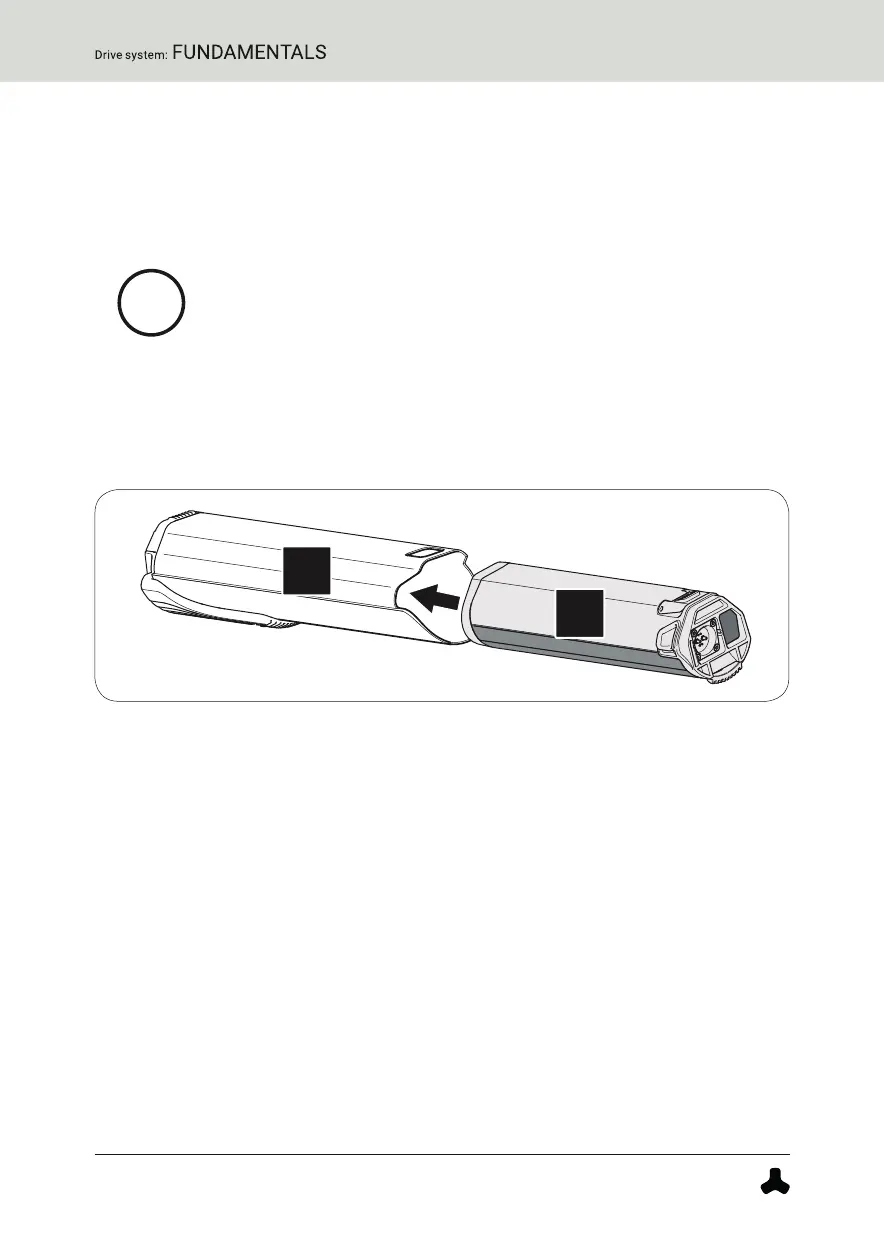
4.1.1 Inserting the battery into the drivepack
More detailed information can be found → in chapter 31.1 "Checking and switching on
battery" and in chapter 31.2 "Inserting the battery into the drivepack".
On delivery, the battery may only be precharged.
► Fully charge the battery before inserting it into the
drivepack for the first time.
1. Check the battery for visible damage.
2. Press the on/off button on the battery once to turn on the battery.
3. Place the battery with the connecting contact first on the battery holder
of the drivepack.
4. Carefully insert the battery as far as possible into the battery holder.
The battery is automatically locked when you have inserted it correctly.
If the battery does not lock, repeat the procedure. Do not use the drive
system if the battery cannot be locked.
4.1.2 Mounting the drivepack on the eBike
More detailed information can be found → in chapter 15.1 "Mounting the drivepack on
the e-bike".
1. Place the drivepack with the interface for the bottom bracket in front
of the corresponding interface on the bottom bracket.
2. Swing the upper end of the drivepack into the down tube of the eBike.
The drivepack is automatically locked in place when the two interfaces
on the drivepack and the bottom bracket are correctly engaged and the
drivepack is fully swiveled into the intended position on the down tube.


 To Next Page