Manual MWD BP
FEIG ELECTRONIC GmbH Page 34 of 97 MWD BP_Handbuch_mehrsprachig_8.doc
E N G L I S H
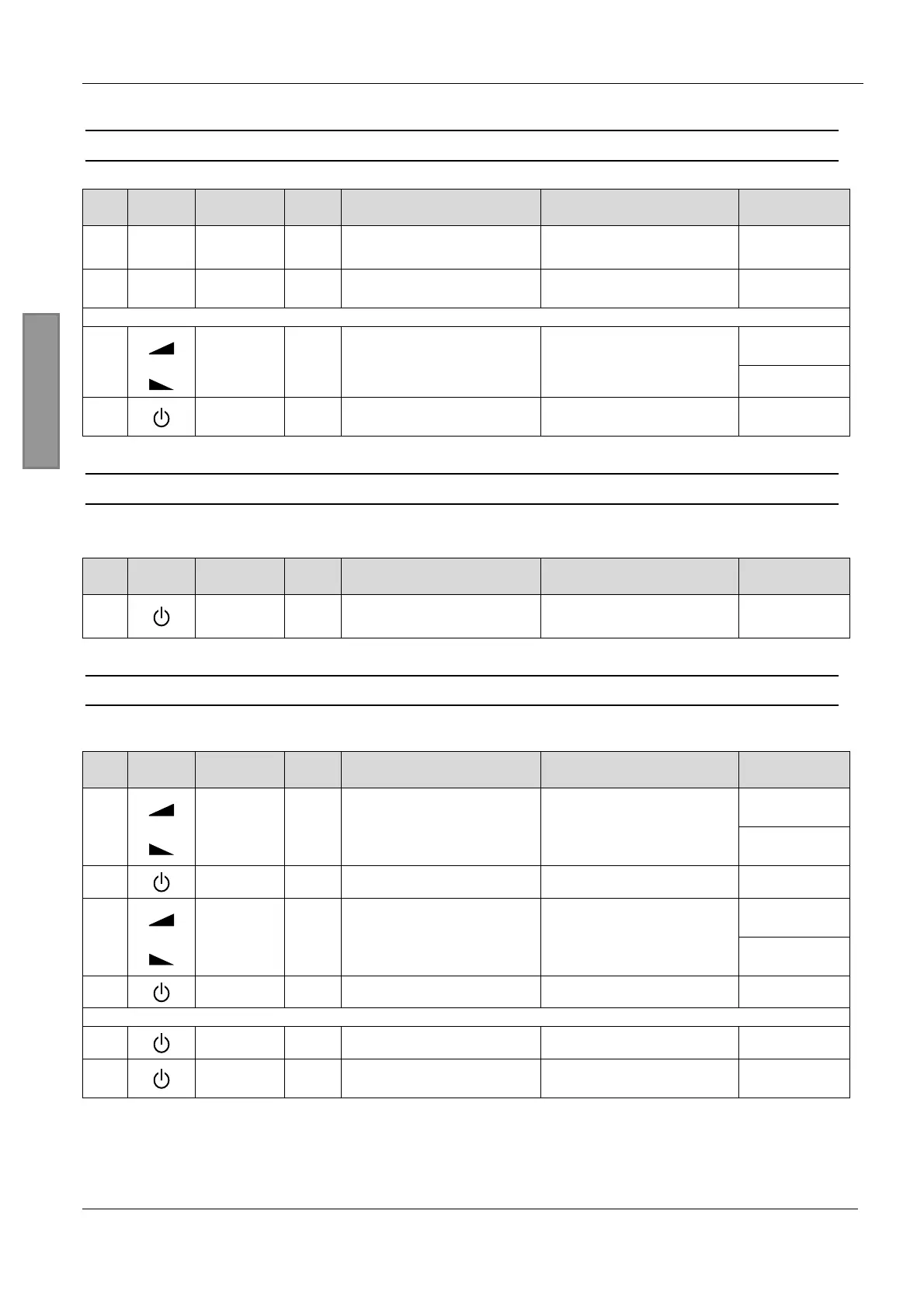
9.1 Opening parameter mode
Symbol Key
Key-
press
Description Action
Display
Example
1.
i
i-Button
short
Channel 1: displayed address
Channel 2: displayed address + 1
Actual device address is
displayed with blinking digit and
decimal point
Ñ1.Ò
2a. 1..4 Value 1..4 short
Direct confirmation
of device address
Display first parameter name
L.
or
Volume +
2.
2b.
Volume -
short
Select address value
Increment or decrement value.
Changed values doesn’t blink !
F
3b. On/Off short
Indirect confirmation
of device address
Display first parameter name
L.
9.2 Closing parameter mode
) Parameter mode is automatically closed 60 seconds after the last keypress on the remote control.
Symbol Key
Key-
press
Description Action
Display
Example
1. On/Off long
Close parameter entry
from standard parameter menu
service parameter menu
display off
9.3 Changing parameters
Before changing parameter values you have to open the parameter entry as described in 9.1.
Symbol Key
Key-
press
Description Action
Display
Example
Volume +
d.
1.
Volume -
short
(long)
Change parameter name
(long: quick selection)
Display parameter name with
character and decimal point.
P.
2. On/Off short
Return to display
parameter value
Actual parameter value is
displayed without decimal point.
1
Volume +
2.Ò
3.
Volume -
short
(long)
Change parameter value
(long: quick selection)
Display changed parameter value
with blinking decimal point.
0.Ò
4a. On/Off short
Undo changes
Display actual parameter value
again (without decimal point)
1
or
4b. On/Off long
Save new parameter value
Decimal point expires after
successful saving.
2
5. On/Off short
Return to display
parameter name
Display parameter name with
character and decimal point.
d.


 To Next Page