Page 11
iLiL
iLiL
iL
OFT DUOOFT DUO
OFT DUOOFT DUO
OFT DUO
XX
XX
X
iLiL
iLiL
iL
OFT DUOOFT DUO
OFT DUOOFT DUO
OFT DUO
XX
XX
X
+
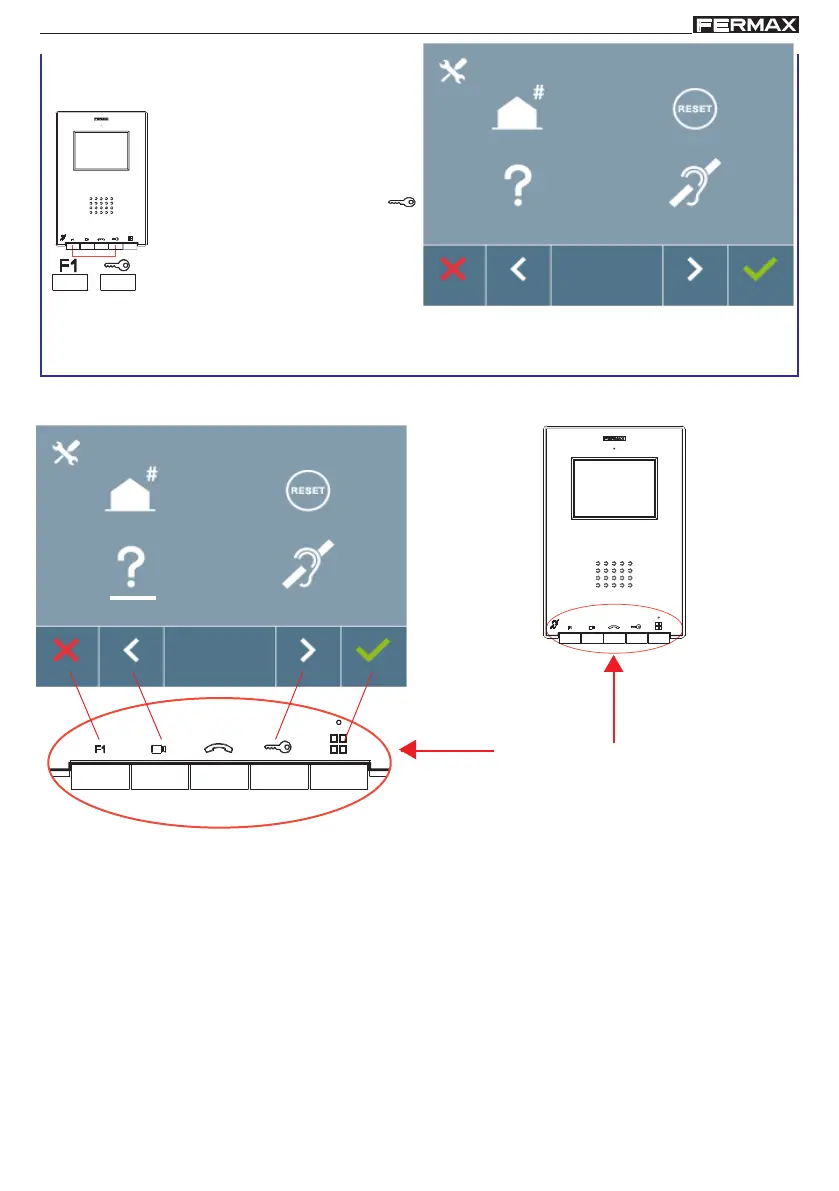
2. When on the User Menu
screen, simultaneously
press these buttons: F1 +
(lock-release).
Screen: ADMINISTRATOR Menu
Navigation
buttons
- Navigation buttons and monitor buttons
Monitor buttons
The icons viewed on the screen (navigation buttons: X, <, > and ), are used with the
corresponding buttons located on the monitor
X : Return to the previous screen or stand-by.
< : Select the previous menu option.
> : Mark the following menu option.
: Confirm the selection and activate the function.
Notes:
- The white line below the icon indicates the function we are currently in. Upon pressing
it is
selected.
-
The monitor will automatically exit programming mode after 60 seconds of inactivity.
- Once you exit from any configuration menu, you need to wait 1.5 seconds to perform a new
action.














 To Next Page