Page 17
iLiL
iLiL
iL
OFT DUOOFT DUO
OFT DUOOFT DUO
OFT DUO
XX
XX
X
iLiL
iLiL
iL
OFT DUOOFT DUO
OFT DUOOFT DUO
OFT DUO
XX
XX
X
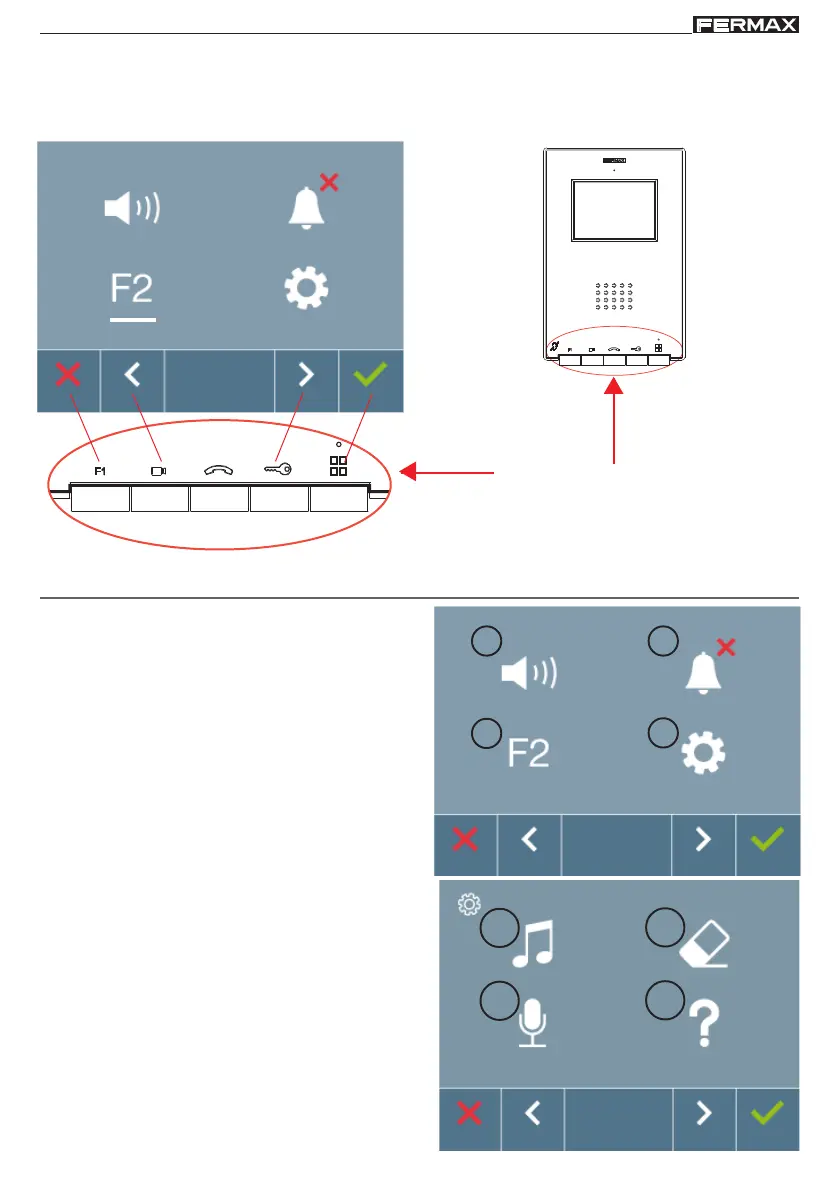
Navigation
buttons
Monitor buttons
Programming: USER MENU Screen
There are the following options:
1. Call volume settings on monitor
2. Do not disturb mode.
3. Function F2.
4. User parameter settings:
4.1 Selecting ringtones
4.2 Conversation mode
4.3.User reset
4.4 Help.
3
2
1
4
4.3
4.4
4.2
4.1
Note: By pressing the MENU button, we directly
access the User Menu screen if the monitor is
programmed.
- Once you exit from any configuration menu, you need to wait 1.5 seconds to perform a new
action.














 To Next Page