Page 5
iLiL
iLiL
iL
OFT DUOOFT DUO
OFT DUOOFT DUO
OFT DUO
XX
XX
X
iLiL
iLiL
iL
OFT DUOOFT DUO
OFT DUOOFT DUO
OFT DUO
XX
XX
X
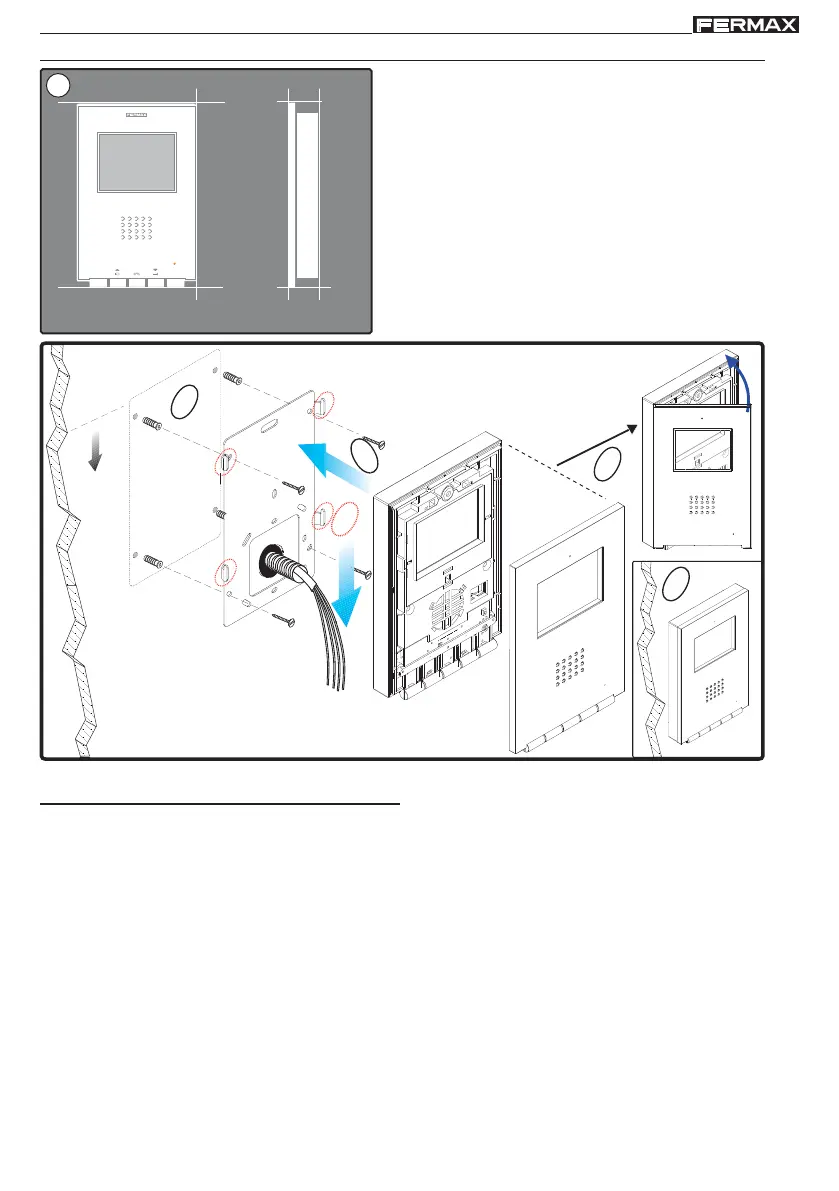
INSTALLING THE SURFACE MONITOR
197mm
131mm
F1 F2
MENU
34,3mm
1
Monitor Dimensions (Height x Width x Depth*.):
197 x 131 x 34.3 mm / 7,7” x 5,1” x 1,3”
Pure model Monitor Dimensions (Height x Width x Depth.):
197 x 131 x 33.3 mm / 7,7” x 5,1” x 1,3”
1.60m
5.25 feet
1
3
2
4
5
(*) Remove the electrostatic protective tag.
Available Functions
The functions available on the Loft Duox monitor are summarised in the following list:
- Open door.
- Call to guard.
- Hands-free and simplex conversation modes (Push to talk: push to talk and release to listen).
- Call Volume Regulation.
- Call disconnection (Do not Disturb).
- Ringtone Selection
- Doorbell.
- Light and Doorbell Activation option
- Programming via the terminal and via the entry panel.
- Audio Volume Regulation
- Configuration of Parameters via screen menu (OSD).
- Brightness, contrast and colour settings.
- F1 and F2 auxiliary functions
- Audio induction loop (by model).














 To Next Page