Page 10
iLiL
iLiL
iL
OFT DUOOFT DUO
OFT DUOOFT DUO
OFT DUO
XX
XX
X
iLiL
iLiL
iL
OFT DUOOFT DUO
OFT DUOOFT DUO
OFT DUO
XX
XX
X
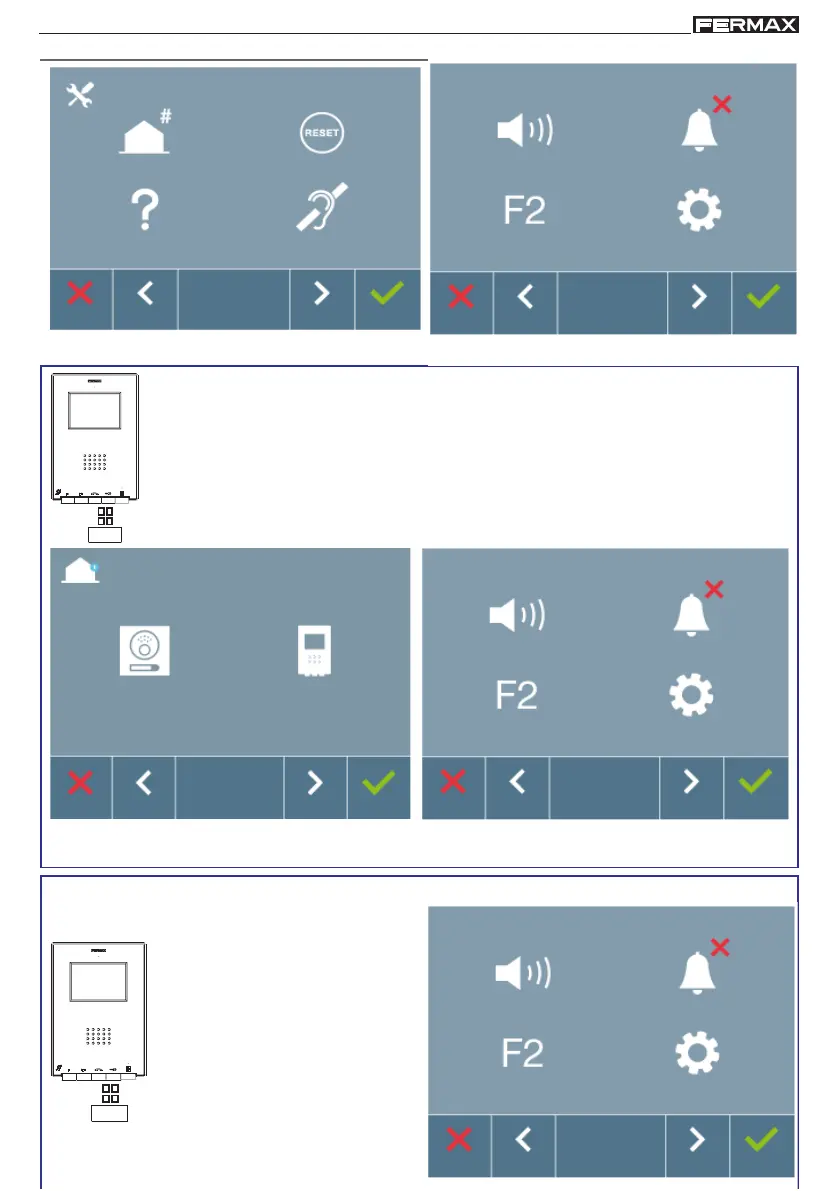
SCREENS: ADMINISTRATOR MENU AND USER MENU. How to access these.
Screen: ADMINISTRATOR Menu
Screen: USER Menu
By pressing the MENU button, you directly access:
- The monitor's Programming option on the Administrator Menu, if the monitor
is not programmed.
- The User Menu screen if the monitor is programmed.
Screen: ADMINISTRATOR Menu
Programming the monitor option
Screen: USER Menu
To access the Administrator Menu when the monitor is programmed you must follow these
2 steps
:
1. Press the MENU button, access
the screen on the User Menu.














 To Next Page