Page 22
iLiL
iLiL
iL
OFT DUOOFT DUO
OFT DUOOFT DUO
OFT DUO
XX
XX
X
iLiL
iLiL
iL
OFT DUOOFT DUO
OFT DUOOFT DUO
OFT DUO
XX
XX
X
SETTINGS: Video and Audio
Video adjustments: Brightness - Contrast - Colour
The monitor allows you to adjust brightness, contrast and colour while you have received a
call (without hanging up) or when performing an auto-start
(camera), (see Operating
chapter: Auto-start).
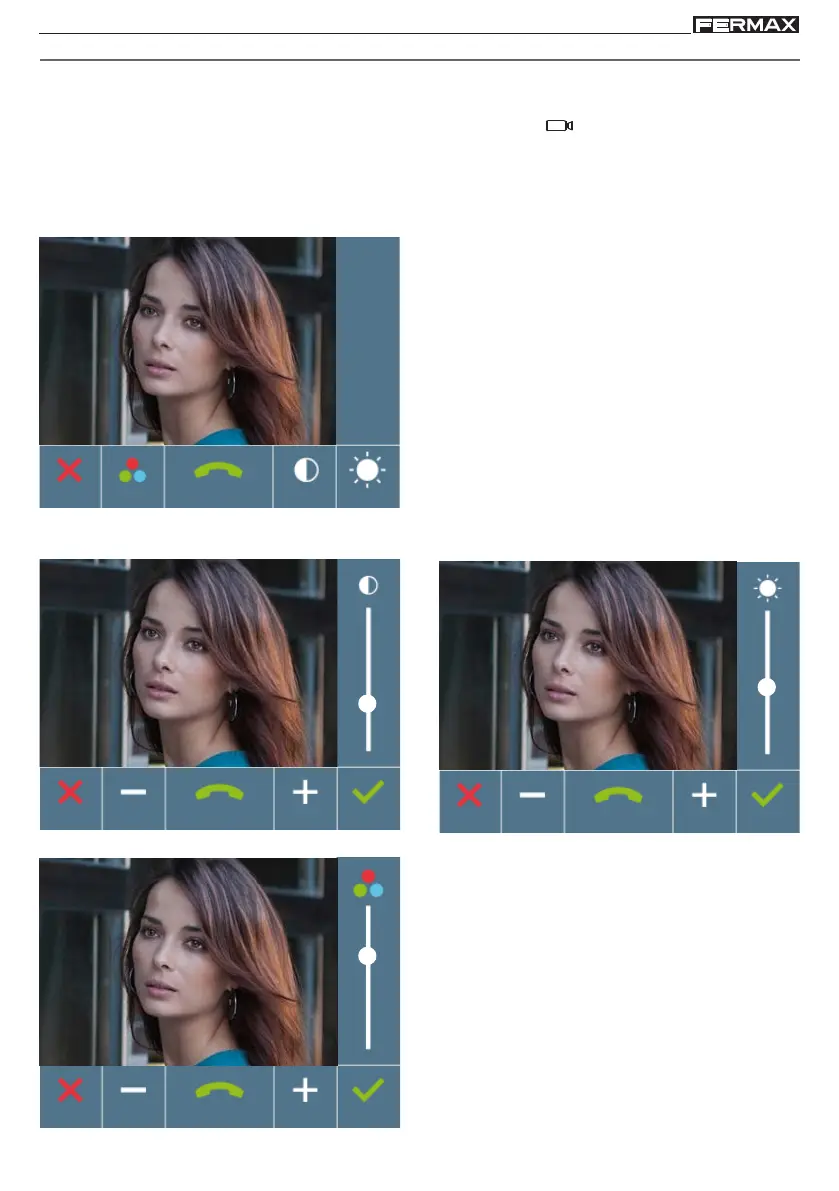
With the video image on the screen, short-press the "MENU" button and a menu appears on
the screen to adjust the image's brightness, contrast and colour.
1. Select the contrast, brightness and colour
settings with the corresponding buttons.
From this screen you can also activate the
audio (Pick-up).
Brightness
Colour
Contrast
2. Select the desired option and increase or decrease the video settings with the arrows
according to the selected option.
Note: Upon pressing:
- X (cancel): exit the screen without changes
-
(confirm): all changes made are saved and
the user menu screen appears
Note: The time to perform the Audio Settings is
30 seconds, after this time the monitor returns
to stand-by.














 To Next Page