Page 14
iLiL
iLiL
iL
OFT DUOOFT DUO
OFT DUOOFT DUO
OFT DUO
XX
XX
X
iLiL
iLiL
iL
OFT DUOOFT DUO
OFT DUOOFT DUO
OFT DUO
XX
XX
X
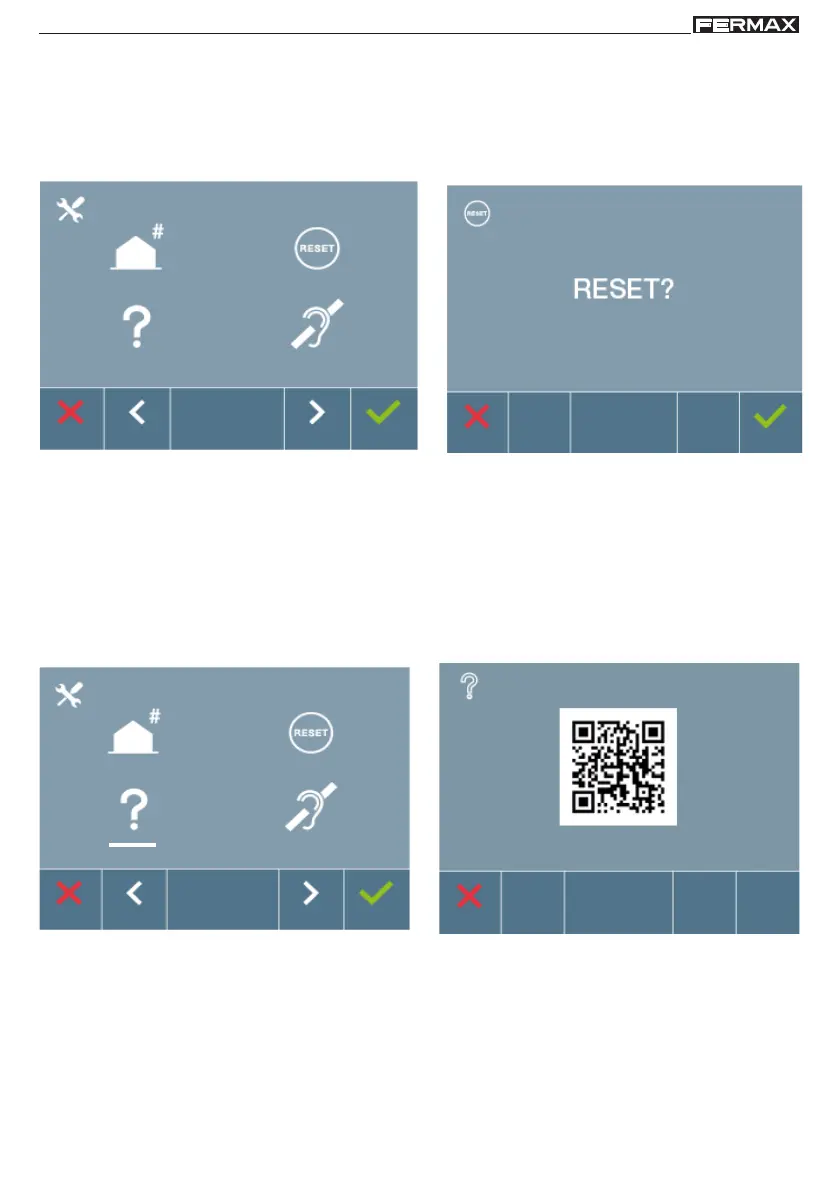
2. ADMINISTRATOR Menu: RESETTING PARAMETERS
The installer may reset the parameters to their monitor's default configuration, selecting
and confirming this option.
The reset affects both the user configuration parameters and the monitor’s address, along
with the Audio induction loop activation (if the model includes it).
Note: The blue LED blinking slowly indicates that the monitor has not been programmed.
Since reset deletes the programmed monitor's address, when the LED is blinking it indicates
that the reset has completed.
3. ADMINISTRATOR Menu: ABOUT
The screen displays a QR code that allows access to the complete monitor documentation.
4. ADMINISTRATOR Menu: AUDIO INDUCTION LOOP
From the screen you can activate/deactivate the Induction loop included in the monitor (by
model).
This screen appears in all models of the monitors, with our without an induction loop.
Make sure to ask for the right model if you require this function.














 To Next Page