Page 12
iLiL
iLiL
iL
OFT DUOOFT DUO
OFT DUOOFT DUO
OFT DUO
XX
XX
X
iLiL
iLiL
iL
OFT DUOOFT DUO
OFT DUOOFT DUO
OFT DUO
XX
XX
X
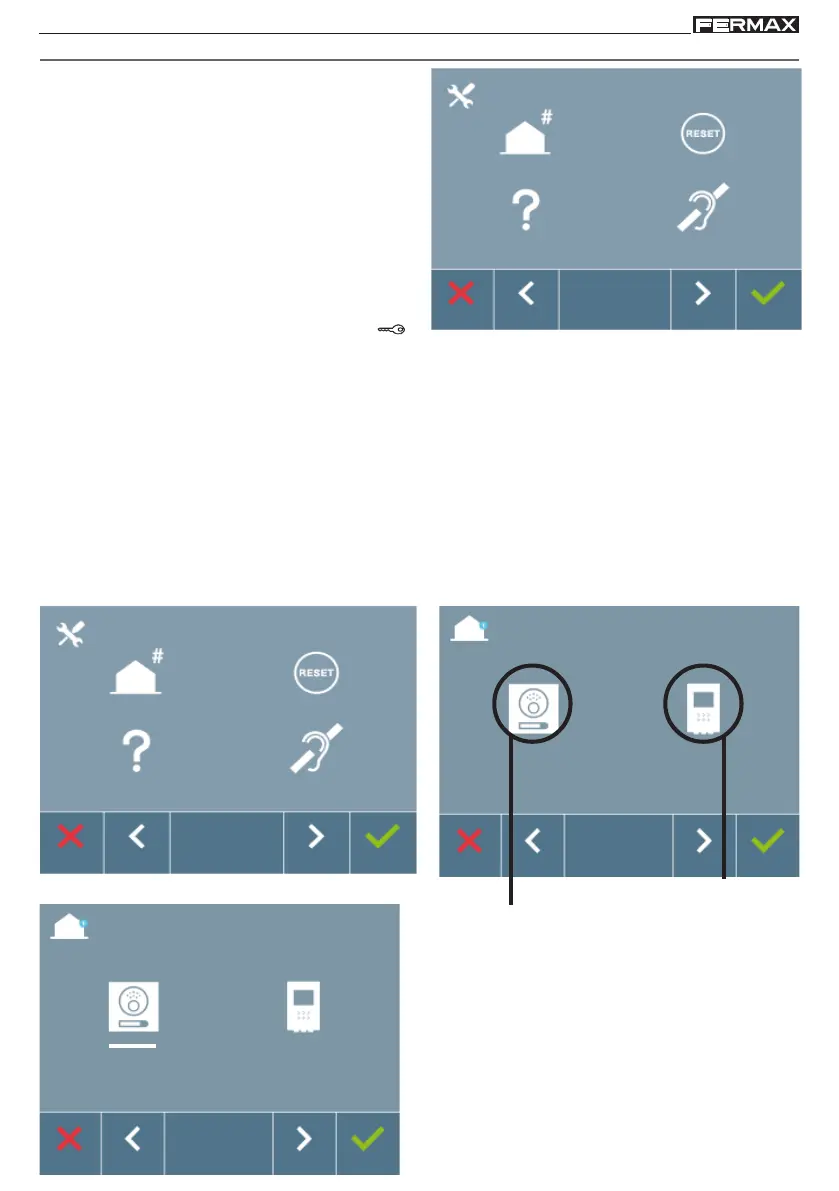
The selected option is displayed with the white
line under the icon. Press , and you hear a
beep on the monitor.
Programming: ADMINISTRATOR MENU Screen
The monitor will not function until it has been programmed!
Note: A slow blue blinking LED means that the monitor is not programmed and once
programmed, the monitor's address is indicated via a red fixed LED.
There are two monitor programming options:
Option 1: From the panel.
Option 2: From the Monitor.
1. ADMINISTRATOR Menu: PROGRAMMING THE iLOFT MONITOR.
The white line below the icon indicates the function we are currently in. Upon pressing it is
selected.
Programming from the panel
Programming from the monitor
Option 1: From the panel.
There are several options:
1. Programming the Monitor address.
2. Resetting Parameters
3. About.
4. Audio induction loop.
Note: To access the Administrator Menu when
the monitor is programmed you must follow
these 2 steps:
1. Press the MENU button, access the screen
on the User Menu.
2. When on the User Menu screen,
simultaneously press these buttons: F1 +
(lock-release).














 To Next Page