Page 27
iLiL
iLiL
iL
OFT DUOOFT DUO
OFT DUOOFT DUO
OFT DUO
XX
XX
X
iLiL
iLiL
iL
OFT DUOOFT DUO
OFT DUOOFT DUO
OFT DUO
XX
XX
X
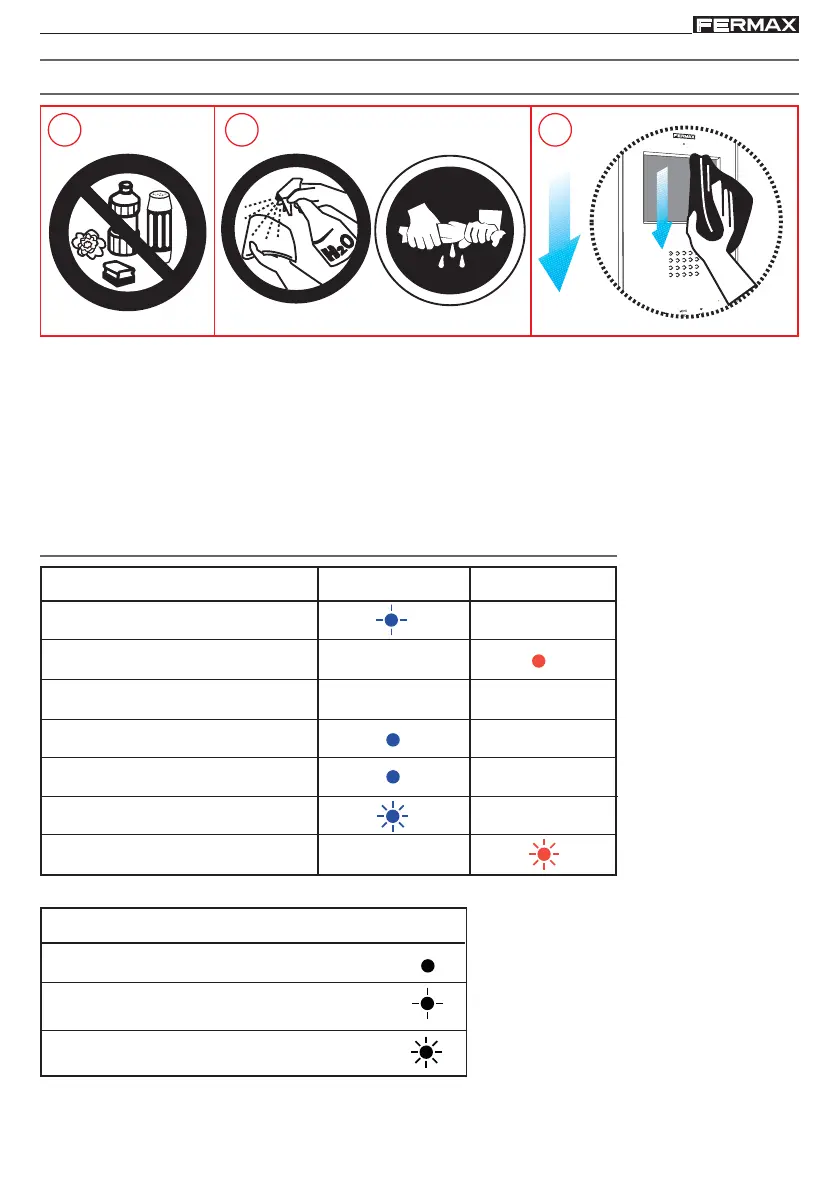
Cleaning the Monitor
1. Do not use cleaning products which contain acids, vinegar or are abrasive in nature.
2. Use a slightly moist cotton cloth.
3. Wipe it over the monitor always following the same direction. After cleaning the monitor dry
it carefully to avoid moisture damage.
1 2 3
Quick guide: LED signals
STATUS
Not programmed
Standby
Call/Called
Handsfree audio
Output Audio (simplex mode)
Input Audio (simplex mode)
Do not Disturb
Blue LED Red LED
STATUS
LED On
Very slow flashing (0.1’’ ON - 5’’ OFF)
Slow flashing (1’’ ON - 0.5’’ OFF)
APPENDIX














 To Previous Page