Page 16
iLiL
iLiL
iL
OFT DUOOFT DUO
OFT DUOOFT DUO
OFT DUO
XX
XX
X
iLiL
iLiL
iL
OFT DUOOFT DUO
OFT DUOOFT DUO
OFT DUO
XX
XX
X
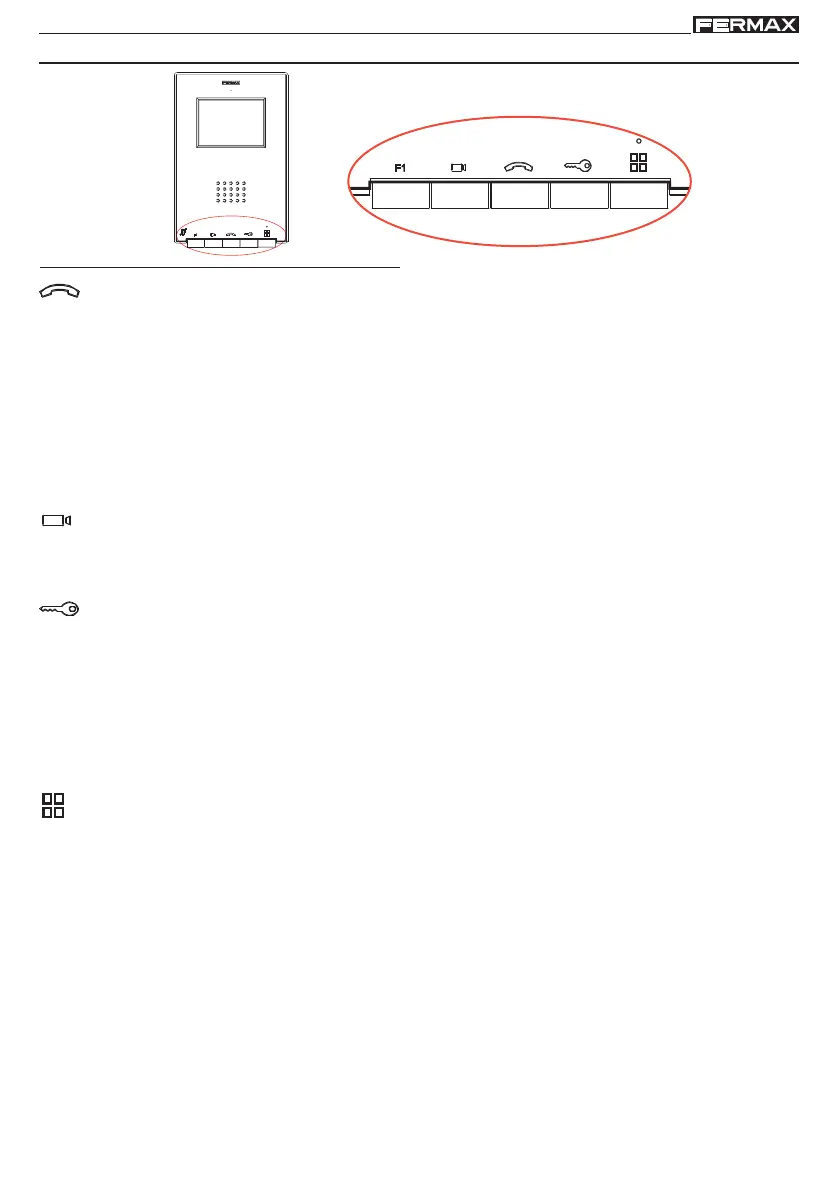
iLOFT MONITOR
Buttons
Audio activation and hang-up button.
· Upon receiving a call (sthe user has 30 seconds to answer before returning to standby.
During this time the red LED light will turn off, informing you that a call is pending), press
this button to talk to the visitor. The audio channel is opened from street entrance
to residence, (the blue LED lights up indicating a conversation with the street entrance,
and everything said will be heard by it), this is in hands-free operating mode.
· Press after finishing the communication, (when finished the blue LED light again
turns off and the red light is turned on). The monitor's default internal timer is 90
seconds.
Auto-start button.
· Select the Block's or General Entrance's camera (depending on availability in the
installation, see Operations chapter: Auto-start).
Lock Releases / Call Guard Unit Button.
· While in conversation with the Street Panel (only video or audio+video), pressing it
will activate the open door lock-release.
· Pressing this button whilst the monitor is on standby will result in a call being made
to the guard unit (where one exists).
F1
F1 Button
Auxiliary function, (contact your installer).
Button Menu: Adjustments and configuration.
·
To access the User menu From here we can personalise the user settings.
- Navigation buttons and monitor buttons
The icons viewed on the screen (navigation buttons: X, <, > and ), are used with the
corresponding buttons located on the monitor
X : Return to the previous screen or stand-by.
< : Select the previous menu option.
> : Mark the following menu option.
: Confirm the selection and activate the function.
Notes:
-
The white line below the icon indicates the function we are currently in. Upon pressing it is
selected.
- The monitor will automatically exit programming mode after 60 seconds of inactivity.














 To Next Page