1. Installation
1-16
Festo P.BE-CTEU-EC-OP+MAINT-EN en 1208NH
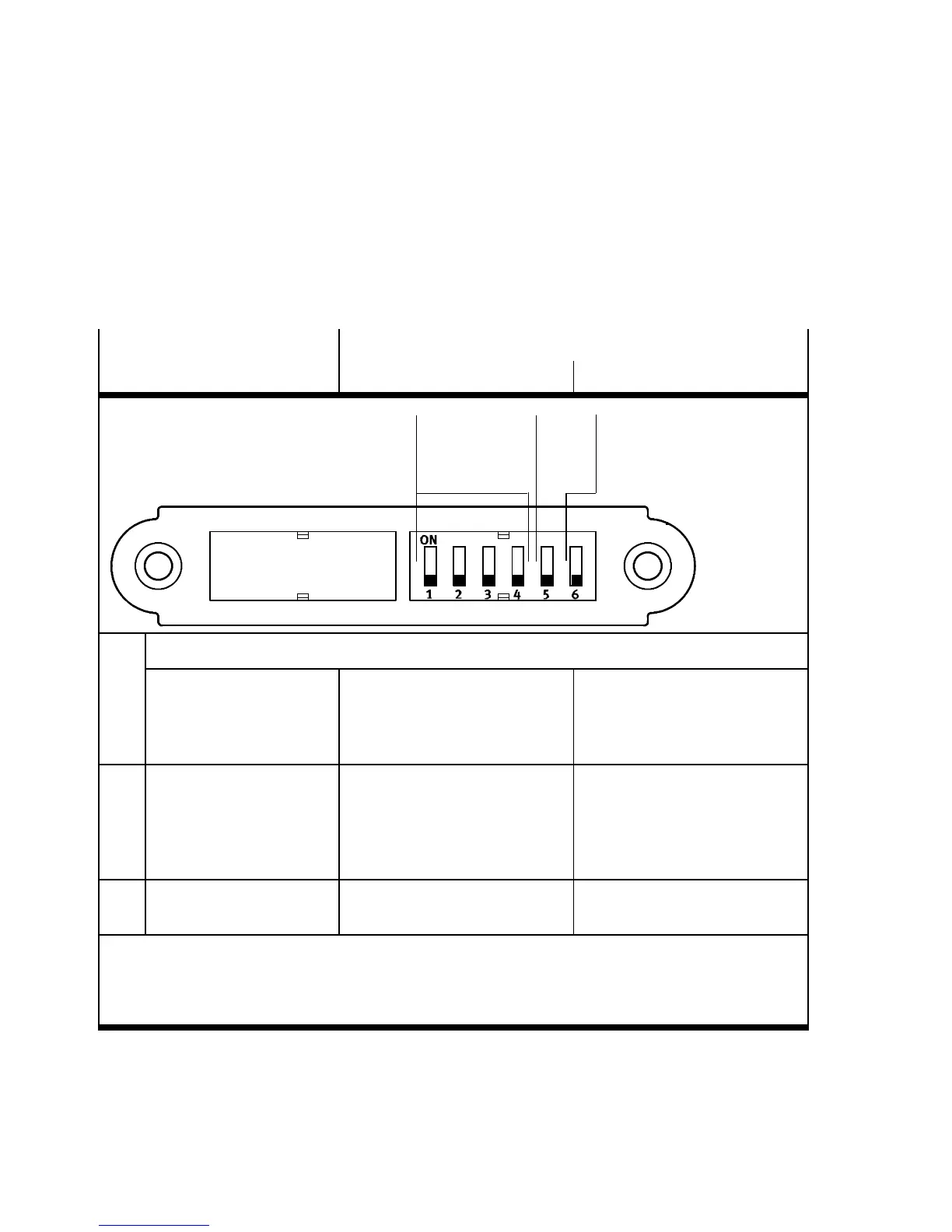
Settingthe DIL switches
The following table provides an overview of the possible
settings.
DIL switch
Function
ON OFF
123
1 1 … 4: EtherCAT address, 0 … 1 5, binary coded (fac tory sett ing: 0)
1)
1: 2
0
2: 2
1
3: 2
2
4: 2
3
1x2
0
1x2
1
1x2
2
1x2
3
0x2
0
0x2
1
0x2
2
0x2
3
2 5: Diagnostics Diagnostics activated: trans-
mission of diagnostic informa-
tion as emergenc y messages
(E M) and storage in diagnosis
history
Diagnostics off ( factory setting)
3 6: Fail state mode
2)
Hold last state Reset
(factory setting)
1)
Optional, e.g. for Hot Connect func tion
2)
If the PLC is in stop (EtherCAT: PRE-OPERATIONAL) mode or the fieldbus connect io n is interrupted
(fail state); applies for all outputs
Note: Fail-state mode is also known as “fail-safe mode”


 To Next Page