TWINFLEX
®
pro² Control Panel Engineering and Commissioning Manual
66
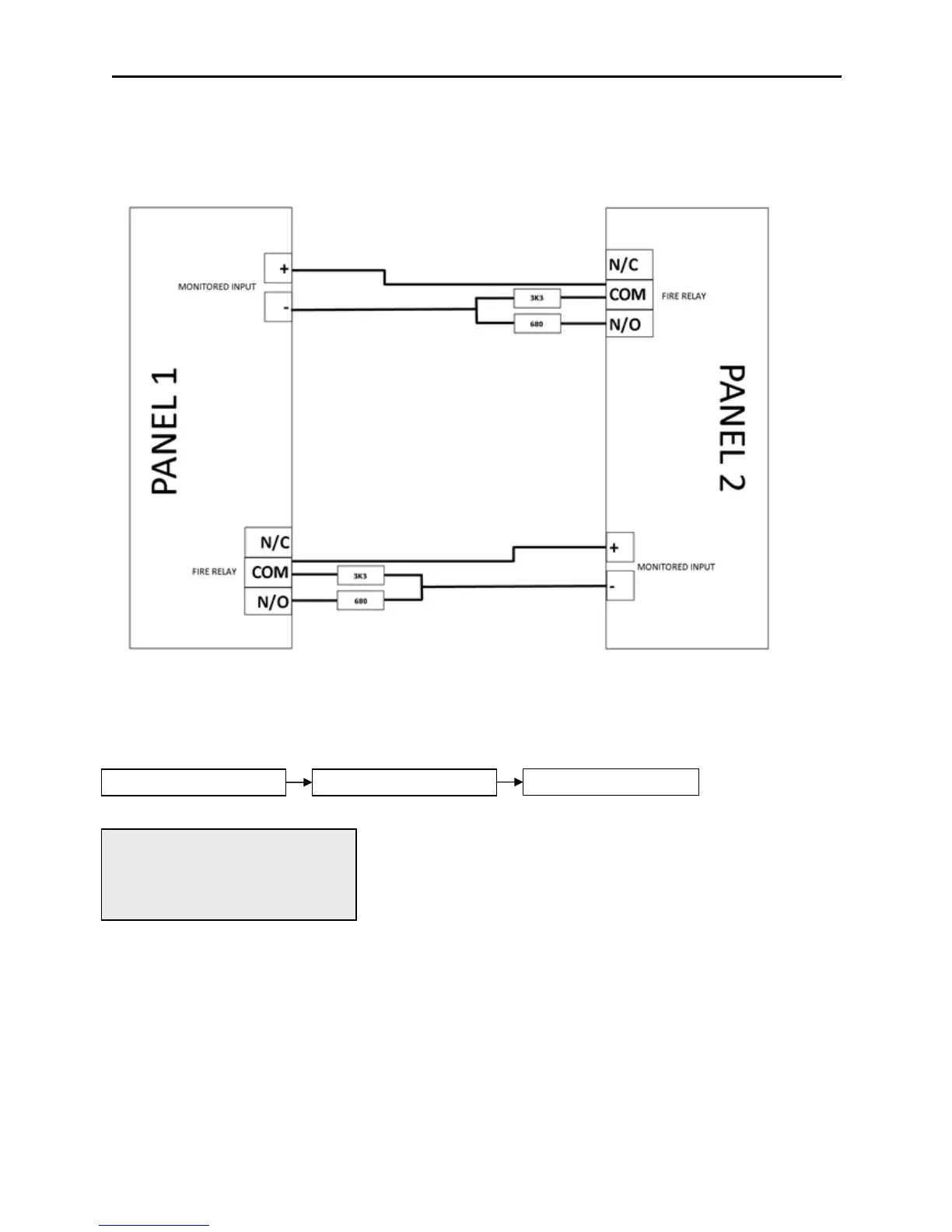
Connecting Two Panels Together
Only a maximum of two panels should be connected in this way.
For each panel, configure a monitored input as a remote fire event as follows:
Monitored inputs on panels 1 and 2 should be set to remote fire event with no relay activation.
This active control will allow the engineer to view or change the
operation of programmable input 1. Use the UP and DOWN arrow keys
to toggle through the following options. To confirm the changes press
ENTER.
2. REMOTE FIRE EVENT– Within this option select option 2. Rem
Fire, No Relay. Operation of the
Monitored I/P will signal a remote fire
input at the control panel. Panel
outputs will be triggered and fire
indication will be shown at the control
panel but the relays will not operate.
This will allow the fire condition to be reset from the panel that reported the fire. If the relays were set to
operate then the fire condition would be re-triggered after a reset.



 To Next Page