EN
78
• Close the DC disconnect switches (15) to supply the inverter
with input voltage from the photovoltaic generator or (only in case
PVS-100/120 PRE-CHARGE BOARD KIT is installed) close the
AC switch downstream of the inverter (and AC disconnect switch
(09) for the -S2, -SX2, SY2 wiring box version) to supply the
inverter with AC grid voltage. In the pre-commissioning phase
the “Alarm” LED keeps quickly flashing, “Power” and “GFI” LEDs
are OFF.
ATTENTION – A This inverter can be powered both with DC
or (only in case PVS-100/120 PRE-CHARGE BOARD KIT is
installed) AC sources. In case of DC source is used, make
sure that irradiation is stable and adequate for the inverter
commissioning procedure to be completed.
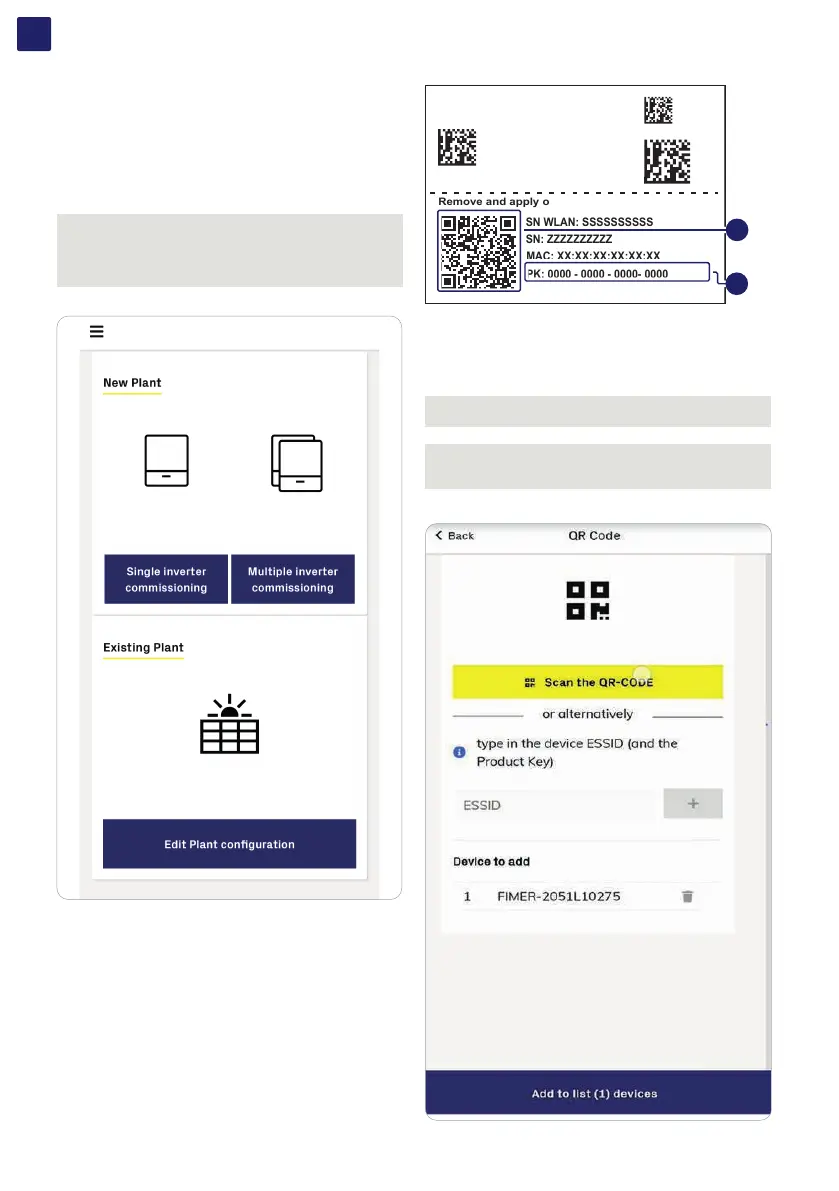
• Select the configuration you would like to get.
• Manual claiming of the inverters:
Single inverter:
The claiming process defines which inverter has to be
commissioned and it can be executed by scanning the QR codes
(L) (printed on the Communication identification label).
Multiple inverters: The claiming process of multiple inverters
requires to select which inverters add into the working list.
(Please insert no more than 40 inverters by time can be configured
together.)
Multiple inverters:
The claiming process of multiple inverters requires
to select which inverters add into the working list.
(Please insert no more than 40 inverters by time
can be configured together.)
SN WLAN: SSSSSSSSSS
PN WLAN: PPP.PPPPP.P
Mac Address:
XX:XX:XX:XX:XX:XX
PK: 0000 - 0000 - 0000- 0000
SN WLAN: SSSSSSSSSS
SN: ZZZZZZZZZZ
Remove and apply on the plant documentation
MAC: XX:XX:XX:XX:XX:XX
L
M
As an alternative of QR code scanning, claiming process can be
executed by selecting manually the ESSIDs associated to the
Wi-Fi networks generated by each inverter to commission and
inserting Product key (M) when requested:
NOTE – D It’s required to digit also the dash “-” characters of
the Product Key in the password field.
NOTE – D The steps below are valid for executing any other
available funtionalities of the Installer for Solar Inverters
mobile APP.
• Tap “Add to list (x) devices”.



 To Next Page