EN
86
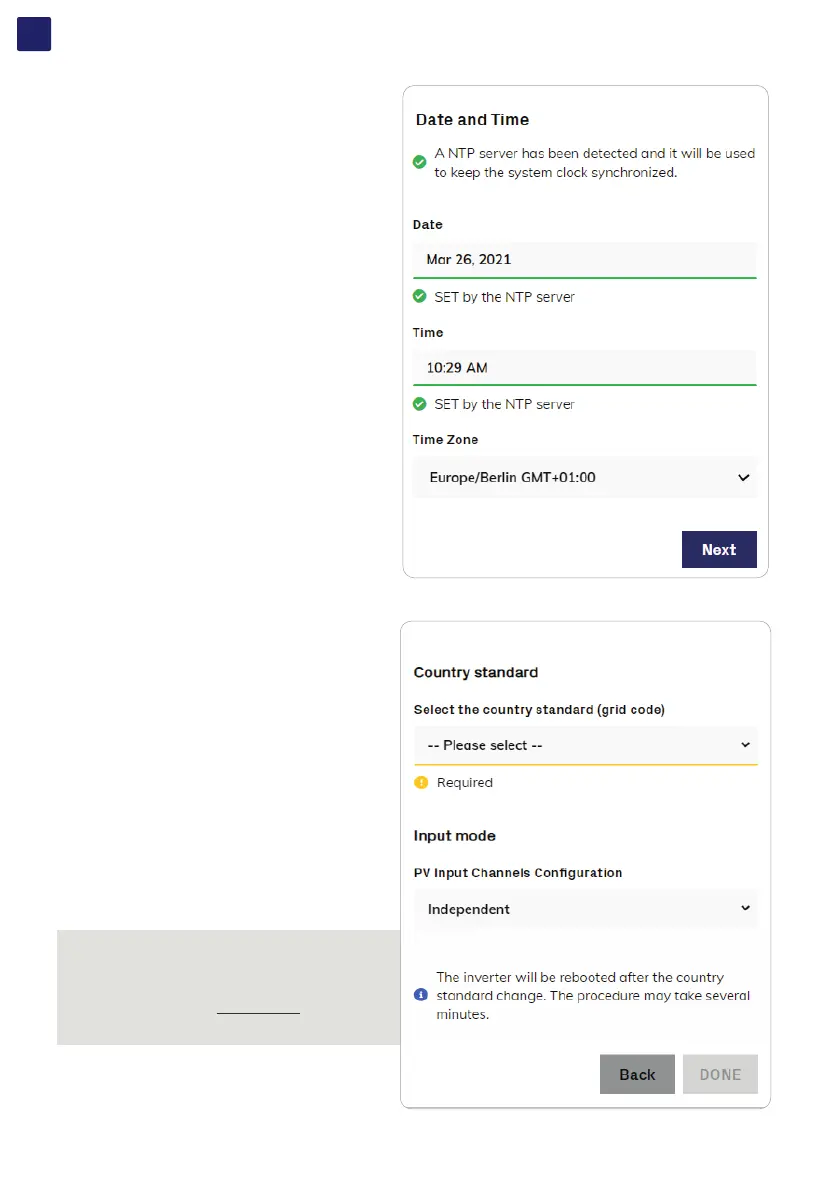
7.2.2.3 STEP 3 - Date, Time and Time zone.
• Set the Date, Time and Time zone (The inverter will propose
these fields when available; when it’s not possible for the
inverter to detect the time protocol, these fields have to be
manually entered).
• Click on “Next” button to proceed to the next stage of the
configuration wizard.
7.2.2.4 STEP 4 - Inverter country standard and Input configuration
• Country standard (selection of grid standard):
Set the grid standard of the country in which the inverter is
installed.
• Input mode:
Parallel or Indipendent mode (parallel mode is only available
on standard and S2 models).
• Confirm the settings by clicking “END”; the inverter will reboot.
NOTE – D After the grid standard is set you have 24 hours to
make any changes to the grid standard value; 24 hours later
the Country Standard will be locked. In case of subsequent
needs of change of grid standard, the remaining time shall
be reset in order to have the 24 hours of unlocked operation
available again (refer to “USER menu” and “SERVICE
TOOLS menu” sections of Web UI to know how to unlock
the Country Standard).



 To Next Page