Audio Command Center Series Manual — P/N 51889:E1 6/8/2010 33
Field Programming
The following tables list the ACC-25/50 Series programmable features and the DIP switch settings
required to select a parrticular feature. A detailed description of each feature is presented in the fol-
lowing pages.
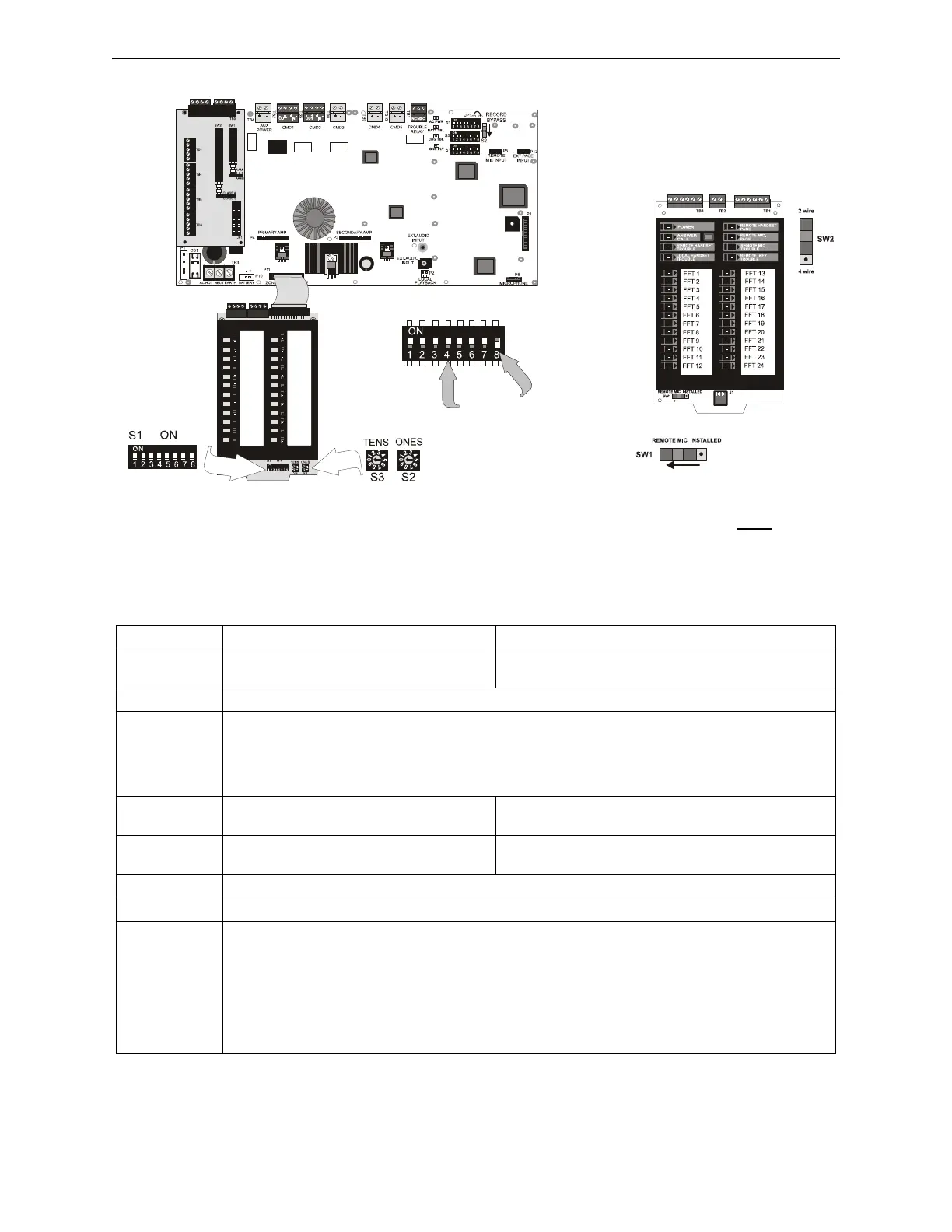
Figure 2.2 Field Programming DIP Switch for ACC-25/50ZS & ACC-25/50ZST Only
Switch 8 shown
in ON position
Switches 1 through 7
shown in OFF position
ACC-ZPMK
EIA-485 Addressing Switches
ACC-25/50ZS
ac25zswitch.wmf
ACC-FFT
SW1 shown in position when a
Remote Microphone is installed
SW2 shown in position when
a 2-wire connection is made
to the telephone loop.
acc-fftswitch.wmf
S1 DIP Switch ON OFF
1
1
Enable Temporal Pattern Tone
(switches 2 & 3 must be OFF)
Disable Temporal Pattern Tone (factory default)
(tone generated as selected by switches 2 & 3)
2
1
This switch works in conjunction with switch 3 to determine tone to be generated over speakers
3
1
Tone transmitted before and after message transmission and as backup tone if message fails:
2 OFF, 3 OFF = Steady Tone
2 OFF, 3 ON -= Slow Whoop Tone (factory default)
2 ON, 3 OFF = Hi-Lo Tone
2 ON, 3 ON = Chime
4
1
Enable Tone Transmission Before Message
(factory default)
Disable Tone Transmission Before Message
5
1
Enable Tone Transmission After Message Disable Tone Transmission After Message
(factory default)
6 This switch works in conjunction with switches 7 & 8 to determine number of times message will repeat
7 This switch works in conjunction with switches 6 & 8 to determine number of times message will repeat
8 Number of times voice message will repeat:
6 OFF, 7 OFF, 8 OFF = Tone Only, No Voice
6 ON, 7 OFF, 8 OFF = 3
6 OFF, 7 ON, 8 OFF = 4
6 ON, 7 ON, 8 OFF = 6 (factory default)
6 OFF, 7 OFF, 8 ON = 8
6 ON, 7 ON, 8 ON = Infinite (until FACP NAC is reset)
All other settings for switches 6, 7 and 8 are invalid and will default to a message repeat of 3 times
Table 2.1 S1 DIP Switch Settings on ACC-25/50 Series Motherboard (ACC-MCB)
1 Tone selection applies only to Message 1 (Fire Evac). Message 2, Message 3, Message 4, and
Message 5 will output only the message.











 To Next Page