23
Lockout on flame fail.
Lockout on air flow switch opening while main flame energized.
Recycle/Non-recycle dipswitch controls lockout on air flow switch not closing 10 seconds into
purge.
Modulate contacts on daughter board change state 5 seconds into Auto.
OPTIONAL PLUG-IN BOARDS
Description
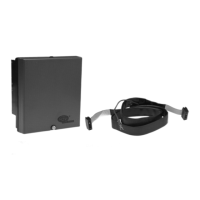
A family of optional plug-in boards are available separately for the MicroM chassis to provide
remote reset, remote alpha-numeric display and serial communications as a stand alone or in combi-
nation. Refer to ORDERING INFORMATION for MicroM Chassis types for units that have pre-
installed functions.
FIGURE 4. PLUG -IN BOARD LOCATION AND INSTALLATION
Installation
For upgrading standard units or for replacing the installed plug-in board, grasp plug-in board at the
top and pull away from the chassis, freeing the unit from the retaining standoff. Lift plug-in board up
and away from connector located on chassis board. Guide new plug-in board into the same connector
and push onto standoff.
TYPE MEP697
PROGRAMMING SEQUENCE
L1/7
ON
PURGE
COMPLETE
FIRING
PERIOD
(AUTO)
L1/7
OFF
5/10 SEC
SELECTABLE
PTFI
SELECTABLE
PURGE
8
T
E
R
M
I
N
A
L
S
3
4
5
SELECTABLE
POST PURGE
INTERLOCK
AIR FLOW
PROVEN
5 SEC
PILOT
PROVING
10 SEC
MTFI
INTERRUPTED
PILOT
MODULATE CONTACTS
STANDOFF
PLUG-IN BOARD
(MED SERIES)
RELEASE
DIRECTION
WARNING: Remove power when servicing the control.


 To Next Page
 Loading...