The Panda Generator
16.1.15 Kapitel/Chapter 4: The Panda Generator - Seite/Page 45
4.2 Details of function units
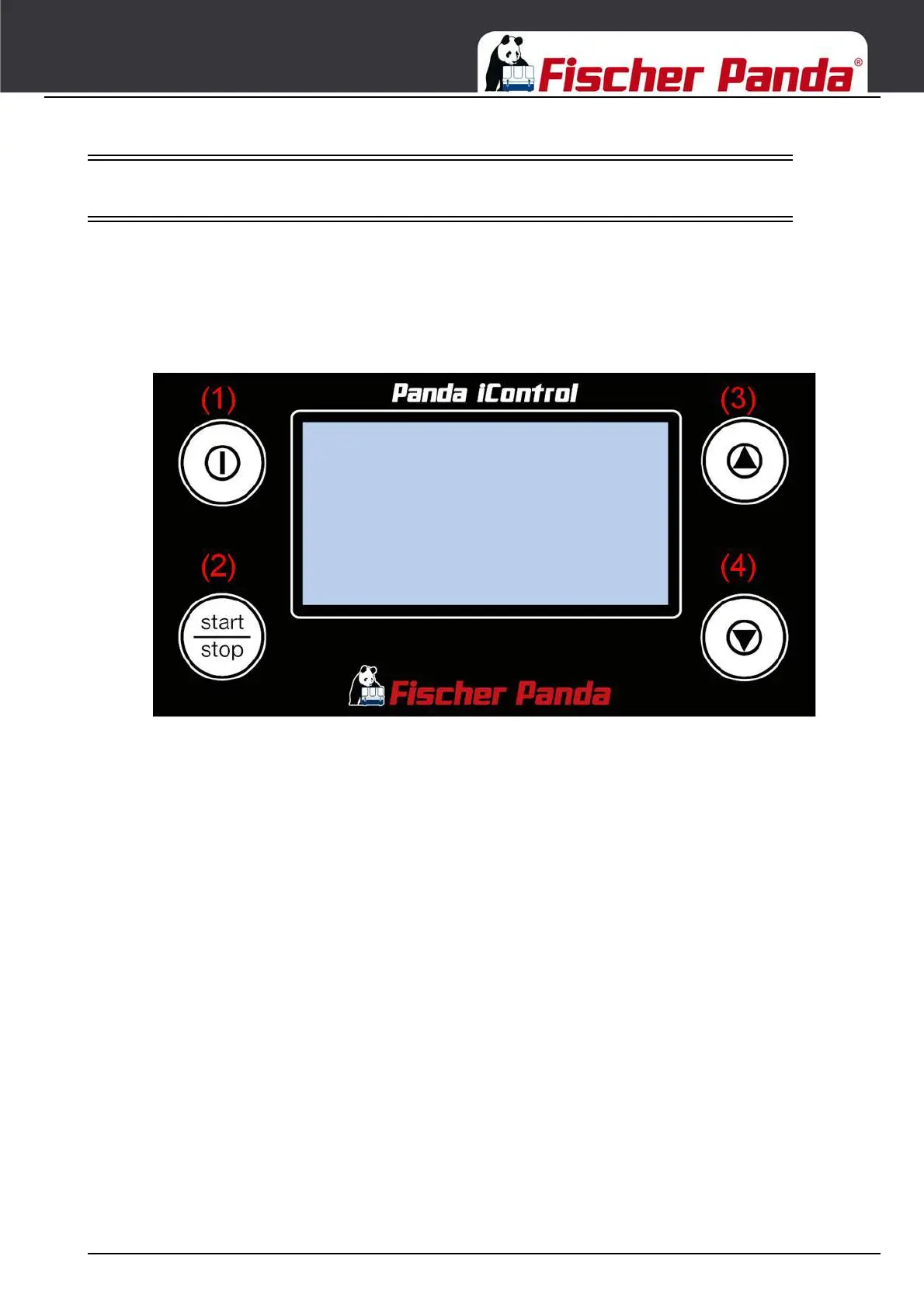
4.3 The Panda iControl2 panel
The "Panda iControl2 panel" control panel is the control and display unit for the Panda iControl2 control system and
represents the interface between the user and the Panda iControl2 controller. The integrated display serves to
present the most important data of the system as well as warnings and error messages.
The control panel is equipped with four buttons for operating the Panda iControl2 controller:
Fig. 4.3-1: Panda iControl 2 panel
1. On/Off button: Switching the Panda iControl2 controller on and off
2. Start/Stop button: Starting and stopping the generator, confirming values in selection menus (Enter key)
3. Cursor-up button Switching between display screens (up), counting values up in selection menus
4. Cursor-down button Switching between display screens (down), counting values down in selection menus.




 To Next Page