Panda PMGi 6000
PGMi 6000_eng.fm Chapter A: Panda PMGi 6000 - Page 97
Fischer Panda Datasheet
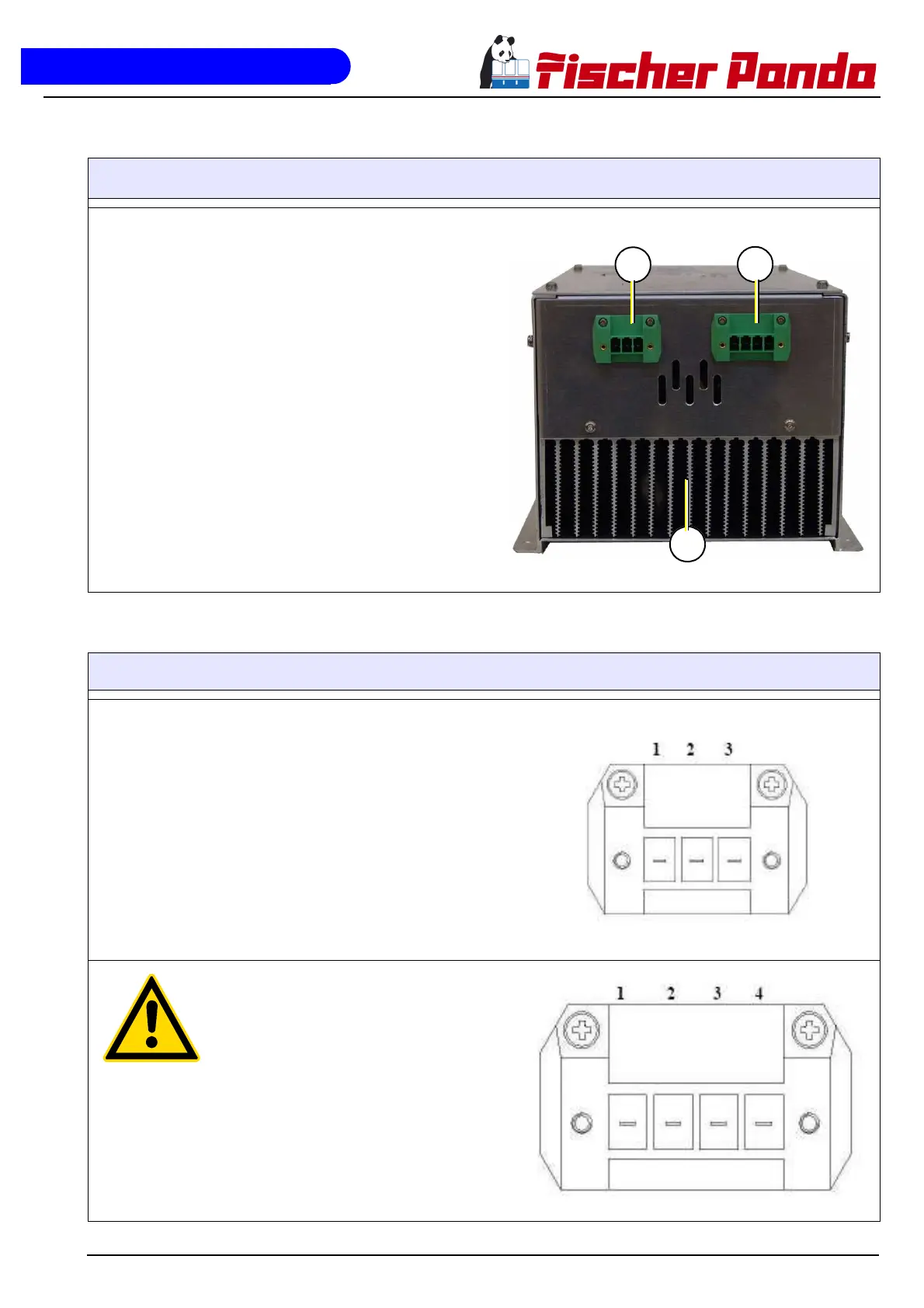
A.3 Front side/connection side
To connect the PMGi 6000 use the prepared cable with t
he 4pin plug and connect to socket 3 (PMGi in-450V/
400Hz)
Connect your termination box with the socket 1. Use a
3pin plug (230V/50Hz AC - PMGi out)
Do not cover the Air out grille (2)
Fig. A.3-1: Connection side
A.3.1 Socket pins of the PMGi 6000
Socket 1 - 230V / 50Hz AC - PMGi out
1. Ground (cabel green/yellow)
2. Neutral (cabel blue)
3. Live (cabel brown)
.Socket 3 - PMGi in
1. Ground
2-4. Phase 1-3
Attention! Connecting one of the three Phase with the
earth pin will destroy the PGMi
Fig. A.3-1: Sockets


 To Next Page