TemplateA4_v20130506
27
11-1
11-2
11-4
11-5
11-6
11-7
11985432
2-2
2-2-1
4-1
4-20
9-1
9-9
9-10
10
11-8
11-3
(....)
9-5
9-6
8-5-1
8-5-2
8-5-3
8-5-4
8-5-5
8-5-6
8-5
8-4
8-4-1
8-4-17
(....)
8-3
8-3-1
8-1
8-1-1
8-2
8-2-1
8-2-2
Example:
P
SV
;Triggerpressuresafetyvalve6bar(appendix)
(Fromorderspecication<=nominalpressureunit)
P
E
;nalpressure5.4bar
Safetyvalve,codeletterDGH
P
SV
x0.9[P
SV
>=3bar];P
SV
-0.3bar[P
SV
<3bar]
Safetyvalve,codeletterH
P
SV
-0.5bar[P
SV
=3bar]
(Fromorderspecication)
P
A
;Operatingpressure1.2bar(congurablerangebyunittype)
P
A+
;Upperoperatingpressuretolerance0.2bar(default)
P
A-
;Loweroperatingpressuretolerance0.2bar(default)
(Fromorderspecication)
P
+
;Positivepressure0.3bar(default,recommended)
P
0
;Displayedvalue,message:P
A
- P
A-
- P
+
=1.2-0.2-0.3=0.7bar
(e.g.:=P
static
+ P
steam
+ P
dynamic=0.7bar
)
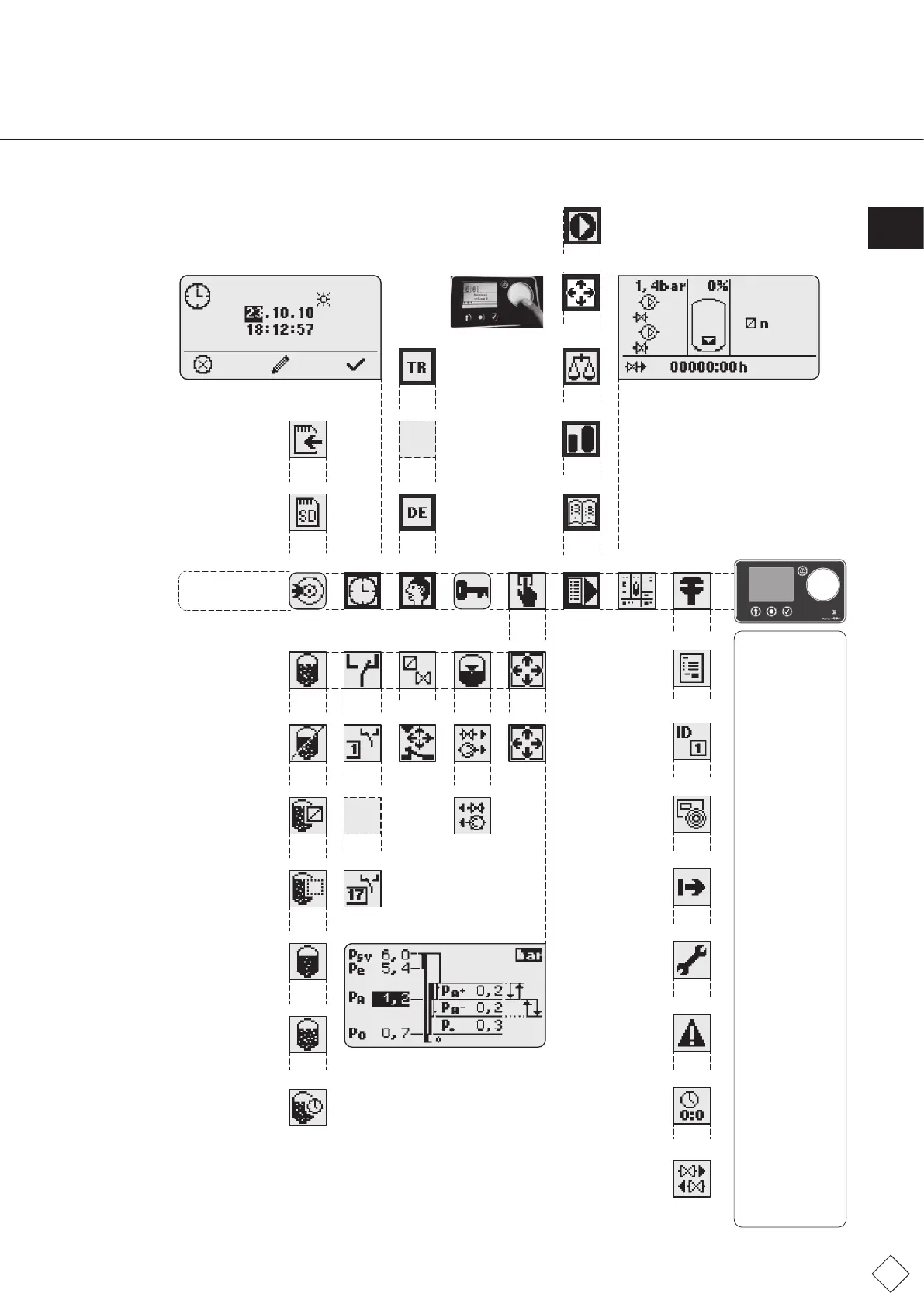
Main switch on;
SPC terminal with
main menuon;
Fields and messages
withbacklighting
areactive.
- Menu 2: Module
extension option
required;
- Menu 3:Check,change
date,time
- Menu 4:Check,change
language
- Menu 5: Not
possible, not necessary;
- Menu 8: Defaults
can be still changed
after start or as
required:
- Menu 8-1-1:
Application to
change P
e
, P
A
- Menu 8-2-2: Can be
switched off/on if
drainage exists;
- Menu: 8-3-1: Install
on request, then
enable;
- Menu 8-4-1...17:
Group error message
assignments; enable/
disable
on request;
- Menu 9:
-Menu9-1:Pleasenote;
-Menu9-5:Input,select
nominalcapacity;
-Menu9-6:Execute;
-Menu9-7:Execute;
-Menu9-8:Check,
change;
-Menu9-9:Operating
rangedetermined,
execute.
Example:
Actualpressure1.4bar
Duopumpunit;pumps,valvesnotON.
Vesselcontent0%,errormin.priming
waterON(errorno.:19;10).
top-upvalve230v,self-monitoring,ON;
Noimpulsewatermeter,top-uptime<1minute.
Gassensorenabled,degasicationmodenormal
(DegassingnotONduetomin.primingwater).
Example:
Summer time is ON
date:23.10.2010.
Time:
18.00hours,
12minutes,57seconds.
Linebelow:
Functionalassignmentfor
sensor buttons.
Change menu
Date,time
Werkingsindicator
Start
Pressure
settings
Turkish
Operational
calibration
Saveconguration
on SD
ID Vessel
ID Vessel
Example:
Thenominalvolume
(seesection5.2)is
shownonthevessel
labelorSPCIDsticker.
Thiscorrespondstothe
vesselcapacitywiththe
letterA,BorC.
Forexample:
A-200
B-200
C-200
(....)
Read
manual
Operating
Menu
Service
menu
Order number
Unit
information
Version
information
Start
Maintaining
Error list
Operating hours
Top-up,
overowspill
Start
menu
Conguration
menuLoginmenu
Degassing
Manufacturer,
supplier
(traceability)
Unit,vessel,
vesselcalibration
(test)
Controlunit,
software,hardware
(traceability)
Date:Startof
commissioning,
vesselcalibration
(statistics)
See:
Maintaining
Errorhistory,nolongeractive
errors,errorno.,date,time
(analysis)
(Statistics)
Quantities,
times
(statistics)
Degassing
procedure
ON,OFF
(TestcycleON,
see8-5-2)
Distribution of
sleepintervalsto
weekdays(next
page)
Gassensor,sensor
connectionarray
required(optional)
Activated
Controlled
Standby
Normal
Operating
pressure menu
Closing
times
Language
menu
Error
message
Pressure
(....)
Phase
monitor
Date/ Time
menu
Sensors
valves
Minimum
pressure limiter
Data transfer
menu
Level
Top-up
Drain
Fast
Pressure
Operating
pressure
SPC terminal
SD-kaart
German
Main menu
7.3 Overview menu options
Fig. FM.038.V02.15
ENG


 To Next Page