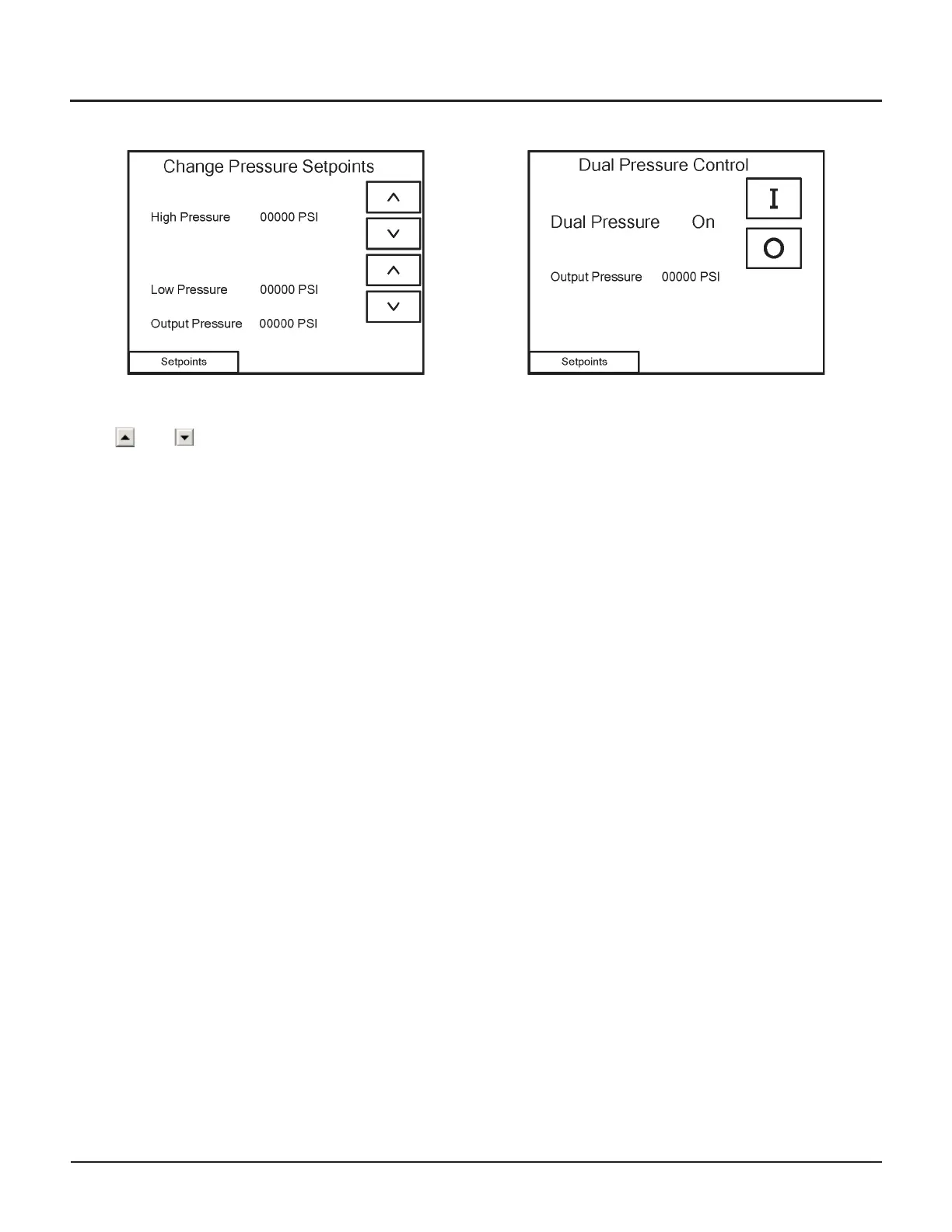
Change Pressure Setpoints
From the Change Pressure Setpoints screen, you can
view and adjust the pump’s pressure settings by touching
the and buttons.
Navigation
•
Touch the Setpoints button to continue to the
Dual Pressure Control screen
Dual Pressure Control
The Dual Pressure Control screen will indicate whether
the pump is operating at either High or Low pressure.
•
If the indicator reads "High," the pump is at or near
the high-pressure setpoint.
•
If the indicator reads "Low," the pump is at or near
the low-pressure setpoint.
Use the [I] and [O] buttons on this screen to turn dual
pressure on and off, and refer to the Output Pressure
reading to confirm the status of dual pressure.
Dual pressure can also be controlled from the terminal
block input. If the terminal block input is Off, then this
screen allows you to test high pressure. If the terminal
block input is On, then you cannot force it to low
pressure.
Navigation
•
Touch the Setpoints button to continue to the
Boost Pump Control screen
© Flow International Corporation M-390 | 23
CHAPTER 3
Operating the 87K Standalone Pump


 To Next Page