Configuration screens
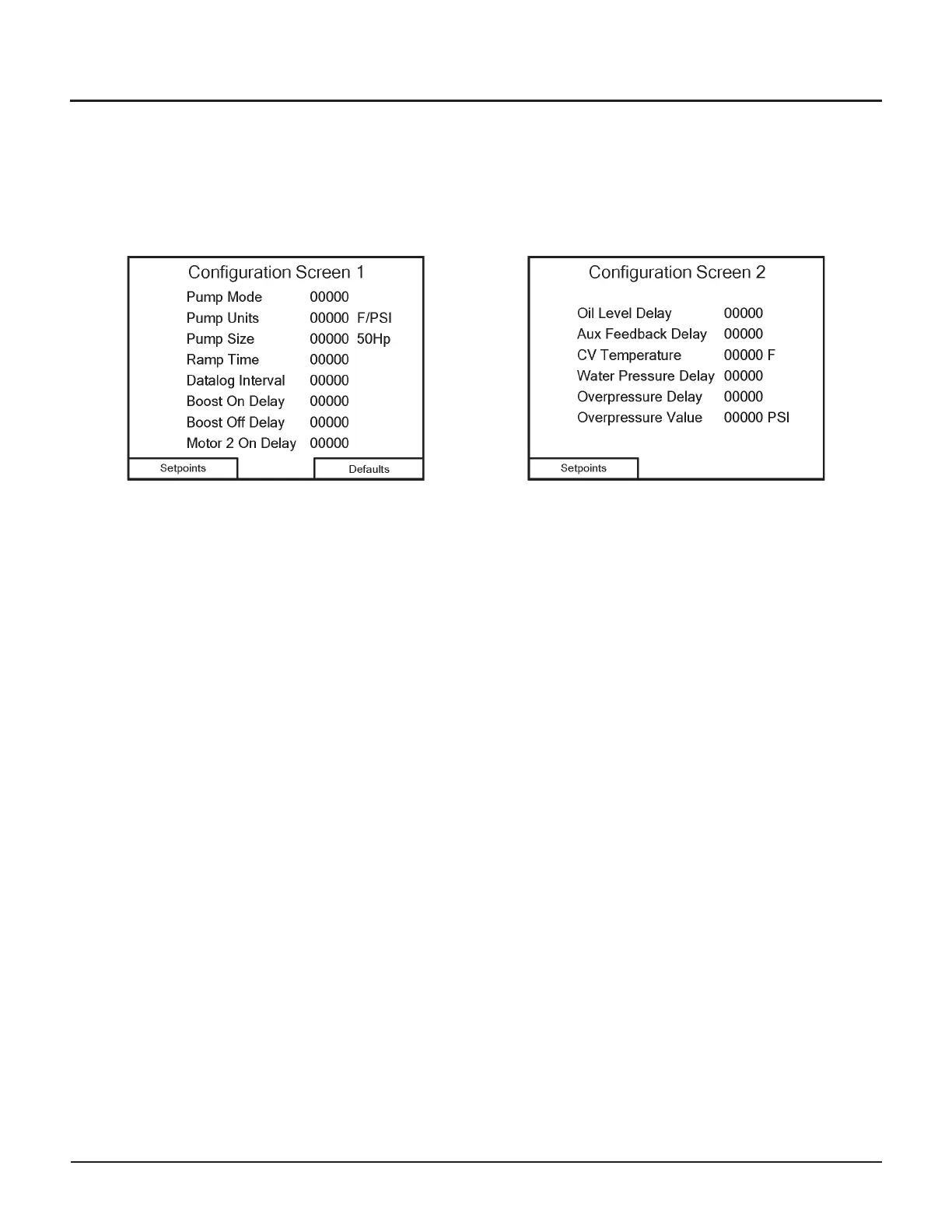
The Configuration screens display information about the pump’s current configuration. You can also change the con
-
figuration of the pump’s UHP offset and pressure points on these screens.
Configuration Screen 1
The indicators on Configuration Screen 1 show how the
pump is running.
•
Set Pump Mode to “1” for standalone operation.
•
Pump Units are “0” for °F/Psi and “1” for °C/Bar.
Note: do not change this while the pump is running!
•
Pump Size is “0” for 50HpA, “1” for 100Hp, and
“2” for 50HpB (see the Defaults screen for a defini-
tion of these pumps)
•
Ramp Time can range from 20 to 100
(2–10 seconds)
•
Datalog Interval time can range from 50 to 3000
(5–300 seconds) between samples. The shorter the
interval, the higher the resolution of the data, but
the shorter the time span of the total data set.
•
Boost On Delay can range from 10 to 25
•
Boost Off Delay can range from 10 to 35
•
Motor 2 On Delay can range from 10 to 30
To change a value, touch that number on the screen. A
keypad will appear; enter the desired value, then touch
the
ENTER button to accept the value.
Navigation
•
Touch the Setpoints button to continue to
Configuration Screen 2
•
Touch the Defaults button to continue to the
Defaults screen
Configuration Screen 2
The indicators on Configuration Screen 2 shows how
the pump is configured.
•
Oil Level Delay can range from 10 to 50
•
Aux Feedback Delay can range from 60 to 600
•
CV Temperature can range from 40–80°F (25–45°C)
above inlet water temperature
•
Water Pressure Delay can range from 50 to 600
•
Overpressure Delay can range from 300 to 6000
•
Overpressure Value can range from
93500–96500 psi (6447–6657 Bar)
Navigation
•
Touch the Setpoints button to continue to Configu
-
ration Screen 3
© Flow International Corporation M-390 | 27
CHAPTER 3
Operating the 87K Standalone Pump


 To Next Page