Operation
Introduction
3
3-3
Introduction 3-1.
Information in this section tells you how to operate the 732B and 734A on battery and ac
line power. This section begins with a description of the features of the models covered
in this manual. Instructions for how to power the standard, connect it to other
instruments, and use it to make a voltage transfer follow. Other operating topics,
including minimization of errors during measurements, are included here.
Unless you purchased a calibration option and shipment under battery power (see
Section 1 or a Fluke Catalog for details), the 732B is shipped from the factory with the
internal battery disconnected. (The BAT switch on the rear panel is in the position
marked
). On receipt, connect the ac line cord to line power as described in Section 2.
After 2 hours, set the BAT switch to the position marked l. Verify that the AC PWR
indicator is lit.
Note
If your 732B was shipped cold, you will need to calibrate it against a
traceable standard as described in Section 5 before you begin using it. For
best results, leave the standard powered for 14 days before you calibrate
and begin using it.
To maintain the state of calibration as a traceable standard, the 732B must continue to
receive uninterrupted operating voltage from the line power or from the internal battery,
which provides approximately 72 hours of off-line operation when fully charged.
Summary of the Features 3-2.
Please read the following summary of features before you begin using the standard.
Separate illustrations and tables describe the functions and locations of features on the
732B DC Standard, 732B-7001 External Battery and Charger, and 734A-7001
Instrument Enclosure.
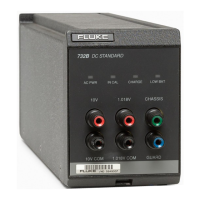
732B DC Standard Front Panel 3-3.
Figure 3-1 shows the 732B DC Standard front panel features. Table 3-1 describes these
features.
732B DC Standard Rear Panel 3-4.
Figure 3-2 shows the 732B DC Standard rear panel features. Table 3-2 describes these
features.
732B-7001 External Battery and Charger Front Panel 3-5.
Figure 3-3 shows the 732B-7001 External Battery and Charger front panel features.
Table 3-3 describes these features.
732B-7001 External Battery and Charger Rear Panel 3-6.
Figure 3-4 shows the 732B-7001 External Battery and Charger rear panel features. Table
3-4 describes these features.
734A-7001 Instrument Enclosure Front Panel 3-7.
Figure 3-5 shows the 732A-7001 Instrument Enclosure front panel features. Table 3-5
describes these features.
734A-7001 Instrument Enclosure Rear Panel 3-8.
Figure 3-6 shows the 732A-7001 Instrument Enclosure rear panel features. Table 3-6
describes these features.
www.valuetronics.com


 To Next Page