Operation
Powering the Standard
3
3-11
J502
MONITOR/EXT BAT IN
(SEE MANUAL FOR PINOUT)
CAUTION:
O
J502
MONITOR/EXT BAT IN
(SEE MANUAL FOR PINOUT)
CAUTION:
I O
CAL
RESET
J502
MONITOR/EXT BAT IN
(SEE MANUAL FOR PINOUT)
CAUTION:
I O
CAL
RESET
J502
MONITOR/EXT BAT IN
(SEE MANUAL FOR PINOUT)
CAUTION:
I O
CAL
RESET
734A-7001 INSTRUMENT ENCLOSURE
FLUKE CORPORATION MADE IN USA
50/60 Hz 264 W MAX
NOTE:
CHECK 732B REAR PANELS
FOR PROPER VOLTAGE SETTING
AND FUSE. BEFORE INSERTING
INTO 734A CHASSIS
1
2
BAT BAT BATAT
k10f.eps
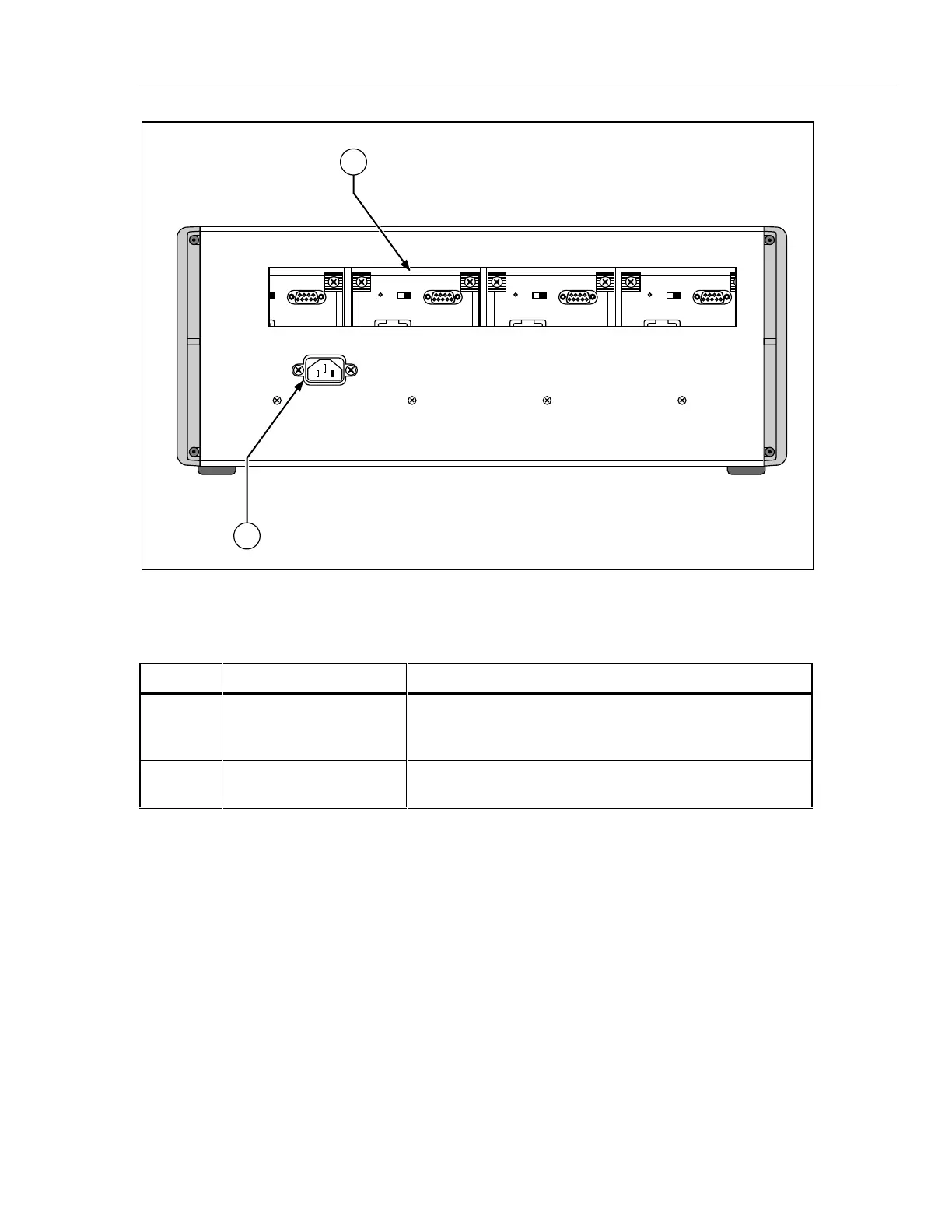
Figure 3-6. 734A-7001 Instrument Enclosure Rear Panel Features
Table 3-6. 734A-7001 Instrument Enclosure Rear Panel Features
Item Feature Description
1 Access Window This opening provides access to BAT switches and
MONITOR/EXT BAT IN or EXT BAT OUT connectors on
installed 732B or 732B-7001 units.
2 AC Line Input IEC-type line cord male connector. All fusing is done in the
individual installed 732B units.
Powering the Standard 3-9.
The standard must remain powered continuously to maintain the state of calibration. The
IN CAL indicator goes out if battery voltage has dropped too low, or if there has been a
gross change in oven temperature. Use ac line power at all times unless battery power is
required for moving, shipping, or isolating the standard. Leave the BAT switch set to l so
it is available to power the standard in case of ac power interruption. Leaving the
standard plugged into ac power also maintains full charge on the internal battery.
Switching between line power and battery power has no effect on the standard’s output.
Variations in ac line voltage within ±10% of the line voltage setting change the 10V
output no more than 0.05 ppm. Variations in external dc power within the 12 to 15V
range also change the 10V output no more than 0.05 ppm.
When you remove the line power cord from a grounded receptacle, you can use the front
panel GROUND binding post to connect the chassis to the same earth ground potential
as other instruments in a system.
www.valuetronics.com


 To Next Page