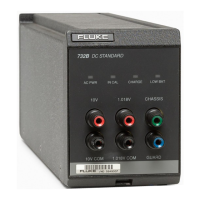
732B/734A
Instruction Manual
3-12
Setting the BAT Switch 3-10.
Caution
To avoid loss of the state of calibration in case of ac power
interruption, set the BAT switch to ✡ (on). This enables battery
backup power.
Leave the rear panel BAT switch set to l to enable proper battery charging, and to allow
for automatic changeover to battery power in case of ac power interruption or failure.
If you set the BAT switch to
, the 732B requires continuous power from the ac line or
an external dc source to operate. The following situations are the only times it is
recommended that you set the BAT switch to :
1. When you replace the battery. (Connect the standard to ac line power before you set
the BAT switch to
.)
2. When you want to ship the unit cold (without battery power).
For information about how to set the BAT switch on the 732B when you are using an
external dc source such as the 732B-7001, refer to "Powering the Standard from a 732B-
7001."
Charging the Internal Battery 3-11.
To completely recharge the internal battery in a 732B or 732B-7001 External Battery,
unplug any external dc source from the rear panel. Make sure the BAT switch is set to
the ✢ position, and plug the unit into ac line power. Then return the BAT switch to the l
position and let the instrument charge for 36 hours. The charger applies a constant-
current charge until the battery is at approximately 90% capacity. During the constant-
current charge, the CHARGE indicator is lit. The charger then switches to float-
charging mode to complete and maintain the charge on the battery. In float-charging
mode, the CHARGE indicator is extinguished.
The charger circuit is designed to charge the internal battery only. Do not attempt to
charge an external battery through the rear panel MONITOR/EXT BAT IN connector.
Use a separate charger to charge any external batteries, such as the charger inside the
732B-7001 External Battery and Charger.
Powering the Standard from a 732B-7001 3-12.
You can power the standard using an external battery such as the 732B-7001 External
Battery/Charger, or other 12 to 15V dc source that can supply at least 300 mA. You
connect the external dc source through the MONITOR/EXT BAT IN connector. Figure
3-7 shows a pinout diagram of the MONITOR/EXT BAT IN connector. Use this method
if you need to operate the standard on battery power for a period longer than 72 hours.
Or, if the preferred power source is 12 to 15V dc, you can use this method to power the
standard permanently.
Leave the 732B BAT the switch set to l to connect the internal and external batteries in
parallel. Each battery is protected from high discharge into the other by current-limiting
varistor. Set the 732B BAT switch to
to isolate the internal and external batteries. In
this switch position, an external dc source connected to the MONITOR/EXT BAT IN
input continues to power the 732B, but is isolated from the 732B’s internal battery.
To power the standard using the 732B-7001, proceed as follows. Use a similar procedure
for any other 12 to 15V source.
1. Apply ac line power continuously to the 732B and the 732B-7001 during steps 2
through 7 of this procedure.
www.valuetronics.com


 To Next Page