Setting User Preferences
13
avv11f.eps
Character Sets Available
ABCDEFGHIJKLMNOPQRSTUVWXYZ
abcdefghijklmnopqrstuvwxyz
0123456789
#"!$%&'( )*+,-./:;<=>?@[ \ ]^_ `{ | } space
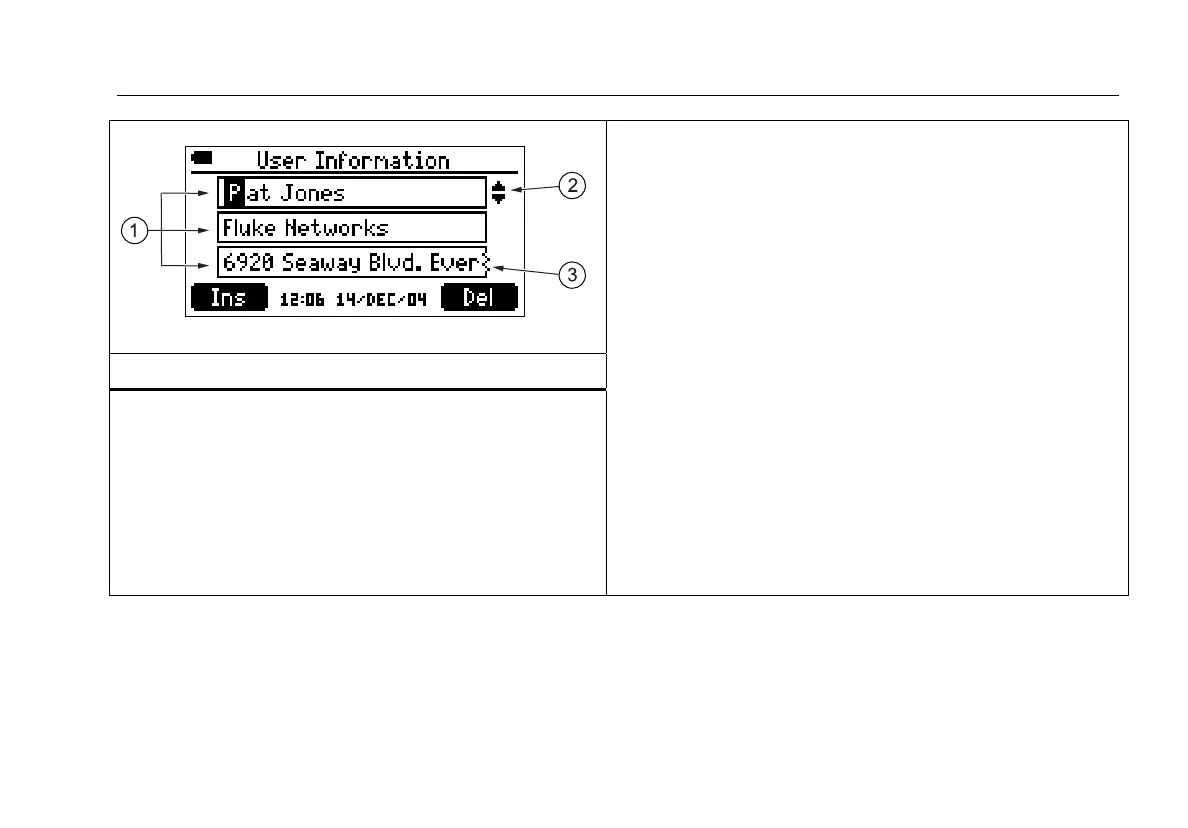
A The three fields for text entry.
B Indicates the field is selected for editing. To select a field,
use A D to highlight the field; then press H or J.
B C: Moves the cursor. Moving the cursor beyond the
last character inserts the first character from the last
character’s set.
A D: Changes the highlighted character.
J Ins: Inserts the first character from the set that
includes the highlighted character.
K Del: Deletes the highlighted character.
SHIFT and D or SHIFT and A: Changes the character
set.
To save changes to a field, press
H.
C Indicates the text extends beyond the box. Use B C to
scroll.
Figure 4. Editing Text









 To Next Page