CableIQ Qualification Tester
Users Manual
18
Selecting Tests to Run
To select tests to run during an Autotest:
Turn the rotary switch to SETUP; then select Autotests. Or
turn the rotary switch to AUTOTEST; then press
J Setup.
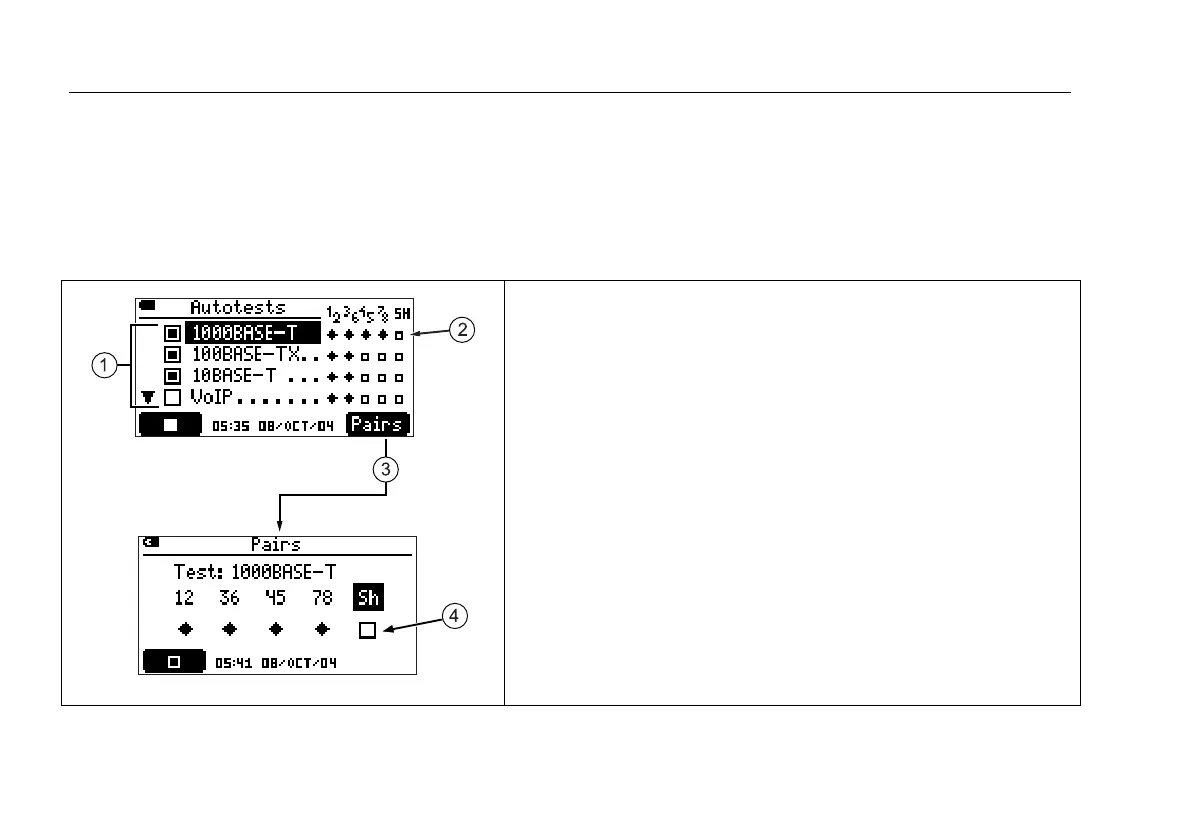
Figure 5 describes how to use the Autotest setup screens.
avv40f.eps
A The tests available. To select (s) or deselect (n) a test, use
D A to highlight the test; then press H or J.
B The pairs required (q) and optional (s n) for twisted pair tests.
C To select or deselect pairs for the highlighted test, press K
Pairs.
D To select or deselect an optional pair, use B C to highlight the
pair; then press H or J.
Press
I to save your settings.
Figure 5. Autotest Setup Screens









 To Next Page