Qualifying Cabling with the Autotest
25
Wiremap Results
avv16f.eps
avv17.bmp
(a)
avv18.bmp
(b)
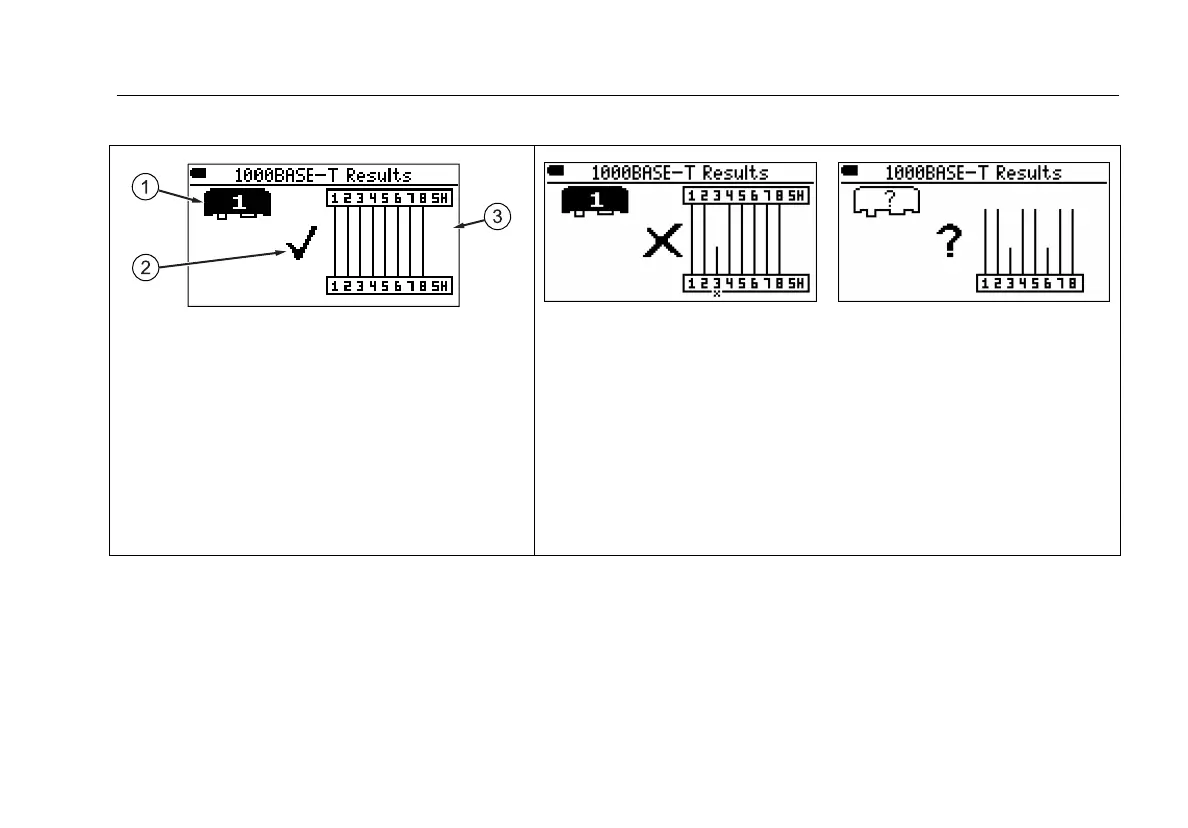
A Adapter type and number (wiremap adapter
as shown, or remote ID locator).
B Overall result for the wiremap (pass F, fail f ,
informational ?). See Figure 9.
C Wiremap. This example shows a good
wiremap with a wiremap adapter connected.
Open on pin 3 with (a) and without (b) a far-end adapter. The open is
before the middle of the cabling.
With an adapter, the tester identifies which wire in the pair is open.
Without an adapter, only the pair with the open is identified.
The wiremap diagrams are proportional to the cabling tested. For
example, if a wire is open halfway down the cable, the open appears
in the middle of the wiremap diagram.
-continued-
Figure 10. Typical Wiremap Screens









 To Next Page