EasyManua.ls Logo

Fly Sky FS-IT4 - 14,Main Screen 开机画面

Fly Sky FS-IT4
45 pages
Print Icon
To Next Page IconTo Next Page
To Previous Page IconTo Previous Page
Loading...
14. Main screen
开机画面
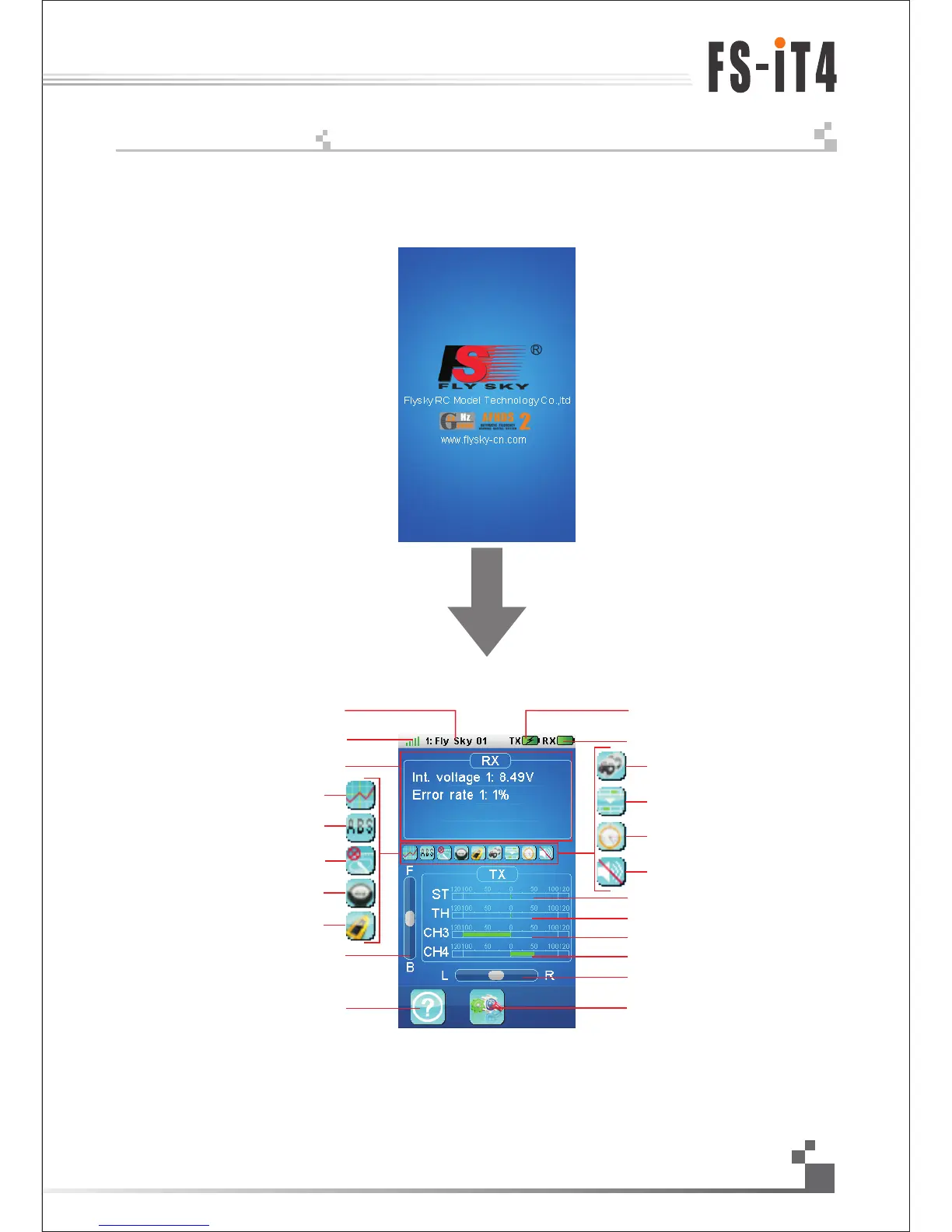
开机画面显示了富斯公司的标志, 两秒后进入到主菜单. 主菜单显示的具体内容如下图
发射机电池状态
接收机电池状态
方向通道状态
设置图标
帮助图标
接收机模块(传感器)反馈状态
接收信号
模型名称
油门通道状态
3通道状态
4通道状态
方向微调状态
油门微调状态
油门怠速开启
关闭声音
计时器开启
混控开启
刹车混控开启
船模式开启
油门曲线开启
ABS开启
油门锁定开启
The screen display the logo of FLYSKY. Entering the main menu after two seconds . the main menu is as the
following picture:
Model name
Receiver signal
Receiver sensor’s state feedback
Throttle curve
Engine cut
TH trim state
Help icon
Settings icon
Setting trim state
4 channel state
3 channel state
Throttle channel state
Steering channel state
Turn sound
Race timer
Mixes
Break mixing
Boat modle
Throttle idle
Receiver battery
Transmitter battery
17
Digital propotional radio control system

Table of Contents