Chapter 4 Web Interface FTA5102/FTA5101 User Manual
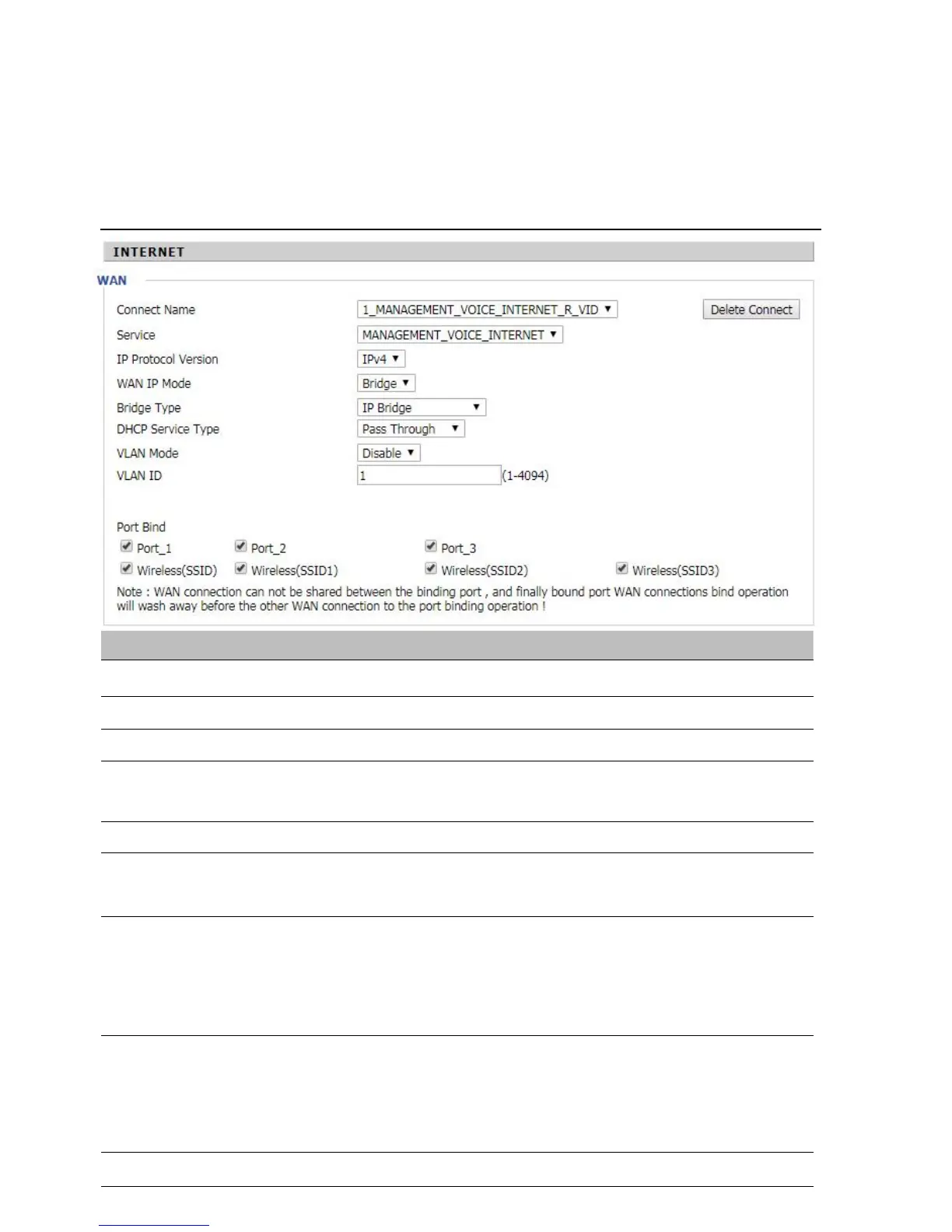
4.Bridge Mode
Bridge Mode under Multi WAN is different with traditional bridge setting. Bridge mode employs no IP addressing
and the device operates as a bridge between the WAN port and the LAN port. Route Connection has to be built to
give IP address to local service on device.
Table 13
Bridge Mode
Allow all Ethernet packets to pass. PC can connect to upper network directly.
Only Allow PPPoE packets pass. PC needs PPPoE dial-up software.
Packets pass through hardware switch with wired speed. Does not support
wireless port binding
DHCP packets can be forwarded between WAN and LAN, DHCP server in
gateway will not allocate IP to clients of LAN port.
When gateway forwards DHCP packets form LAN to WAN it will add
option82 to DHCP packet, and it will remove option82 when forwarding DHCP
packet from the WAN interface to the LAN interface. Local DHCP service will not
allocate IP to clients of LAN port.
Gateway will not forward DHCP packets between LAN and WAN, it also blocks
DHCP packets from the WAN port. Clients connected to the LAN port can get IP
from DHCP server run in gateway.



 To Next Page