Chapter 4 Web Interface FTA5102/FTA5101 User Manual
Enable/Disable scheduled PPPoE
Scheduled Mode
Scheduled Mode
Set the time to start PPPoE
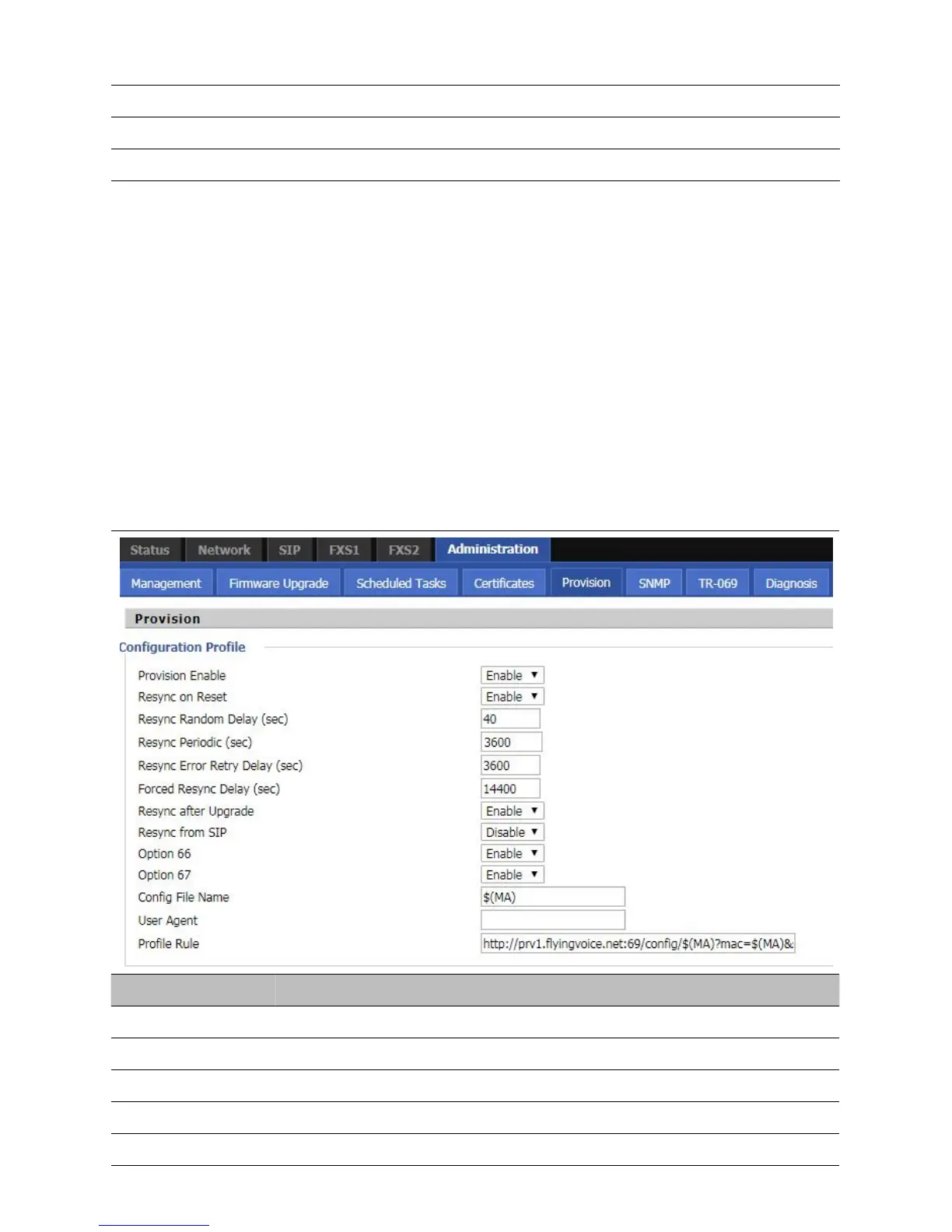
Provision
Provisioning allows the router to auto-upgrade and auto-configure devices which support TFTP, HTTP and
HTTPs .
Before testing or using TFTP, user should have tftp server and upgrading file and configuring file.
Before testing or using HTTP, user should have http server and upgrading file and configuring file.
Before testing or using HTTPS, user should have https server and upgrading file and configuring file
and CA Certificate file (should same as https server’s) and Client Certificate file and Private key file
User can upload a CA Certificate file and Client Certificate file and Private Key file in the Security page.
Table 47
Pr
ovision
Enable resync after restart or not
Set the maximum delay for the request of synchronization file. The default is 40
If the last resync was failure, The router will retry resync after the “Resync Error
Set the periodic time for resync, default is 3600s



 To Next Page