Chapter 4 Web Interface FTA5102/FTA5101 User Manual
The number will be displayed on LCD
Enter telephone number provided by SIP Proxy
Enter SIP account provided by SIP Proxy
Enter SIP password provided by SIP Proxy
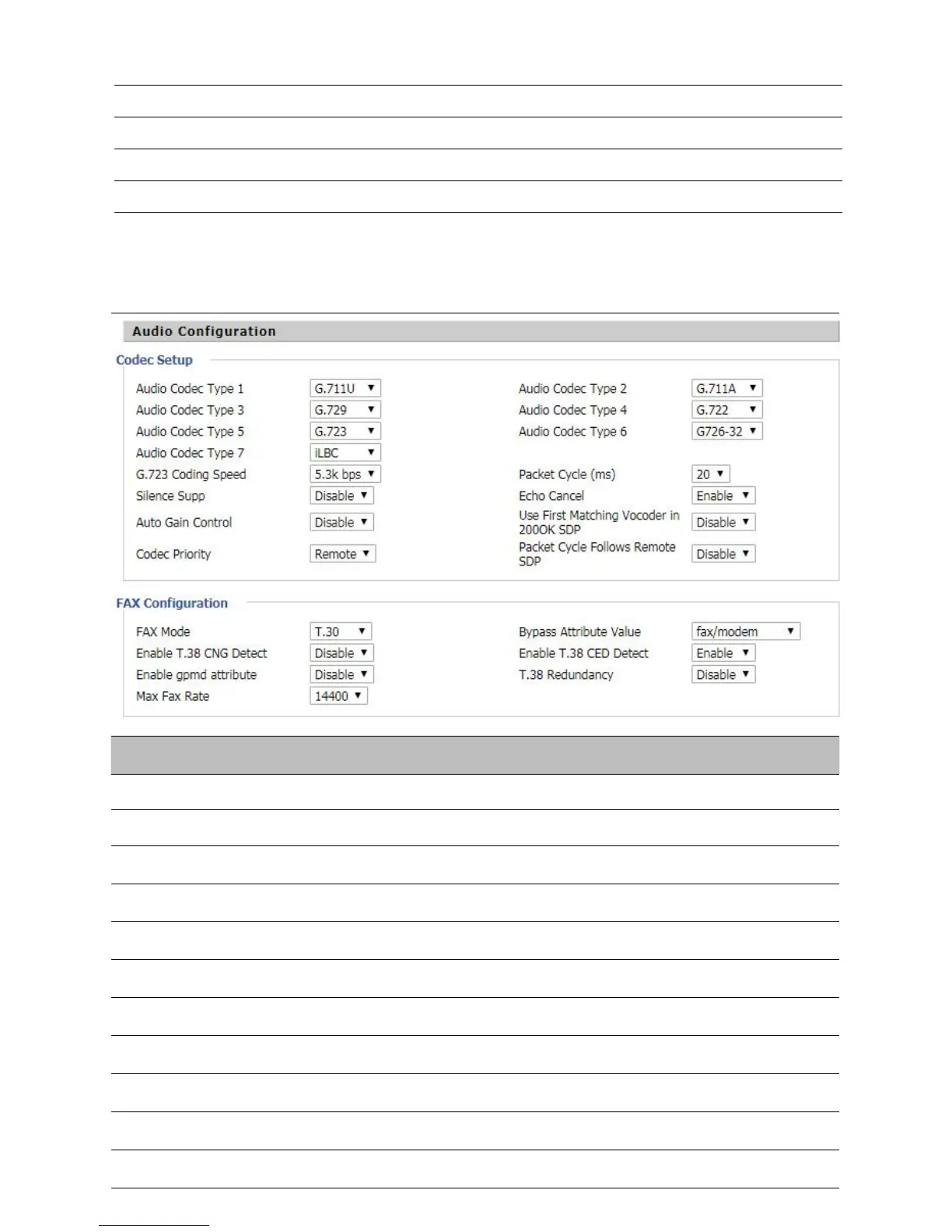
Audio Configuration
Table 31
A
udio configuration
Choose the audio codec type from G.711U, G.711A, G.722, G.729, G.723
Choose the audio codec type from G.711U, G.711A, G.722, G.729, G.723
Choose the audio codec type from G.711U, G.711A, G.722, G.729, G.723
Choose the audio codec type from G.711U, G.711A, G.722, G.729, G.723
Choose the audio codec type from G.711U, G.711A, G.722, G.729, G.723
Choose the speed of G.723 from 5.3kbps and 6.3kbps
The RTP packet cycle time, default is 20ms
Enable/Disable silence support
Enable/Disable echo cancel. By default, it is enabled


 To Next Page
 Loading...