FT-5 User Manual Page 83
Support
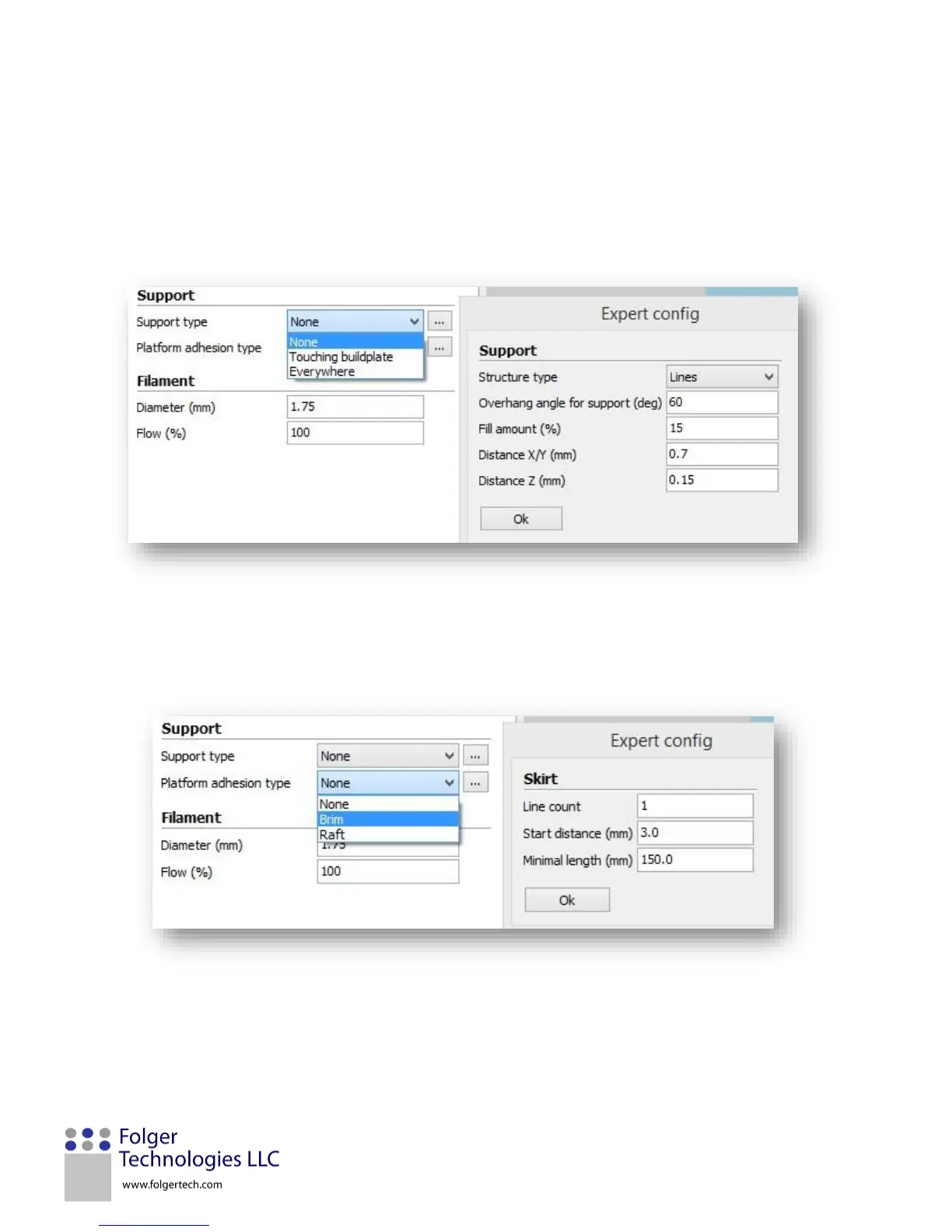
Support type: Support material is used when a model’s geometry exceeds 60 degrees from the vertical for a part feature.
There are three support type options: 1) None, which should be used when there are no features that exceed 60 degrees.
Touching buildplate, which will add support material everywhere that a feature exceeds the 60-degree requirement as long
as the structure overhangs the printer bed and not another section of the part, and 3) Everywhere, which will add support
material to all features that exceed the 60-degree requirement, including overhangs that are over another section of the
part. Clicking on the “…” button will bring up the Expert config window where additional features can be edited.
Platform adhesion type: The platform adhesion setting is used to prevent the part from warping or peeling off the printer
bed. If the printer bed is properly prepared using blue painters tape, the platform adhesion parameter should not be
needed using PLA filament. There are two types of platform adhesion: 1) Brim, which is a flat single layer that extends past
the footprint of the part to extend the adhesion area, and 2) Raft, which is a support structure under a print that helps
secure it to the bed. A skirt is the initial pass that outlines a part to prepare the hot end for printing.


 To Next Page