Part number 550-142-950/0122
34
FreeStyle
®
series
2
wall mount gas-fired water boiler – boiler manual
Control selection for vent material
-
Perform at start-up nal checks
Venting Material Change “b22” parameter
See Figure128,page101 (boiler default is “1”for PVC vent
material)
If other vent material is used, you program that material via
the control board.
To insure proper boiler operation (Combi and Heating Only boil-
ers) the boiler control programmed default is for PVC venting
material. You MUST program the boiler control for any other
venting material that you installed other than PVC, in order to
improve operational eciency.
Refer to “Quick Start Guide” page73, to rst power up the boiler.
To access the conguration menu:
16 Vent and air piping and boiler connections (continued)
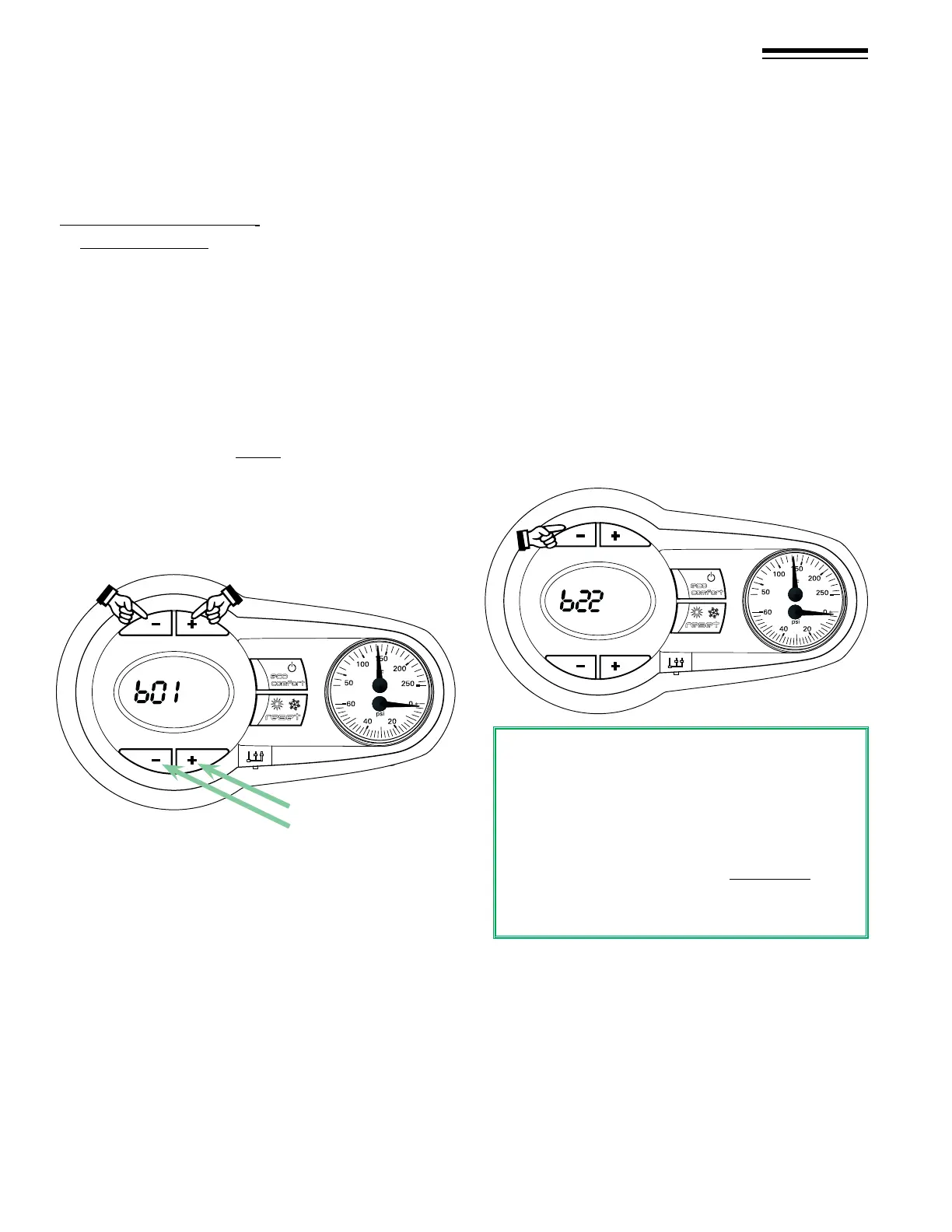
Push DHW buttons + & -
together for 10 seconds
DHW
Press Heating
buttons + & - to
scroll up or down
the parameter
numbers
1. Press the DHW + and DHW – buttons together for 10
seconds.
2. At the end of the 10 seconds the display will show the
message “b01”.
3. Press the heating buttons (+ or -) to scroll up or down
the list of parameters in increasing or decreasing order to
parameter “b22”.
For example: CPVC, Polypropylene, or AL29-4C stainless
steel.
“b22” parameter
PVC solid core, ....................................... Select: “1”
CPVC only, ............................................. Select: “2”
Polypropylene and AL29-4C, ................ Select: “0”
4. Press the DHW buttons (+ or -) to view or modify the value of
a parameter: the modication will be saved aer two minutes,
or “Exit” out of parameter mode by pressing the DHW+ and
the DHW- buttons together for 10 seconds.
DHW
Use the DHW + or – buttons to
modify the parameter value
To exit the “User interface setting” menu.
Press the “DHW +” and “DHW -” buttons together for 10 sec-
onds; or switch the power to the unit o and then on again; or
wa
it for automatic exiting which occurs aer two (2) minutes.
Shutting o the power to the boiler will NOT save any
parameter changes -
Y
ou must Exit out of parameter mode or wait 2 minutes.


 To Next Page