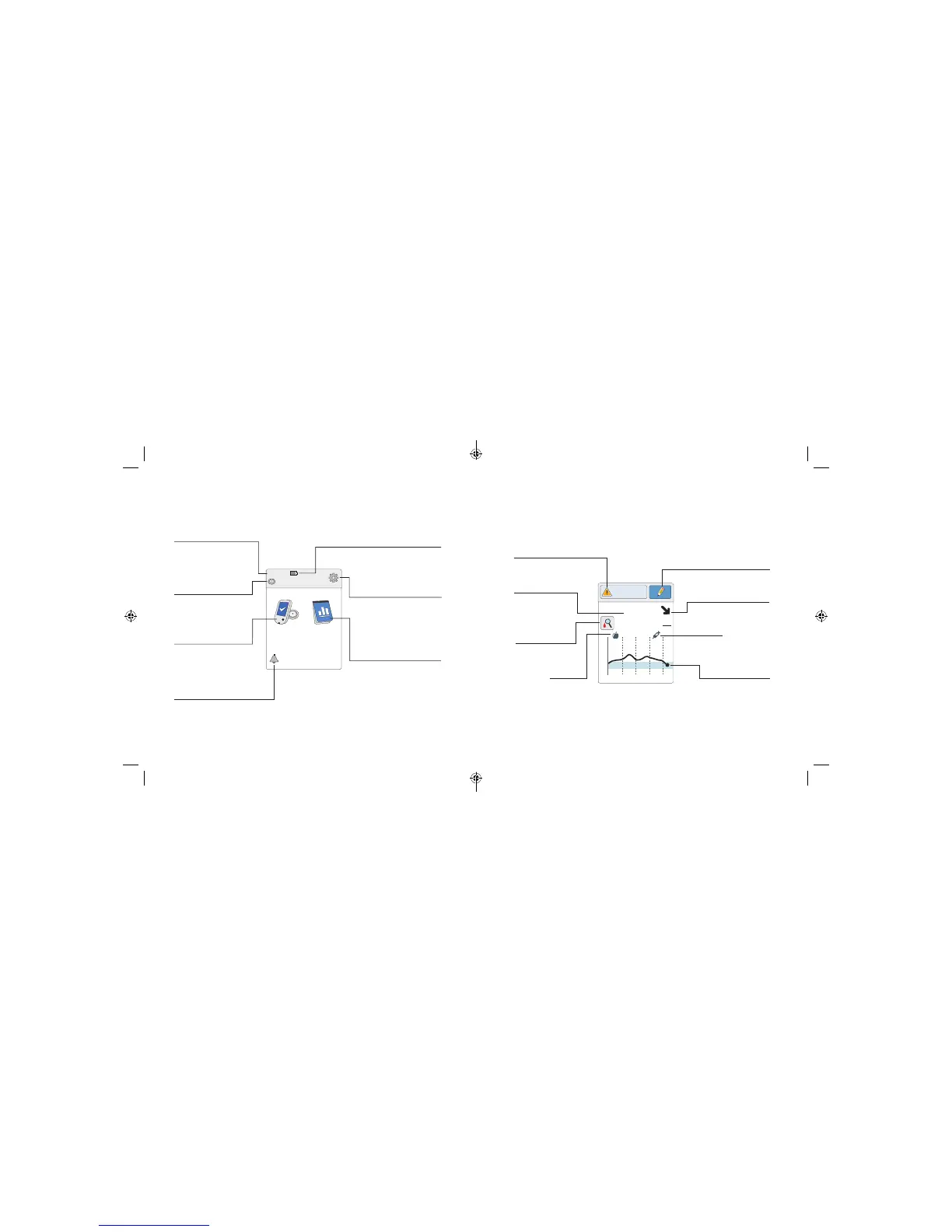
The Reader Home Screen provides access to information about your
glucose and the System. You can press the Home Button to get to the
Home Screen.
Home Screen
Ends in 10 days
10:23pm
Check
Glucose
Review
History
Time
Current time set on
the Reader.
Sensor Status
Information about your
current Sensor.
Battery Level
Battery charge remaining.
Settings
Touch to change the
Reader’s settings.
Review History
Touch to review information
about your past glucose
readings.
Check Glucose
Touch to check your
Sensor glucose.
Reminder
Touch to set or change
reminders.
The Sensor Glucose Readings screen appears after you use the Reader to
scan your Sensor. Your Reading includes your Current Glucose, a Glucose
Trend Arrow indicating which way your glucose is going, and a graph of
your current and stored glucose readings.
Sensor Glucose Readings
350
250
150
50
2pm 6pm 10pm
82
mg
dL
Glucose Going
Low
Rapid-Acting
Insulin Note
Message
Touch for more
information.
Current Glucose
Glucose from your
latest scan.
Add Notes
Touch to add notes to the
glucose reading.
Glucose Trend Arrow
Direction your
glucose is going.
Glucose Graph
Graph of your current
and stored glucose
readings
.
Food Note
Check Blood
Glucose symbol
Touch for more
information.
15 16
ART38553-101_rev-A_manual.indd 15-16 2/1/18 2:13 PM



 To Next Page