5
Introduction
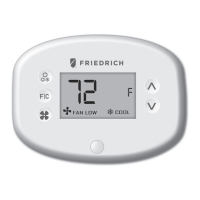
Friedrich VRPXEMWRT2 Energy Management Wall Controllers for the hospitality
industry deliver unprecedented energy savings without compromising guest
comfort. Integrated occupancy sensor uses a combination of motion and thermal
sensing technologies for accurate occupancy detection. Reliable occupancy
detection allows saving energy when rooms are unoccupied.
Energy saving presets eliminate the guesswork and make it easy to adjust the
energy saving settings. (Patent Pending) Fully congurable energy saving
settings allow customizing the Wall Controller energy saving settings to t any
situation.
Large buttons with international symbols make it easy to adjust the temperature
in ±1° °F or °C and control the fan speed.
Built-in wireless mesh-networking enables optional remote management. For
installation of a networking Wall Controller with remote management, refer to the
“Network Installation” manual.
FOR INSTALLATION OF NETWORKING WALL CONTROLLERS WITH REMOTE
MANAGEMENT, REFER TO THE NETWORK INSTALLATION” MANUAL.
LOGIN TO THE REMOTE MANAGEMENT WEBSITE TO CONFIRM THE SERVER IS
CONNECTED TO THE INTERNET BEFORE INSTALLING WALL CONTROLLERS.
DO NOT INSTALL WALL CONTROLLERS IF THE SERVER IS NOT CONNECTED TO
THE INTERNET. STOP THE INSTALLATION AND CONTACT TECHNICAL SUPPORT.
START BY FIRST INSTALLING A WALL CONTROLLER IN THE ROOM CLOSEST TO
THE SERVER.
LOG IN TO REMOTE MANAGEMENT WEBSITE TO CONFIRM THAT THE WALL
CONTROLLER IS ON THE REMOTE MANAGEMENT WEBSITE WITH THE
CORRECT ROOM NUMBER. CONTINUE BY INSTALLING ADDITIONAL WALL
CONTROLLERS IN ADJACENT ROOMS ONLY AFTER CONFIRMING THAT
INSTALLED WALL CONTROLLER(S) HAVE CONNECTED TO THE WIRELESS
NETWORK AND THE REMOTE MANAGEMENT WEBSITE .
IF INSTALLED WALL CONTROLLER(S) ARE NOT CONNECTING TO THE
NETWORK AND DO NOT APPEAR ON THE REMOTE MANAGEMENT WEBSITE
WITH THE CORRECT ROOM NUMBER, STOP THE INSTALLATION AND CONTACT
TECHNICAL SUPPORT THE ROOMS FURTHEST AWAY FROM THE SERVER
SHOULD BE INSTALLED LAST.
VPXEMWRT2-Thermostat Manual_pkg.indd 5 2017-12-15 3:37 PM



 To Next Page