Whenever replacing the blades, it is recommended to restart the counter of the blades replacement
reminder by choosing the ‘Blades replaced’ option under the ‘User Preferences’ menu and press the GO
button again to clear the reminder.
Figure 9.1
9.3 Outer Housing
Use only a damp cloth and a dry brush to clean the outer surfaces of the RoboMower. A light detergent
can be used in a water solution, and then soaking and wringing dry the cloth for cleaning. Never use harsh
or abrasive cleaning solutions. Never spray with a garden hose or other type of liquid spray hose.
S
ueeze tabs &
ull S
ueeze tabs &
ull
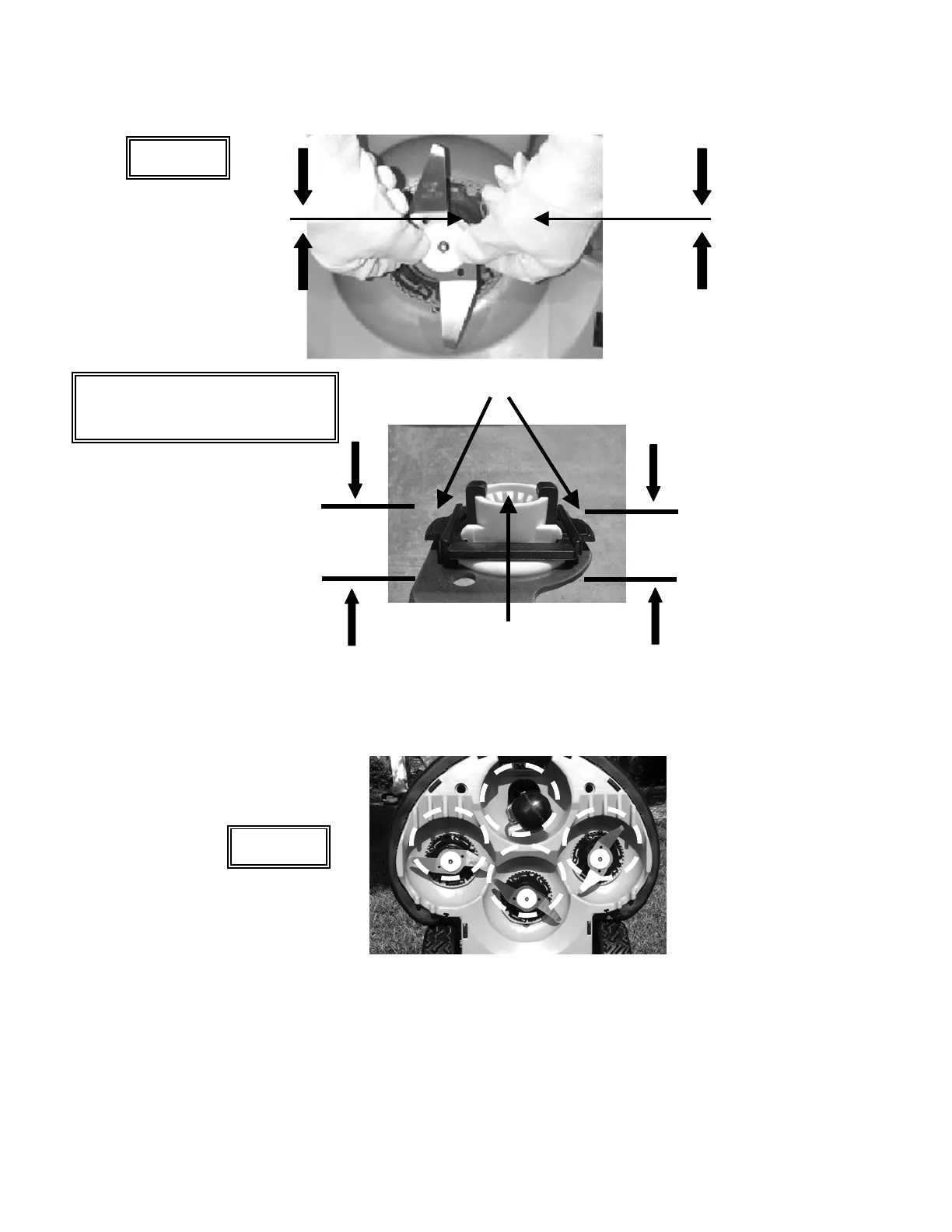
To remove blades, squeeze locking tabs on each side of blade retainer,
then pull blade assembly off, away from mower. When reinstalling the
blade, line up the mating splines and push until a firm click is heard,
indicating a proper seating of the blade onto the shaft.
Squeeze here
Squeeze here
Locking tabs
Mating spline
Using a wooden stick or similar object, clean accumulated grass from these
areas of the mowing deck. Remove blades if necessary for better access.
Figure 9.2
CAUTION! ALWAYS REMOVE
POWER PACK BEFORE
SERVICING BLADES!
68








 To Next Page