LOV
™
Generation II Technical Reference
14
Basic Operation
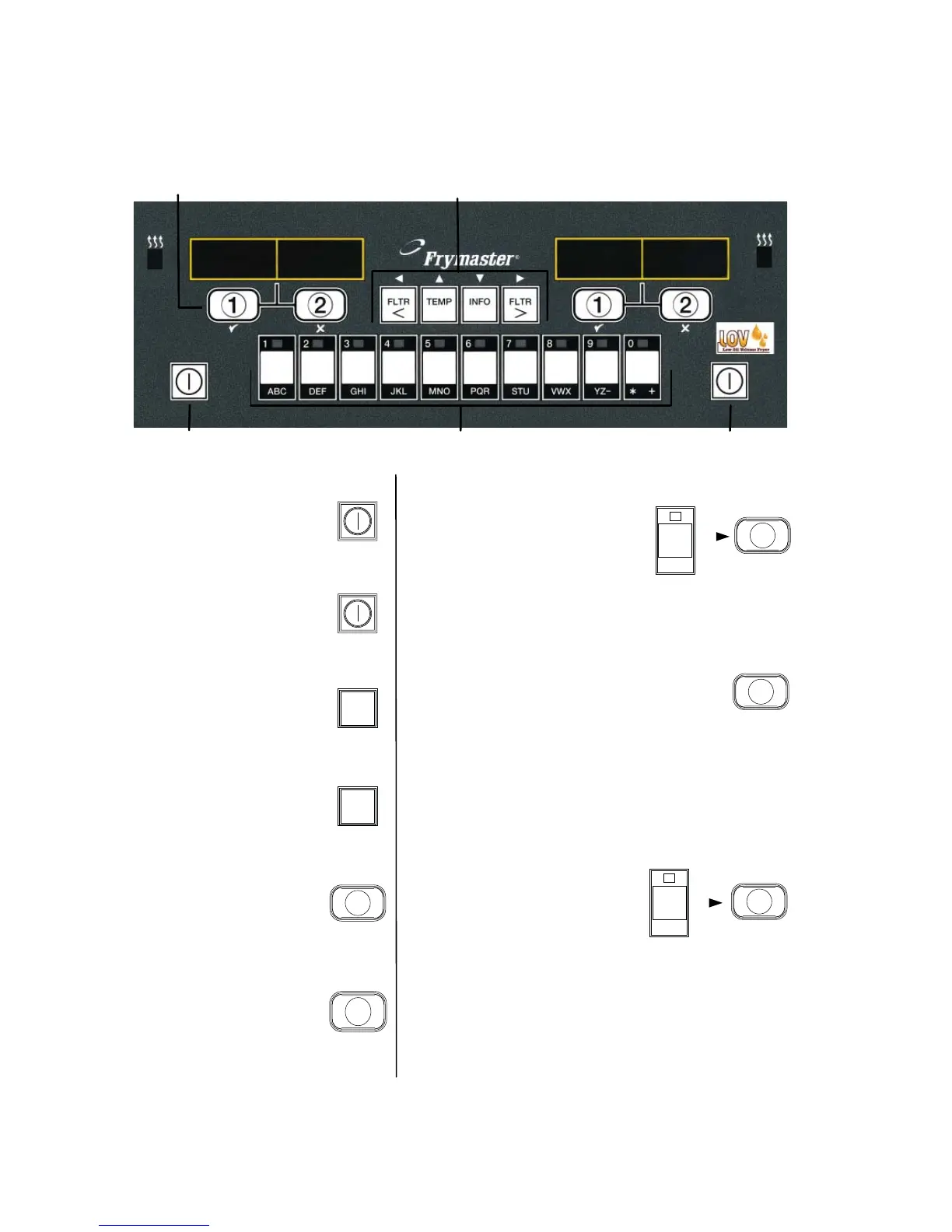
Turn Fryer ON
Press right key for full
pot; press key on desired
side on a split pot.
Turn Fryer OFF
Press right key for full
pot; press key on desired
side on a split pot.
Check Frypot Temperature
Press Temp key once.
Displays show frypot
temperatures.
Check Frypot Setpoint
Press Temp key twice.
Displays show frypot
setpoint temperatures.
Start One-Button Cook Cycle
(Dedicated Mode)
Press key under
display showing
desired item.
1
Start Two-Button Cook Cycle (Multi-Product Mode)
Press product key
bearing icon for desired
product. Press cook
channel button to begin
cook cycle
.
2
Cancel Duty or Remove
Alarm
Press key under active
display.
2
TEMP
TEMP
Press product key bearing
icon for desired product.
Press cook channel button
under display showing
desired item until beep is
heard (approx 3 seconds).
2
Change From Dedicated
to Multi-Product Mode
Press and hold Cook
Channel button under
displayed menu item for
approximately 3 seconds
until beep is heard.
Display changes to dashed
lines.
2
Change From Multi-Product
Mode to Dedicated Mode
Filter, Temp, Info,
Programming and Navigation Buttons
Cook Channel
and Selection Buttons
ON/OFF
ON/OFF
Product Buttons














 To Next Page