LOV
™
Generation II Technical Reference
20
Loading and Updating Software Procedures
Updating the software takes approximately 20 minutes. To update the software, follow these steps:
1. Switch all computers to
OFF. Press the TEMP button to check current M3000/MIB/AIF/ATO software
version.
2. Remove the two screws on the left side cover plate of the M3000 board.
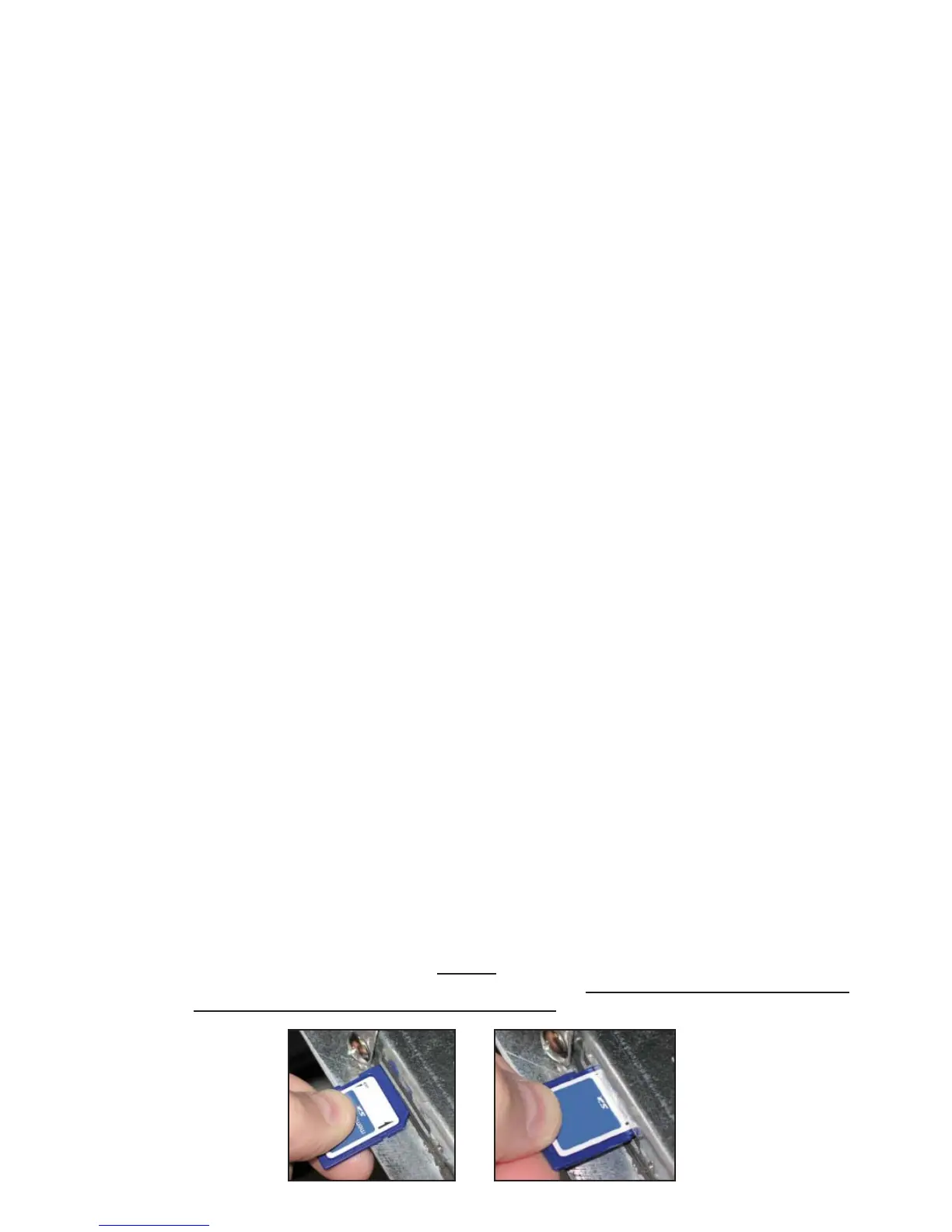
3. With the computer folded down, insert the SD card into the slot on the left side of the M3000. The
contacts on the card should face down and the notch should appear on the bottom right (see pictures
below).
4. Once inserted,
UPGRADE IN PROGRESS appears on the left display and
WAIT on the right.
5. The display then changes to
CC UPDATING on the left and the percentage completed appears on the
right. The display counts up to 100 on the right, changing to a fl ashing
BOOT. DO NOT REMOVE
THE CARD UNTIL THE DISPLAY PROMPTS TO DO SO IN STEP 8.
6. Then,
UPGRADE IN PROGRESS is displayed on the left display and
WAIT on the right again,
followed by
COOK HEX,
mib HEX,
aif HEX ending with
aTO HEX displayed on the left and
the percentage complete on the right.
7. The display then changes to
REMOVED SD CARD on the left and
100 on the right.
8. Remove the SD card using the fi ngernail slot on the top of the SD card.
9. Once the SD card is removed the display changes to
CYCLE POWER.
10. Cycle the control power using the hidden reset switch behind the right control box (see page 38). HOLD
THE SWITCH FOR 10 SECONDS ENSURING THE MIB BOARD HAS POWERED FULLY
DOWN.
11.
M3000 CAN TX FULL (a
SERVICE REQUIRED error) may appear while computers are
rebooting. Press YES at the prompt to cancel alarm. A fl ashing
BOOT is displayed on the remaining
computers while the program is transferred.
12. When the update is complete, the M3000 displays
OFF. The MIB display will remain blank while
software is loading, changing to show the vat numbers. Once the LEDs stop blinking, press
YES to
SYSTEM ERROR FIXED? Enter 1111. The MIB board will display
.
13. Cycle the control power using the hidden reset switch behind the right control box again. ENSURE
THE SWITCH IS HELD FOR 10 SECONDS. WAIT ANOTHER 20 SECONDS UNTIL THE MIB
BOARD HAS FULLY RESET BEFORE CONTINUING.
14. With the computer displaying
OFF, VERIFY software update by pressing the TEMP button to check
updated M3000/MIB/AIF/ATO version on each computer. IF ANY BOARDS DID NOT UPDATE,
REPEAT THE PROCESS STARTING WITH STEP 3.
Remove the SD card
using the fi ngernail
slot on the top of the
card.
Insert the SD card
with contacts fac-
ing down.














 To Next Page