LOV
™
Generation II Technical Reference
7
1L, 1r - 5L, 5r — Numbers correspond to
vats: “L” indicates the left side of a split vat. “r”
indicates a full vat or the right side of a split vat.
A — Auto mode: auto fi ltration enabled.
E — Drain or return valve not in desired
state: display alternates between E and vat
number. (Ensure actuator is plugged in and in the
home position.)
n — Network Error: An “n” displays for 10
seconds if no communication is received from the
cooking computer within ten seconds after a power
on.
P — Pan switch: fi lter pan is not in place or not
sensed. Auto Filtration disabled.
r — Reset: r alternating with a vat number
indicates that the MIB board is resetting. If r is
displayed without alternating with a vat number,
a problem may exist with the MIB board itself.
Three horizontal lines — temperature
sensor: sensor did not detect that the vat
was full during auto fi ltration.
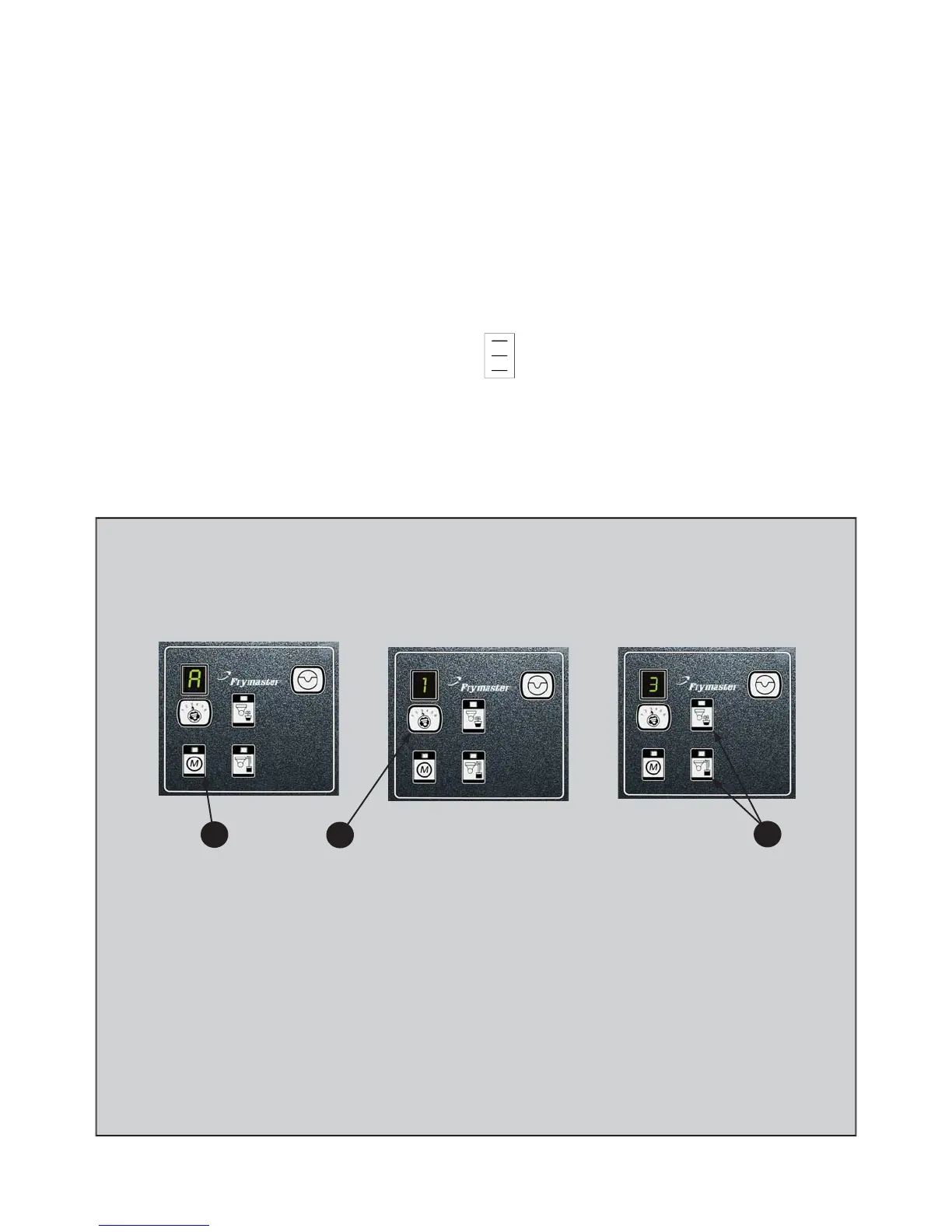
Press the M button, which switches the board to manual. The display becomes
the number of the vat to be controlled manually.
Press the vat selector button until the desired vat number is displayed.
Press the drain button to drain the oil or the press and hold the return button to
return oil to the vat displayed. Opening the drain and pressing and holding the
return button after valve is open allows fi ltration.
Pressing the M button again returns the board to automatic mode.
1.
2.
3.
4.
Manual Draining, Filling, Filtering with MIB
2
1
3
Error Codes














 To Next Page