EasyManua.ls Logo

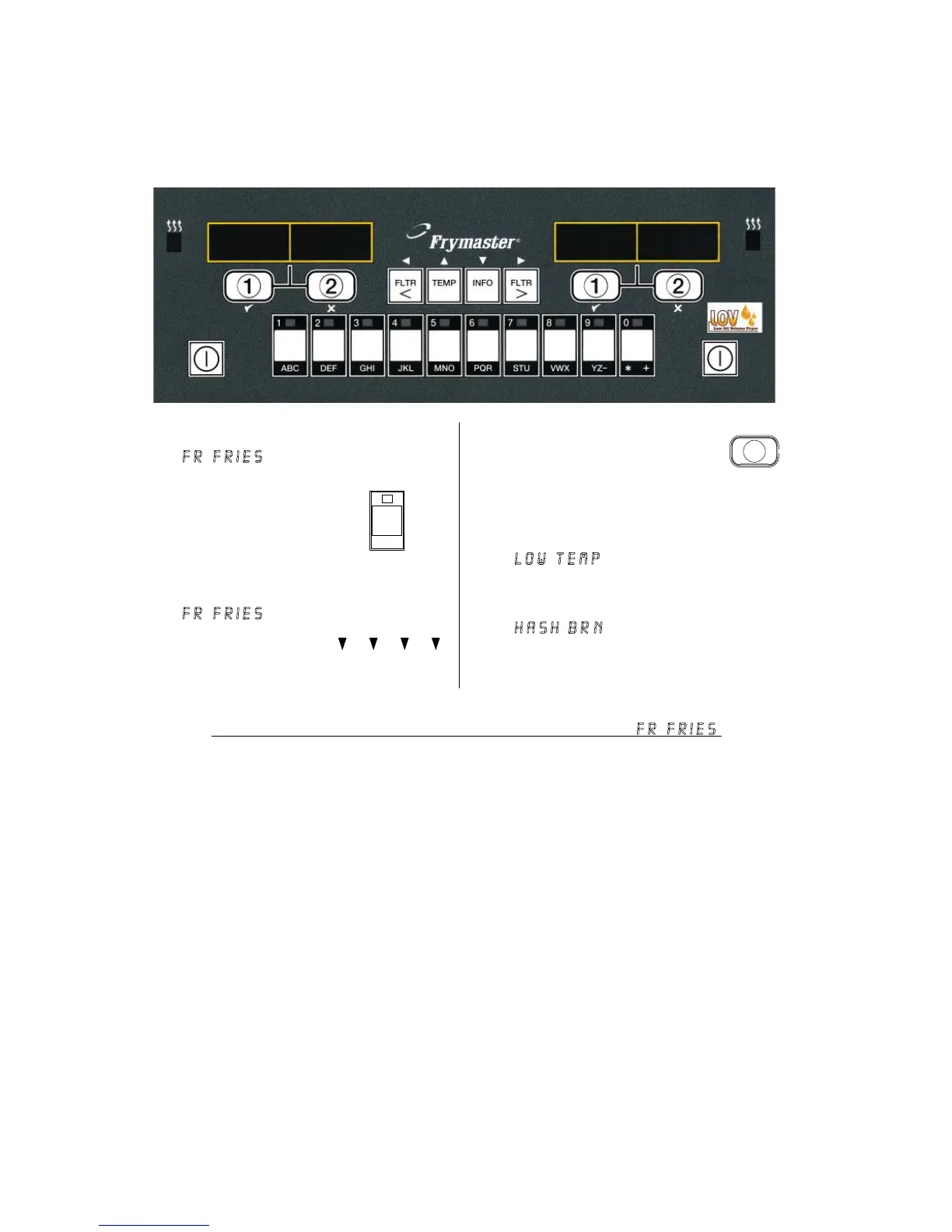
Frymaster LOV M3000 - Changing from Lunch Setup to Breakfast

Frymaster LOV M3000
50 pages
Print Icon
To Next Page IconTo Next Page
To Previous Page IconTo Previous Page
Loading...
LOV
Generation II Technical Reference
18
Press and quickly
release product
button for hash
browns.
<<<<<>>>>>
1
Computer display
will change from
FR Fries to
<<<<<>>>>>; an
alarm sounds.
Press and hold the cook
channel button under the
display until a beep is
heard (approximately
three seconds) and release.
Display changes to
Low Temp until
setpoint is reached.
LOW temp
f
r
fries
Changing from Lunch Setup to Breakfast
1
2
3
4
Computer displays
FR FRIES.
F
R
FRie
s
5
Hash
brn
Display changes to
Hash Brn.
hash brn
6
Fr
fries
Fr
fries
Perform these steps on both sides to change both displays to FR FRIES.

Table of Contents

Related product manuals