PAG.
14
rev 1.1
ENGLISH
PANEL & REMOTE CONTROL DESCRIPTION
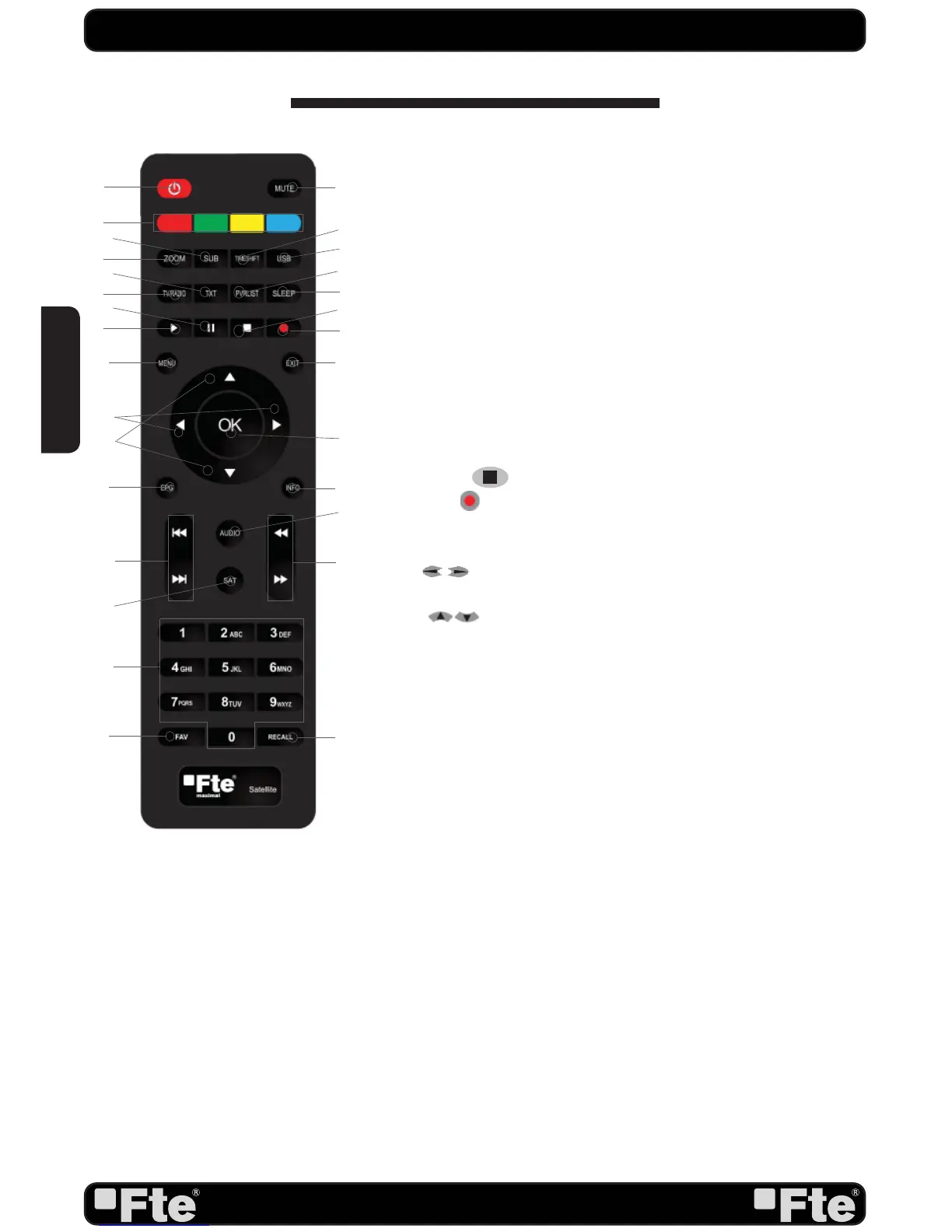
1. POWER: Switches receiver ON or in stand-by-mode.
2. MUTE: Switches audio on and off.
3. Color Keys: Controls menu options.
4. ZOOM: Zoom function.
5. SUB: Switches subtitle on and off.
6. TIMESHIFT:
Without function currently.
7. USB: Opens the multimedia process menu.
8. TV/R: Switches between TV and Radio channels.
9. TXT: Opens and closes teletext.
10. PVR LIST:
Without function currently.
11. SLEEP: It opens the Sleep Timer menu.
12. PLAY: Start / Stop button for media files.
13. || (Pause): Pause button for media files.
14. STOP
: Stop button for media files.
15. REC
:
Without function currently.
16. MENU: Opens the main menu.
17. EXIT: Exit menus or stop operations.
18.
: Adjusts audio volume or controls the cursor in
menus.
19.-
: Changes channels or controls the cursor in
menus.
20.- OK: Confirms selections or opens channel list.
21. EPG: Shows the EPG information.
22. INFO: Shows channel information with signal bar.
23. |<< / >>| : Jump back / Jump next.
24. AUDIO: Opens audio menu.
25. SAT: It shows the satellite list.
26. << / >>: Backward / Forward button for media files.
27. NUMERIC KEYS: For direct typing values and names.
28. FAV: Opens favourite channel list.
29. RECALL: Watch the last viewed channel.
1.3. REMOTE CONTROL DESCRIPTION
1
16
27
20
7
11
10
4
23
26
5
6
25
24
3
18
19
2
8
9
12
13
15
14
17
21 22
28 29


 To Next Page