PAG.
29
rev 1.1
ENGLISH
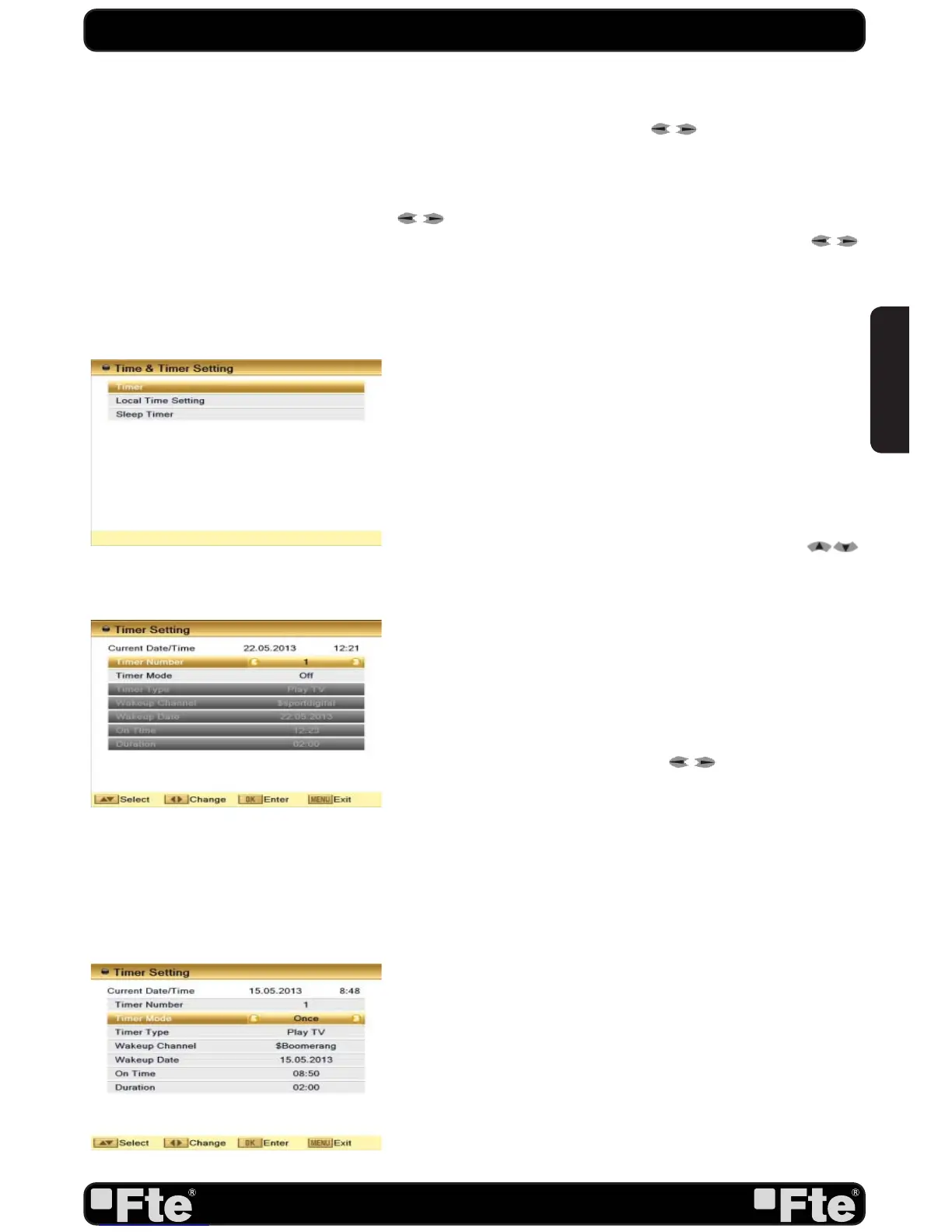
OSD 57
OSD 58
OSD 59
SYSTEM SETUP
720P_60, 1080I_25, 1080I_30, 1080P_50, 1080P_60,
1080P_25, 1080P_30
or 1080P_24 in HD mode and Auto,
PAL or NTSC in SD mode. Press [
] to select the desired
mode.
2. Aspect Mode is used to switch the screen aspect ratio mode.
You can select from Auto / 4:3 PS / 4:3 LB / 16:9. Press
[
] to select the needed mode.
3. In video output you can choose, by the means of [
] keys, the video output mode: SD or HD. We recommend
selecting HD mode when the connection is made by HDMI,
if on the contrary it is made by scart cable, we recommend
selecting SD mode.
4. Digital Audio Out: It will allow you to select the type of
audio digital output. Options: LPCM Out / BitStream Out. If
you connect this output to a device with Dolby digital, select
BitStream Out option.
5. Press [Exit] to close the “TV System” menu.
5.3. TIME & TIMER SETTING
When you enter “Timer ” “Local Time Setting” or “Sleep Timer”
a menu with three items will be opened (OSD 57). Use [
] to select between the three options and confirm with [OK].
5.3.1. TIMER
Select “Timer” item and press [OK] to enter the “Timer list”
menu (OSD 58).
The current time will be displayed in the first column. If the
current time is incorrect, please modify it with the [Number]
buttons at the “Time” menu.
1. Timer Number: You can press [
] to set the Timer
number. There are totally 8 timers.
2. Timer Mode: Select how often the timer is running: Once,
Daily, Weekly, Monthly and Yearly. Or switch the timer off.
3. Timer Type: You can choose between “Play TV” / “Play
Radio” (that way, you will assign the alarm function to a concrete
TV or Radio channel) , “Message” (creating a text message that
will appear on the screen) .
4. “Play TV” / “Play Radio” option: if you select this option,
the following fields of the image will be shown in order to be
configured (OSD 59).
- Start channel: Press [OK] to open the channel list and select
the channel you want to watch.
- Start date: Introduce using the numerical keys on the remote
control the date on which you want to activate the alarm
service.
- On time: Introduce using the numerical keys on the remote
control the time on which you want to activate the alarm
service.


 To Next Page